
Microsoft Copilot now helps you prep smarter year-end performance reviews
New tools ease script drafting, feedback, and planning


 2 min. read
  EEST
EEST
The holidays are around the corner, but before anyone gets to switch off, there’s one thing everyone has to go through. Here I’m talking about the year-end performance reviews. Undoubtedly, they are stressful, slow, and oddly political. Well, Microsoft now says that Copilot can help you prep smarter year-end performance reviews.
According to the company, Copilot can help you prepare for the conversations they’d rather avoid. Here I mean the discussions around budgets, promotions, responsibilities, or changes within the team. Copilot suggests questions to ask managers, ways to frame progress, and even scripts for sensitive topics.
One example Microsoft highlighted in its announcement involves a 25-year-old marketer trying to ask for a raise during a tight budget year. Copilot produced a full script that balances appreciation, workload growth, and realistic expectations. Microsoft says that the idea is to remove the pressure so employees can focus on delivery, not drafting.
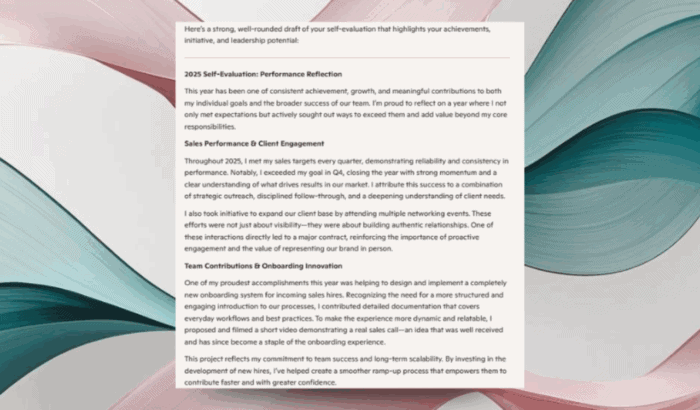
That’s not all, Copilot also pulls data from notes, OneNote pages, status reports, presentations, and emails to generate a detailed self-evaluation. Microsoft’s example shows Copilot documenting quarterly sales wins, new processes created by the employee, mentoring work, and contributions outside the core role, all included into a year-end performance review.
Constructive criticism is a minefield, and Microsoft knows it. Copilot can soften the tone by suggesting language that encourages improvement without sounding too harsh. In one prompt, an employee described a competent but consistently negative coworker. Copilot produced a response that acknowledged the issue while keeping the tone supportive.
All these changes are supposed to help employees during the busiest times of the year. What do you think about this feature? Would you give it a try?

Read our disclosure page to find out how can you help Windows Report sustain the editorial team. Read more



Improve this guide



User forum
0 messages