
Microsoft Planner Agent Is Now Available for All Microsoft 365 Copilot Users


 4 min. read
  Published on
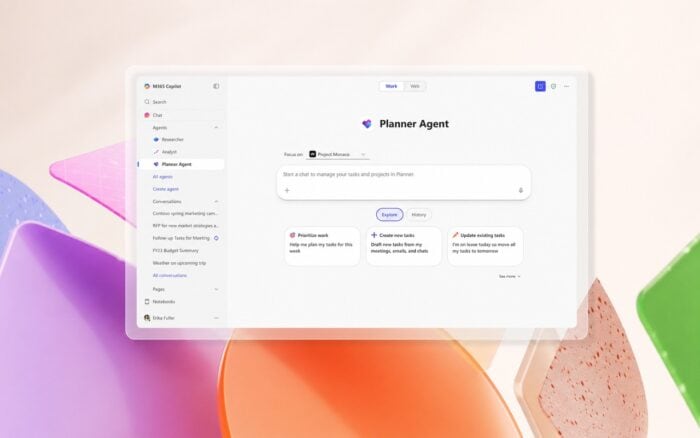
Microsoft Planner Agent is now generally available for all users with a Microsoft 365 Copilot license, giving companies a new way to manage tasks directly from Copilot.
The feature lets users create, update, and review tasks using natural language prompts inside Microsoft 365 Copilot, instead of opening Planner separately.
The general availability release also adds several new features, including a plan picker, draft mode for AI-generated tasks, and a new goals bucket for organizing work around larger objectives.
Microsoft Planner Agent brings task management to Copilot
Planner Agent is designed to make Microsoft Planner easier to use inside daily Microsoft 365 workflows.
Users can ask Copilot to create new tasks, change task names, update statuses, set due dates, and adjust priorities. This should reduce app switching for teams that already use Copilot as part of their daily work.
That makes Planner Agent more than a simple task-entry tool. It acts as a conversational layer for planning, tracking, and reviewing work.
New plan picker helps users find the right plan
One of the main additions in the general availability release is a new plan picker.
The plan picker lets users search and filter plans by name before making changes. This should help users find the correct plan faster, especially in organizations with multiple departments, teams, and project spaces.
Planner Agent can update task details directly
Planner Agent now supports direct updates to important task fields.
Users can update task names, statuses, due dates, and priorities through Copilot. This means a user can type a simple request, such as changing a task deadline or marking an item as complete, and Planner Agent can handle the update.
This could be especially useful during meetings, project reviews, and follow-up conversations. Instead of manually opening Planner, finding the task, and editing the fields, users can make quick updates from the Copilot chat interface.
AI-generated plans and tasks start in draft mode
Microsoft is also adding a review step for AI-created work.
AI-generated plans and tasks are created in draft mode by default. This gives users a chance to review the results before saving them to Planner.
This should make Planner Agent safer for business use, especially in larger teams where incorrect task assignments or deadlines could cause confusion.
Goals bucket helps organize tasks around objectives
Planner Agent also introduces a new goals bucket.
The goals bucket lets users group tasks under specific goals, making it easier to connect daily work to broader project outcomes. Instead of only organizing tasks by standard categories, teams can structure work around objectives.
This gives teams a clearer way to track progress against larger priorities, not just individual assignments.
Planner Agent can build plans from Office files
Planner Agent can also create plans from Word, Excel, and PowerPoint files.
This means users can turn documents, spreadsheets, and presentations into structured task plans. A project document can become a list of action items.
This feature could save time for teams that already store project information in Microsoft 365 files. Instead of manually copying details into Planner, users can ask Copilot to create a plan based on the file content.
The feature works across Teams, Loop, SharePoint, and other Microsoft 365 apps, giving users several entry points for creating and managing tasks.
Microsoft expands Copilot across Microsoft 365
Planner Agent is not the only Copilot-related update.
Copilot Notebooks are now available to all Copilot Chat users. Microsoft has also improved Teams performance across different platforms. These changes are part of the company’s ongoing effort to make Teams faster and more reliable for daily communication.
At the same time, Teams is finally getting the controversial employee tracking feature that has drawn attention from IT admins and workers.
For Microsoft, the global rollout of Planner Agent is showing that Copilot is moving beyond simple chat responses. It is becoming a workspace assistant that can act across Microsoft 365 apps and help users turn conversations, documents, and project files into structured work.

Read our disclosure page to find out how can you help Windows Report sustain the editorial team. Read more



Improve this guide




User forum
0 messages