
Microsoft Teams introduces podcast-style audio recaps
Hour-long meetings summarized into 10-15 minutes podcast-style audio


 2 min. read
  Published on

If you have ever struggled to sit through a full replay of a meeting, Microsoft now has an answer. Teams is rolling out audio recaps, a podcast-style feature that condenses discussions, decisions, and takeaways into a short, easy-to-digest format.
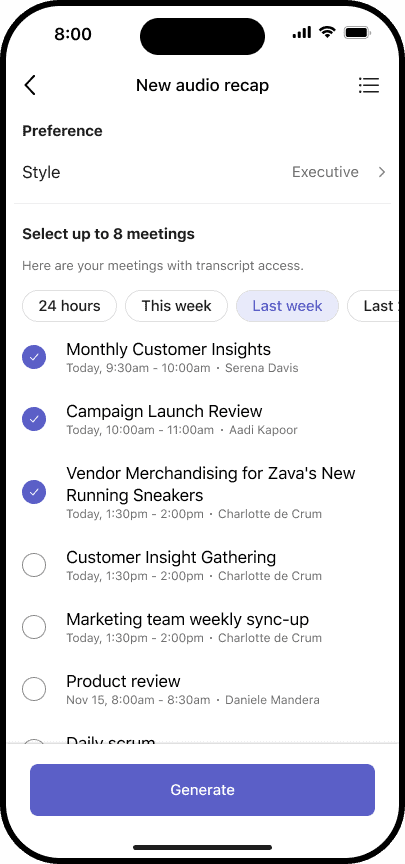
You’ll be able to choose between three styles: Executive, Newscast, and Casual. Exceutive highlights strategy and decisions, while Newscast delivers a fast rundown of keyfacts Last but not least, Casual is all about a lighter conversational take.
Microsoft says that early testing shows slashing hour-long meetings down to 5–10 minutes while staying accurate.
Wirth noting that audio recaps in Teams works across Windows, Mac, web, iOS, and Android. On desktop or web, you’ll find it under Meeting details > Recap > Audio recap.


In the Audio Recap page, you can include transcripts from up to eight meetings and select your preferred style before generating the recap. The experience includes playback controls, speed adjustments, and transcripts.
On mobile, accessing audio recap is even easier. First, open Teams, go to a meeting chat or calendar, and tap the headphones icon to start a recap.

You can also bundle up to eight meetings and choose the format you prefer. Recaps play in the background, while allowing you multitask, commute, or even switch from desktop to phone using a QR handoff.

Microsoft notes that some content may be missing if transcript quality is poor, and since the feature is powered by AI, minor inaccuracies may appear. For now, audio recaps are only available in English, with more languages promised.
You’ll need to be in the Teams Public Preview or Microsoft 365 Targeted Release using the new Teams client to try out the new feature.

Read our disclosure page to find out how can you help Windows Report sustain the editorial team. Read more



Improve this guide



User forum
0 messages