
Microsoft Unveils Project Zenith, a Ready-to-Code Windows 11 Experience for Developers


 2 min. read
  Published on

Microsoft is giving Windows 11 developers a seriously different starting point. The company today announced Project Zenith,which is being touted as a ready-to-code experience for developer-class PCs. The focus is simple; less setup, fewer distractions, and more time actually building software.
Project Zenith changes the Windows starting line
Project Zenith targets devices with 64GB or more unified memory and 250GB/s+ memory bandwidth. Microsoft says AMD Ryzen AI Halo will get the first devices. More systems from Microsoft’s OEM and silicon partners are planned for the coming months. The experience arrives with Windows configured around development workflows.
Windows Terminal and Visual Studio Code are pinned to the Taskbar. Several Windows settings are also changed before developers even start working. File Explorer shows file extensions, hidden files, full paths, and the details pane by default. Long-path support is also enabled. That’s not all; recently used files, folder suggestions, and sync-provider tips are disabled. Microsoft is clearly looking to offer developers a cleaner development workspace.
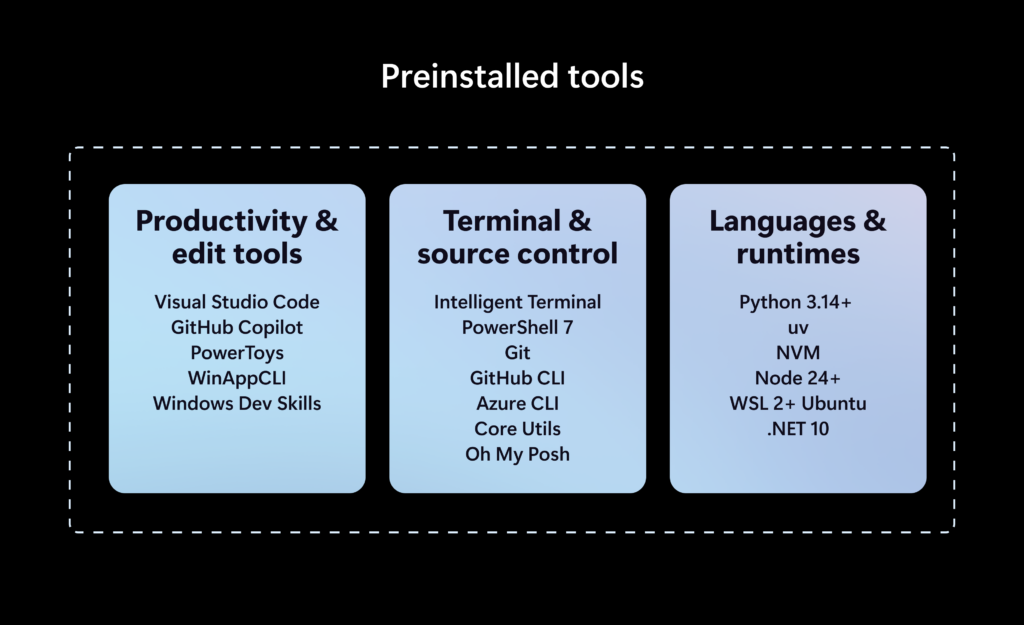
Local AI gets a major role
Project Zenith can run 30-billion-plus parameter models locally without metered cloud-token costs. That could make repeated AI-assisted coding experiments considerably easier. Microsoft is also integrating Zenith into its broader Windows agent strategy. The platform includes security investments involving identity, containment, and enterprise management.
WSL receives an important role too. Microsoft highlights deeper integration through WSL containers for creating and running Linux containers directly on Windows. Do note that Project Zenith is not locked to one development workflow. Developers can still personalize their tools, languages, frameworks, and Windows environment.
Microsoft says the project brings several existing investments together. These include WSL, Developer Configurations, Intelligent Terminal, Coreutils for Windows, and on-device AI capabilities.

Read our disclosure page to find out how can you help Windows Report sustain the editorial team. Read more



Improve this guide

User forum
0 messages