
How to Make Mud in Minecraft (Quick Crafting Guide)


 3 min. read
  Updated on
Mud is a unique block in Minecraft that you can create easily with just dirt and water. This guide shows you how to make mud step by step and explains its best uses.
Table of contents
How to Create Mud Blocks in Minecraft?
1. Gather Dirt Blocks
Dirt is the base material you need.
- Dig dirt from the surface with any shovel.
- Collect enough depending on how much mud you plan to craft.
If you are customizing your character while gathering resources, see this guide on how to change skin in Minecraft.
2. Craft or Collect Glass Bottles
You will need water bottles to convert dirt into mud.
- Smelt sand in a furnace to create glass.
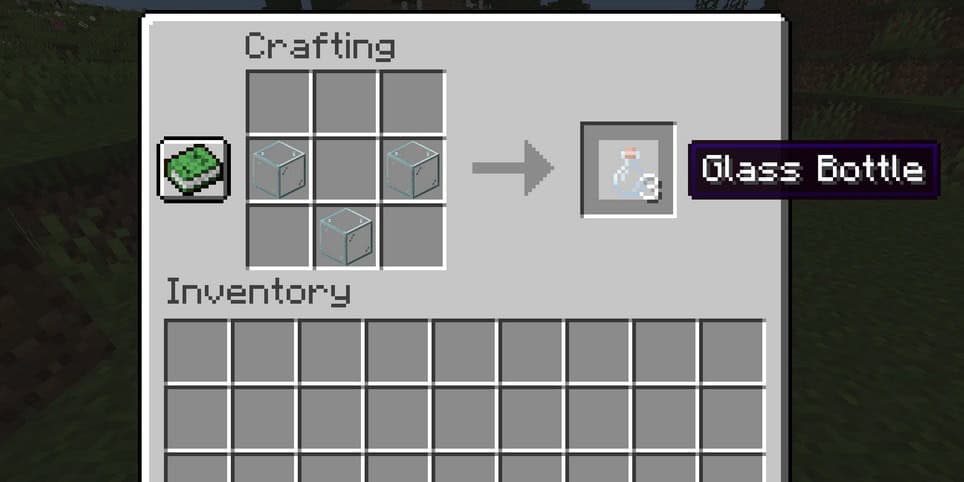
- Craft three glass blocks into glass bottles.
You can speed up your smelting workflow by learning how to make a blast furnace in Minecraft to process ores and materials faster while preparing glass bottles.
3. Fill Bottles with Water
Make sure your bottles are ready.
- Right-click or tap on a water source block.
- Each bottle becomes a water bottle.
4. Apply Water to Dirt
Now you can create mud.
- Hold a water bottle in your hand.
- Right-click or tap on a dirt block.
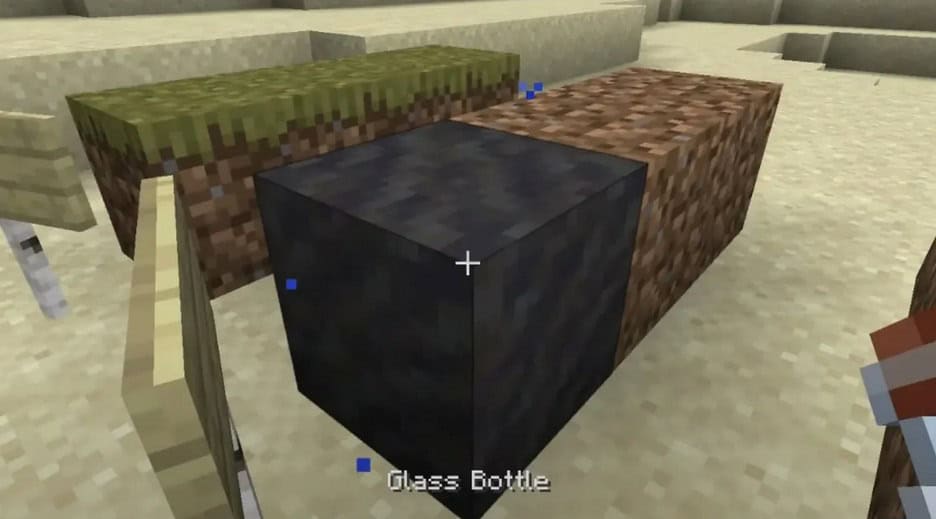
- The dirt turns into a mud block instantly.
If you plan large builds using mud, learn how to see chunks in Minecraft to organize construction more effectively.
What You Can Do With Mud in Minecraft
1. Build with Mud Blocks
Mud has a unique texture for construction.
- Use it for rustic houses or natural paths.
- Mix with other blocks for detailed builds.
2. Craft Packed Mud
Packed mud is a stronger material.
- Combine one mud block with one wheat in a crafting table.
- This creates packed mud, which is useful for bricks.
3. Make Mud Bricks
Mud bricks are a decorative building block.
- Craft four packed mud into mud bricks.
- Use them for stylish walls or floors.
FAQs
Mud naturally generates in mangrove swamps. You can dig it with a shovel.
Yes. Place mud on top of a dripstone block with air below. Over time it dries into clay.
Yes. Since dirt and water are easy to collect, you can make unlimited mud.
Shovels are the fastest tools for breaking mud blocks and collecting them.
Conclusion
Making mud in Minecraft is simple and only requires dirt and water bottles. Once crafted, mud opens the door to packed mud and mud bricks, which are excellent for creative builds. Whether you want natural-looking paths or decorative structures, mud is a versatile block that adds depth to your creations.
If you want to expand your game even more, check out this tutorial on how to install mods in Minecraft to add new features and customization.

Read our disclosure page to find out how can you help Windows Report sustain the editorial team. Read more



Improve this guide




User forum
0 messages