
Fidelity NetBenefits Login Guide: Sign In on PC or Mobile


 4 min. read
  Published on

The Fidelity NetBenefits lets you access your workplace retirement savings, 401(k) plans, and other employee benefits online. Whether you want to check your account balance, manage investments, or update your contributions, you can log in to Fidelity NetBenefits through the official website or mobile app.
How to log in to Fidelity NetBenefits?
1. Use the official website
You can access your Fidelity NetBenefits account from any computer or mobile browser.
Follow these steps to sign in:
- Open your browser and visit www.netbenefits.com.
- Find the Log in section on the homepage.
- Enter your Fidelity username in the Username field.
- Type your account password in the Password field.
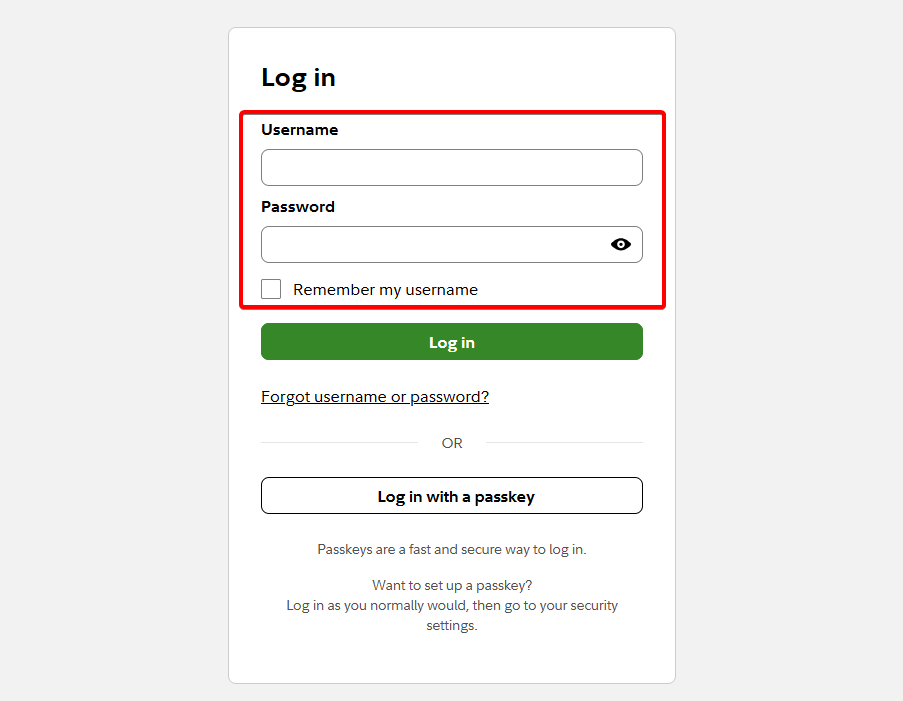
- Check Remember my username if you want to save your username on your personal device.
- Click Log in to access your account.
- Complete any additional security verification if Fidelity requests it.
You can access the official Fidelity NetBenefits login page to manage your workplace benefits.
If you already have a Fidelity.com account, you can use the same username and password to sign in to NetBenefits.
2. Use the Fidelity NetBenefits mobile app
Fidelity also offers a NetBenefits mobile app for Android and iPhone users. The app lets you check your retirement savings and manage available workplace benefits without opening a browser.
Here’s how to sign in through the app:
- Open the Apple App Store or Google Play Store.
- Search for Fidelity NetBenefits.
- Download and install the official app.
- Launch the app and select the login option.
- Enter your Fidelity username and password.
- Complete any security verification.
- Access your account dashboard to view your balances, contributions, and investments.
You can find the official app through Fidelity’s mobile apps page.
Depending on your device and app settings, you may also be able to use biometric authentication for future sign-ins.
How to fix Fidelity NetBenefits login problems
Sometimes, you might have trouble signing in because of incorrect credentials, browser problems, or security verification issues.
Try these solutions before contacting support:
- Check your login credentials – Make sure you entered your username and password correctly.
- Reset your password – Use the password recovery option if you cannot remember your credentials.
- Clear your browser cache – Remove outdated website data that might interfere with the login page.
- Try another browser – Open NetBenefits in a different browser or private browsing window.
- Disable browser extensions temporarily – Some privacy or security extensions may interfere with the sign-in process.
- Check your verification method – Make sure you can access the phone or authenticator app that Fidelity uses to confirm your identity.
- Contact Fidelity support – Request assistance if your account remains locked or you cannot complete verification.
Fidelity provides additional help through its NetBenefits customer support page.
The Fidelity NetBenefits login provides a convenient way to manage your workplace retirement savings and employee benefits. You can sign in using your existing Fidelity credentials or recover your password if you have trouble accessing your account.
If you need help accessing other online services, you can also check our guides on Airbnb login, QuickBooks Online login, and Progressive Insurance login.
Frequently asked questions
Is Fidelity NetBenefits the same as Fidelity.com?
No. NetBenefits primarily focuses on employer-sponsored retirement plans and workplace benefits, while Fidelity.com provides access to brokerage accounts, IRAs, and other personal investments. However, both services generally use the same Fidelity login credentials.
Can I access Fidelity NetBenefits without my employer?
Yes, you may still access an existing workplace retirement account after leaving your employer. Your access and account options depend on the plan and your account status.
Why is my Fidelity NetBenefits login not working?
Incorrect credentials, failed security verification, browser issues, or account restrictions can prevent you from signing in. Try resetting your password or contacting Fidelity if the problem continues.
Can I use my Fidelity login for NetBenefits?
Yes. If you already have a Fidelity username and password, you can generally use those credentials to access your NetBenefits account without registering again.
Is Fidelity NetBenefits available on mobile devices?
Yes. You can access NetBenefits through a mobile browser or use the official Fidelity NetBenefits app for Android and iOS.

Read our disclosure page to find out how can you help Windows Report sustain the editorial team. Read more



Improve this guide


User forum
0 messages