
New Outlook Won’t Launch On Windows 11? Here’s The Quick Fix


 2 min. read
  Published on

Microsoft Outlook fails to launch for some Windows 11 users, and the issue triggers error code 0xc0000409 inside Event Viewer. The problem affects the new Outlook app and stops it from opening entirely. Luckily, users can fix the issue with a quick local data reset.
How To Fix The New Outlook 0xc0000409 Error?
The failure occurs when Outlook loads corrupted temporary data stored inside the Olk and OneAuth folders. When these folders break, Outlook refuses to start and logs the 0xc0000409 exception in Event Viewer.
You can fix the error by deleting two temporary folders. This removes corrupted startup data without touching your emails or account information. To remove them, follow these steps:
- Press Win + R to open Run.
- Type %localappdata%\Microsoft and press Enter.
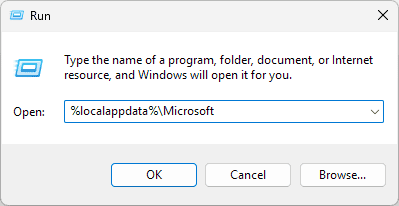
- Find the Olk folder and delete it.
- Delete the OneAuth folder as well.
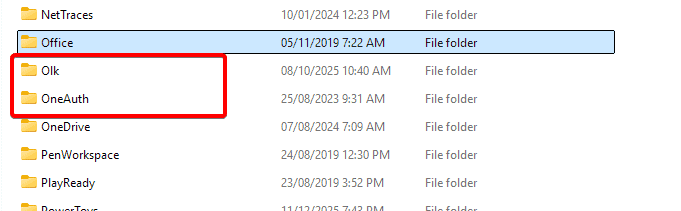
- Close File Explorer and restart Outlook.
Outlook should open normally now. Both folders only contain temporary files, so you will not lose any personal data.
Several users reported the issue online after the latest app updates. Fresh installs of Outlook appear unaffected, which suggests that the problem ties to corrupted local cache data. In other news, Microsoft now allows you to hide AI actions, and we have a guide on how to do that.
If you experienced the same error, share your results in the comments.
Via WindowsLatest

Read our disclosure page to find out how can you help Windows Report sustain the editorial team. Read more



Improve this guide




User forum
0 messages