
Oracle Account Login: Easy Steps to Access Your Account


 5 min. read
  Published on

Signing in to your Oracle account is straightforward, but the process can vary depending on the service you want to access. Whether you’re using Oracle Cloud, downloading software, or managing business applications, you’ll need to open the right sign-in page and enter your account details.
How do I log in to an Oracle account?
1. Use your browser
You can use your regular Oracle account to access Oracle resources, software downloads, communities, and other online services.
Follow these steps to sign in.
- Open your browser and visit the Oracle official website.
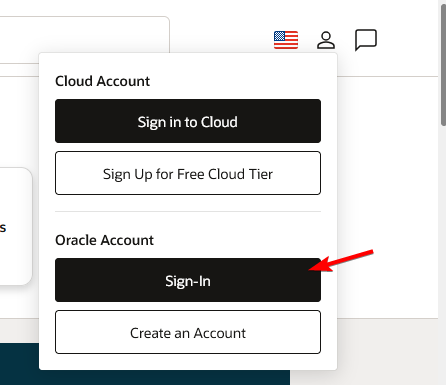
- Click the Account icon in the upper-right corner.
- Select Sign In under Oracle Account.
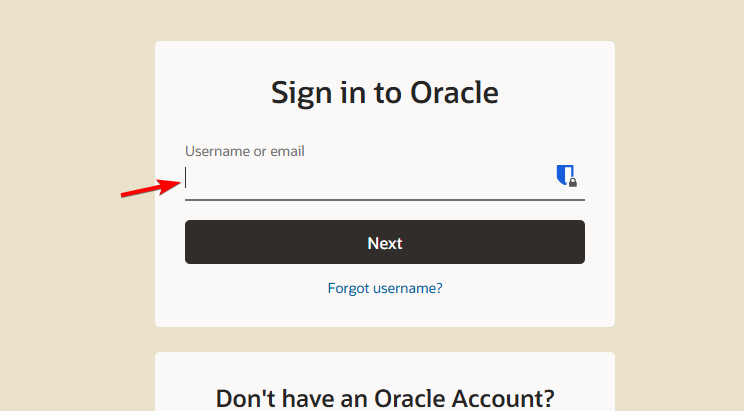
- Enter your registered email address or username.
- Type your account password.
- Click Sign In and complete any required security verification.
Once you log in, you can access the Oracle services associated with your account.
If you don’t have an account, select Create an Account and complete the registration process. Oracle will ask you to verify your email address before you can use your new account.
2. Log in to Oracle Cloud
Oracle Cloud uses a separate login system that requires your cloud account name, also called a tenancy name. You may also need to select an identity domain.
Here’s how to access your Oracle Cloud account.
- Visit the Oracle Cloud login page.
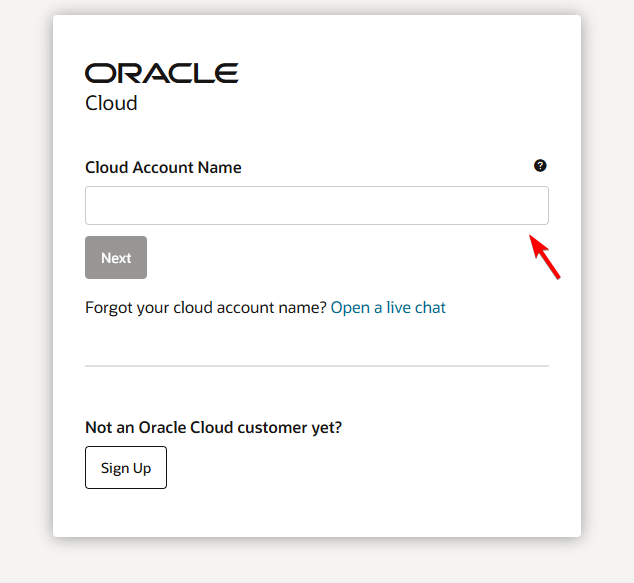
- Enter your Cloud Account Name and click Next.
- Select your identity domain, usually Default, if Oracle asks you to choose one.
- Enter your Oracle Cloud username and password.
- Click Sign In or follow your organization’s single sign-on instructions.
- Complete any required multi-factor authentication.
After signing in, you can access the Oracle Cloud Infrastructure Console and manage the services your account allows.
If you don’t know your cloud account name, check the welcome email Oracle sent when your organization created the account. Your administrator can also provide this information.
3. Log in to My Oracle Support
My Oracle Support allows eligible customers to access technical documentation, software updates, troubleshooting resources, and support requests.
Follow these steps to access the support portal.
- Open the My Oracle Support login page.
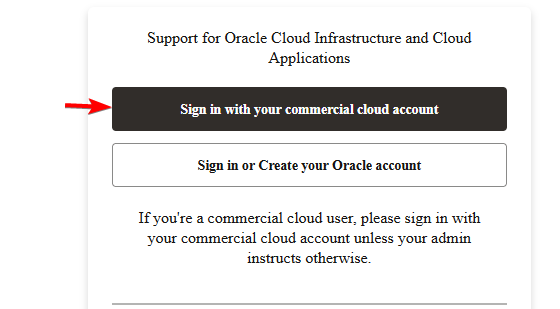
- Select Sign in with your commercial cloud account or Sign in or Create your Oracle account, depending on your account type.
- Enter your login credentials.
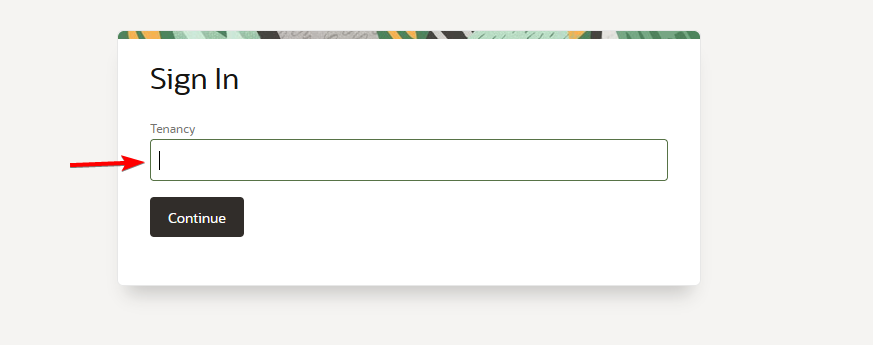
- Provide your tenancy and identity domain if the sign-in page requests them.
- Complete any additional verification steps.
- Access your support dashboard.
Some support features require an active support agreement or approval from your organization’s administrator.
4. How to log in to Oracle HCM or ERP
If your company uses Oracle Fusion Cloud applications, including Oracle HCM or Oracle ERP, you usually need a company-specific login link.
Here’s how to access your work account.
- Open the Oracle application login URL your employer provided.
- Enter your company username or registered email address.
- Type your password or select your organization’s single sign-on option.
- Complete any required identity verification.
- Click Sign In to access your application dashboard.
If you don’t know the correct login URL, contact your company’s IT department or Oracle administrator.
How to fix Oracle login problems
If Oracle doesn’t let you sign in, try these troubleshooting steps before contacting support.
- Check your credentials. Make sure you enter the correct username and password.
- Verify your login page. Oracle Account and Oracle Cloud use different sign-in systems.
- Reset your password. Request a new password if Oracle displays an invalid login error.
- Clear browser cookies and cache. Remove outdated login information that might interfere with authentication.
- Try another browser. Open Oracle in the latest version of Chrome, Firefox, or Edge.
- Check your verification code. Look in your inbox or spam folder if you haven’t received your security code.
- Contact your administrator. Ask your company’s Oracle administrator to check your permissions or account status.
Oracle may temporarily lock accounts after repeated failed login attempts. If you cannot recover access, visit Oracle Account Help for additional assistance.
The right sign-in page depends on what you want to access. You can use your regular Oracle account for general resources, the Cloud portal for infrastructure services, or your company’s dedicated login page for business applications. If you also work with Oracle databases on Windows, you might find our guide on how to install the Oracle ODBC driver useful.
For other business applications, you can learn how to log in to NetSuite on your PC or mobile, another platform owned by Oracle. If your company also uses project management tools, our Trello login guide explains how to access that service from a computer or smartphone.
FAQs
Can I log in to Oracle without a Cloud account?
Yes. You can create a regular Oracle account to access supported resources, communities, and services. You need separate Oracle Cloud credentials to access cloud infrastructure.
Why is my Oracle login not working?
Incorrect credentials, an expired password, the wrong login portal, account restrictions, or multi-factor authentication problems can prevent access. Verify your account details and try resetting your password.
How do I find my Oracle Cloud account name?
Check the welcome email Oracle sent when your organization registered for cloud services. If you cannot find it, ask your Oracle Cloud administrator.
Can I access Oracle from my phone?
Yes. You can access supported Oracle websites through your phone’s browser. Some Oracle applications also offer mobile apps, although available features depend on the service.
Is Oracle login free?
Creating a standard Oracle account is free. However, certain Oracle Cloud services, business applications, and support features require paid subscriptions or authorized access.

Read our disclosure page to find out how can you help Windows Report sustain the editorial team. Read more



Improve this guide



User forum
0 messages