
How to Login to NetSuite on Your PC or Mobile


 4 min. read
  Published on

If you need to log in to NetSuite, the process is usually straightforward, and in this quick guide, we’ll show you how to do it.
How do I log in to NetSuite?
How to Log In to NetSuite on a Computer
- Open the official NetSuite login page.
- Enter the email address associated with your NetSuite account.
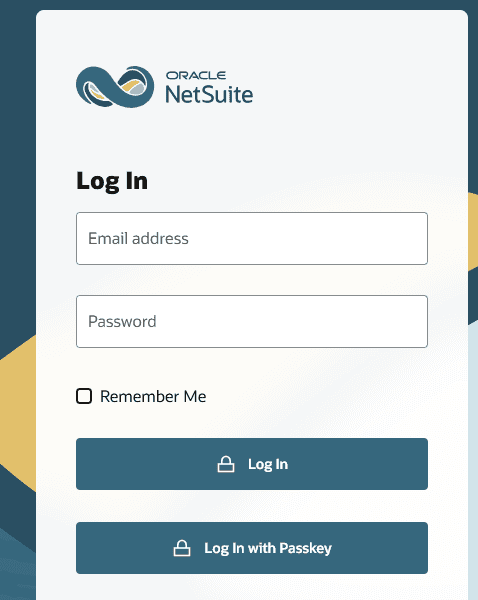
- Enter your NetSuite password, then select Log In.
- If your role requires additional verification, complete the 2FA step or choose the appropriate authentication method.
NetSuite also supports passkey login on its current login page; just be sure to use a browser that works with NetSuite.
Security tip: Avoid using login links from random websites or emails. Oracle provides several NetSuite login URLs depending on the account and role, so your company’s administrator may also give you a specific login address.
NetSuite Login on iPhone and Android
NetSuite provides a dedicated mobile app for accessing supported account roles.
On iPhone or Android:
- Install the official NetSuite for Mobile app.
- Open the app and enter your NetSuite email and password.
- Tap Log In.
- Complete any security-question or authentication prompts that appear.
Your role must have Mobile Device Access enabled. The first mobile login can also require answering one of your security questions.
The app supports Face ID or Touch ID on iOS and fingerprint authentication on Android when the required settings are enabled.
Using NetSuite Mobile With SSO
If your company uses SAML-based single sign-on, open the app and select Company SSO. Enter your NetSuite Account ID, tap Continue, and complete authentication through your company’s identity provider.
One useful detail is that mobile and browser sessions are separate. Logging out of NetSuite in your browser does not automatically log you out of the mobile app.
When You Might Need NetSuite Login on Another Device
People commonly switch devices when they get a new work computer, travel without their usual laptop, replace a phone, troubleshoot a browser, or need access while the mobile app is unavailable.
NetSuite officially supports recent versions of Chrome, Edge, Firefox, and Safari, although the exact operating-system requirements vary by browser.
If your normal browser is acting strangely, trying a supported browser or private/incognito window can help determine whether cached cookies or an existing session is causing the problem.
Common NetSuite Login Problems and Fixes
- Forgotten password: Select Forgot your password? on the login page. Enter your NetSuite email and follow the reset instructions sent to your inbox. Oracle says the password-reset email link expires after 60 minutes.
- Too many incorrect passwords: NetSuite can temporarily lock an account after repeated incorrect password attempts. Oracle says five consecutive wrong passwords can result in a 30-minute lockout.
- 2FA code not working: If your administrator requires 2FA, you may need an authenticator code or backup code. If you have lost or replaced your phone, your administrator may need to help reset your 2FA configuration.
- Blank page or login loop: Clear NetSuite cookies and cache, then try again in a private window. Community reports have also linked some login problems to temporary service issues or session conflicts.
- NetSuite appears to be down: Check the Oracle NetSuite Service Status page before changing your credentials. The status page lists service health by application and data-center region.
Why NetSuite Login Still Causes Confusion
NetSuite is not a single consumer-style account system. Companies can use different roles, dedicated Customer Center URLs, SSO, 2FA, mobile permissions, and account-specific configurations.
That becomes especially important when an employee changes devices or receives a different role. Oracle’s 2026.1 update also introduced authentication changes, including requirements around multiple sessions and 2FA.
NetSuite is also one of the best back office tools you can use, and if you haven’t tried it already this might be a perfect time.
FAQs related to NetSuite Login
Can I log in to NetSuite without my password?
Depending on your account configuration, the current login experience can offer a passkey option. Otherwise, use the password-reset process if you have forgotten your credentials.
Why does NetSuite ask for a verification code?
Your role may require two-factor authentication. Administrator and other highly privileged roles have mandatory 2FA requirements.
Can I use NetSuite on my phone?
Yes. The NetSuite mobile app supports standard account credentials, SSO, and biometric authentication, although your role needs the appropriate mobile permissions.
Why can’t I log in after changing phones?
Your old phone may still be associated with your 2FA setup. If you cannot provide a verification or backup code, Oracle recommends contacting your NetSuite administrator for help resetting 2FA.

Read our disclosure page to find out how can you help Windows Report sustain the editorial team. Read more



Improve this guide



User forum
0 messages