Opera Stops Support for Windows XP and Windows Vista

Windows XP is arguably Microsoft’s most popular operating system ever. But it was released nearly 15 years ago, and Microsoft released a couple of new Windows operating systems in the meantime, so the majority of users and software developers decided to abandon Windows XP.

Microsoft also discontinued the commercial support for Windows XP, which means that the operating system is now less-secure to use. Since Microsoft made this move, software developers also stopped to deliver Windows XP-compatible programs. Yesterday, Windows XP lost the valuable member of the ‘compatible programs family,’ as one of the most popular browsers, Opera decided to remove support for this operating system. Opera browser won’t be compatible with Microsoft’s less-popular operating system, Windows Vista, from now on, as well.

Opera on Windows XP and Windows Vista to still receive security patches

The current version of the browser, Opera 36 is going to be the last Opera version to run on Windows XP and Windows Vista. So, when Opera 37 arrives, it is going to be compatible only with newer versions of Windows (Windows 7, Windows 8.1/8, and Windows 10).

The company stated that users will still be able to run Opera on these operating systems, but only if they run Opera 36. Although the Opera development team won’t offer any new versions of Opera for Windows XP and Vista, they’re still going to provide security updates for Opera 36 on XP and Vista, at least for some time.

“We do care for our loyal users, which you could recently observe with 12.18 security update. While Opera 36 will be last one with features additions on Windows XP and Vista, we are still going to provide security and crash fixes to XP and Vista platform. You will not be able to run Opera 37+ on Windows XP and Vista, we advise you update to more recent OS, if possible. Otherwise, we will have Opera 36 for you.”

We expect Opera to be just one in line of popular programs that will cut the support for Windows XP in the near future. Microsoft also did the similar thing recently, by discontinuing the support for older versions of Internet Explorer, as users are now getting updates only for IE 11.

Although Windows XP is still popular for some users, it became a quite unsafe operating system to use, since Microsoft stopped to support it. But knowing that their safety is threatened, and that a lot of programs don’t support Windows XP anymore, users will eventually have to move to a newer version of Windows, anyway.

Sway updated with Power BI support, recent Office document access, more

Microsoft’s Sway application has recently seen a funneling of updates to its software. Today the Office team announces the latest batch of updates to be added as part of a monthly update cycle that implements ideas from UserVoice directly into Sway. Let’s the a look at the latest additions.

  • Recent Office Documents

When working inside of Sways users now have the ability to embed or import, their most recent Office documents. By tapping Insert and selecting OneDrive, users will be presented with a Recent tab where all their most recent documents are saved.

Sway
Recent Office Documents
  • Power BI Embeds

Users can now embed visual and interactive analytic reports using Power BI dynamic dashboards, straight into their business-related Sways.

  • PollEverywhere.com Embeds

A popular request from teachers now lets all users embed live polls from www.polleverywhere.com into Sways, with live poll results inside their presentations.

  • Embed Sways easier on the web

Sway now supports Embed.ly and oEmbed codes, allowing users to easily embed Sways on websites or blogs. Simply copying the Sway URL and pasting into blog sites, such as WordPress, will embed your sway with proper formatting.

  • Full-Text Editing in Preview Mode

Users of Sway have always had the ability to edit text in Preview mode, this latest update adds the full set of text editing tools, from the Sway Storyline, into the Preview mode.

Sway
Full Text Editing
  • Emphasize Text Cards

When putting emphasis on certain words, users now have to ability to emphasize an entire text card within their Sway, with new visual styling to help the words stand out more.

Sway
Text Card Emphasis
  • Adjust Sway Text Size

Users now can adjust their entire Sways text size, without changing adjustments made to individual text cards. In the Design tab, users can select Customize and use sliders to adjust Text size.

Sway
Text Size Adjustment

Alongside bug and performances fixes for this latest update, Microsoft is also focused on new updates for the Windows 10 version of Sway. Available soon, this update will add the online features like Recycle Bin, full-text editing and full-screen improvements to Sway for Windows 10 PCs and tablets.

These newest updates are available today on Sway.com. How are these latest updates improving your Sway experience? Let us know in the comments.

Windows 10 Insider Hub promotes 3rd party REACHit app, a Cortana booster looking for testers

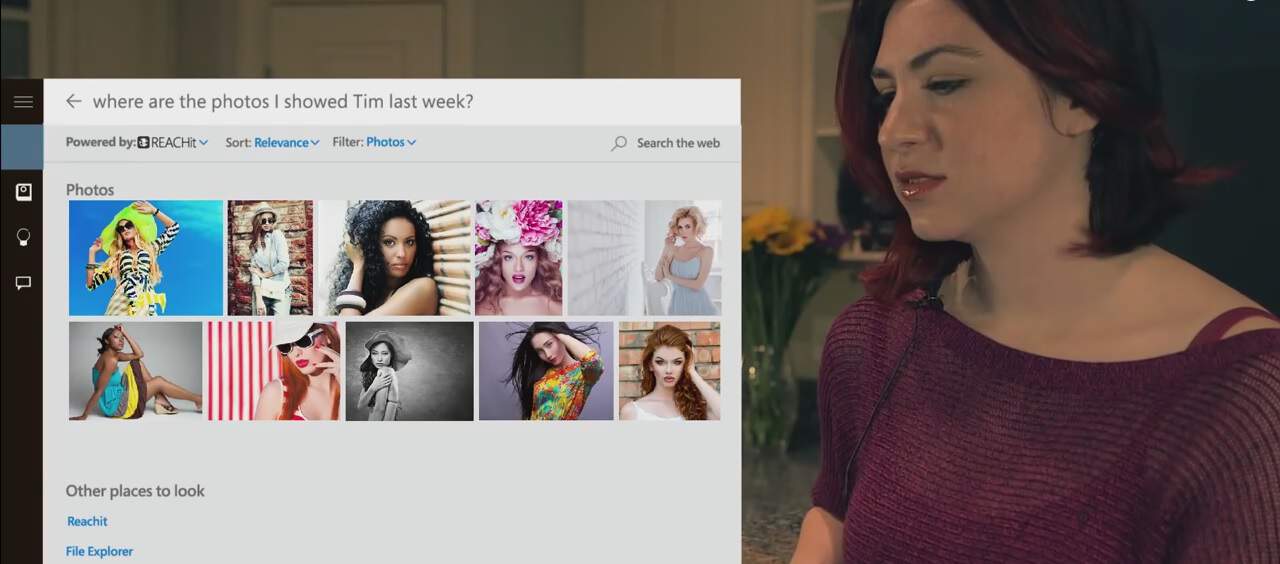
REACHit by Lenovo has been among a handful of 3rd party solutions that have tapped into the extensive functionality of Cortana and attempted to harness and produce even richer end user experiences. Part of REACHit’s functional promise is to offer Windows 10 users the ability to centralize searches of their content from 3rd party cloud storage solutions such as Google Drive, Gmail, Dropbox and more. On top of collecting material from several popular cloud solutions, REACHit also helps refine Cortana’s ability to search by allowing users to search with more natural speech queries and specific item callouts.

For all that REACHit can currently, handle, it’s not without its share of bugs, issues, and quirks. However, it appears the REACHit developers alongside support from the Windows team, is looking for a group of dedicated beta testers. A new post to the Insider Hub details steps a Windows 10 Insider can take to signup, download and install a beta version of the REACHit software.

REACHit

In addition to the sign-up and install process, the post also shines a light on the various functions users can expect from the REACHit software as well as bugs others might encounter such as “some queries may not produce the result you want.” As it is a beta program, it’s understandable that the software needs a bit of user refinement to hit the nail on the head when it comes to utilizing natural speech patterns.

With Cortana being as heavily embedded into Windows 10, it behooves Windows 10 to support this effort. Similar to how Microsoft is leaning on the expertise of the open source community when implementing features on its Azure platform, allowing the open development of additional Cortana functionality will only benefit the Windows engineers, its users, and the platform as a whole.

Hopefully, over time and with the right amount of feedback, whatever data and metrics REACHit collects and transposes will eventually trickle back into the consumer-facing version of Cortana.

For Windows 10 Insiders interesting in testing out the Cortana add-in, providing feedback, or watching the development of the REACHit software, head over to the Insider Hub for more information.

REACHit for Cortana
REACHit for Cortana
Price:
Free

How would you improve the Windows 10 Store?

Since Microsoft launched Windows 8 in 2012, the Windows Store has been the key to Microsoft content strategy. But while the Windows 8 store only featured third-party apps, the Windows 10 Store is now a gateway to the whole Microsoft ecosystem including universal Windows apps and a lots of media content.

More importantly, the new Windows Store is also a key component of Windows 10 as it’s the native tool that will deliver updates to all Microsoft native apps and third-party apps, while the Store itself is a universal app built on the same Universal Windows Platform (UWP) that third-party developers can use. So, let’s just say that Microsoft’s Windows Store has to deliver a rock-solid experience for Windows 10 users and third-party developers if Microsoft wants its Windows 10 strategy to succeed.

Right now, the Windows 10 Store experience is obviously better than the Windows 8 experience, and Microsoft was recently happy to report that the Store received 3 billion visits since the release of Windows 10. The company is still not done yet as the Store experience could still be improved in many ways. Here’s a list of suggestions to improve many aspects the Microsoft Store like the web experience, the search experience and app listings.

Let’s start with my main requested feature as a WinBeta writer: as we often have to report about app updates, it’s really annoying that the Windows Store is not displaying datestamps for apps as well as a full changelog history. It’s quite confusing when you remember that the old Windows Phone Store currently tells you when an app received it last update. Also, wouldn’t it be useful to users if the Store homepage featured a “Recently updated apps” category?

A lot of information but no changelog history.

From a consumer perspective, my most requested feature is a universal wishlist across the web and Windows 10 PC and mobile stores. Both iTunes and Google Play currently have that handy feature, and as the new Windows Store is featuring media content as well a wishlist would be really helpful to track prices of all the content you would like to buy.

Next, some may remember that during the Windows 8 era, it was possible to download apps on your Windows Phone from the web (using the deprecated windowsphone.com website). Well, if you browse the Windows web store using a Windows 10 PC, you can still use web links to quickly redirect you to the Windows Store app, but you can’t use those links to install apps on your Windows Phone. Microsoft should really bring back that feature as a more consistent experience could bring more engagement on its app store.

It's no more possible to download apps to your phone from the web.
It’s no more possible to download apps to your phone from the web.

I also have a lot to say about search, and if you’re a Steam user I guess you’ll know what I’m talking about. Search is currently terrible on the Windows Store because the content is lacking some metadata that could help users get quicker to Store content using search filters. To link to my previous datestamps request, I think it would also be handy to be able to filter search results to quickly see which apps were recently updated.

Also, Microsoft recently added a discreet “Built for Windows 10 label” that some Windows Store apps are now featuring, but that doesn’t explain much to users (does this mean that these apps are Continuum-enabled?). I also have Windows 10 games in mind as it’s currently difficult to know what that “Xbox Live” label really means, and if you’re looking for games that you can play with an Xbox controller you’re also not guaranteed to find that information on app descriptions.

You can't guess it, but this game works with an Xbox controller and uses Xbox Live cloud saves
Why do I have to scroll down to discover that this game works with Xbox controllers and uses Xbox Live cloud saves?

So, I think it would be a good idea to add “badges” on app pages, and there should be search toggle for at least these 3 badge suggestions of mine:

– Windows 10 UWP app (which also implies Continuum enabled on mobile)
– Game that works with an Xbox controller on Windows 10
– Game that uses Xbox Live cloud saves between PC and mobile

So, these are my main feature requests for the Windows 10 Store, but of course I would also appreciate a more reliable Store, as in my own experience the Store can sometimes struggle to download apps. But hopefully, “Windows as a service” means that Windows 10 will get better over time, and the Windows Store is getting updates at a regular pace. And Microsoft really ought to provide the best Windows Store experience for users if the company wants developers to take the Windows platform seriously.

Please tell us in the comments if you’re satisfied with the Windows Store or if you also have feature requests you want to share with us!

Microsoft’s new note and handwriting app Plumbago now available

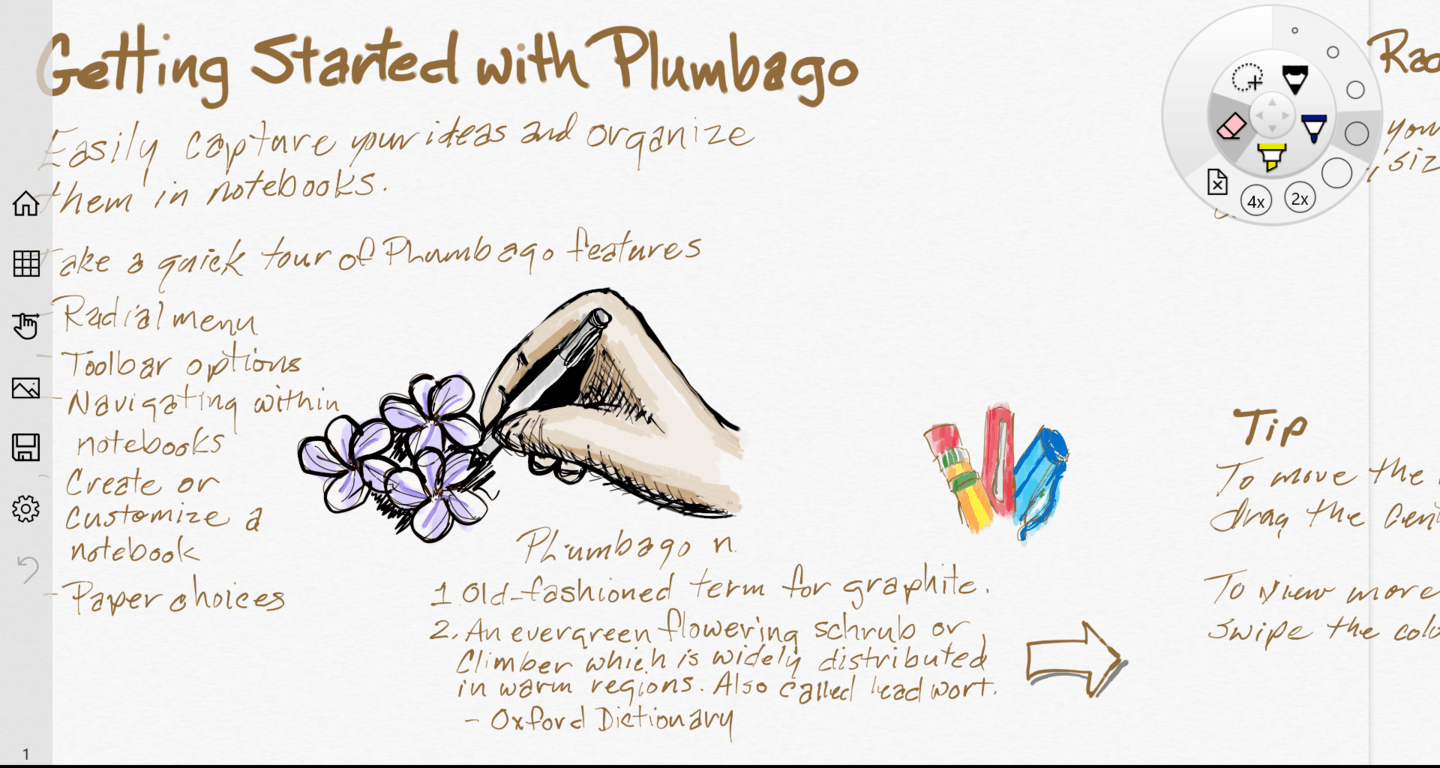
New apps and services are an important part of Microsoft’s strategy. The latest app to be taken out of the Microsoft Garage, an app workshop run by Microsoft employees from around the company,  is Plumbago. It is a note taking app with an emphasis on handwriting. We reported the rumor of it being on the way earlier this month but it is now officially available for download for Windows 10 or Windows 8.x.

Our initial impressions were correct. Plumbago looks like Fresh Paint mixed a little bit with OneNote. While some see this as redundant, this is only a Microsoft Garage app so it isn’t looking to be a part of or compete with the Microsoft Suite of productivity apps.

The app description highlights a few key features including adjustable handwriting smoothness, “realistic ink and paper,” adding pictures and a few more. The app has only recently been released but initial impressions are good with the app delivering a good writing experience as promised.

One feature that fans will likely welcome back is the radial menu. This is a popular layout for those using a stylus who want to quickly switch between how their stylus draws on the screen.

Microsoft has put up a blog post on Plumbago including the video shown below breaking down the new app.

We’ll have to wait and see to know how the features and layout of Plumbago integrate with the rest of Microsoft’s apps but for now you can give it a try for yourself.

Lenovo Settings App for Windows 10 Gets Updated

The Lenovo Settings app, just as the name pretty much makes it clear, allows you to manage a wide range of options on your Lenovo device. You have Smart Settings, options for power, input, networks, audio/media, camera, display and more.

The app has apparently received a small update for Windows 10 users, but we weren’t able to notice anything different, especially as there was no changelog provided by Lenovo for this update.

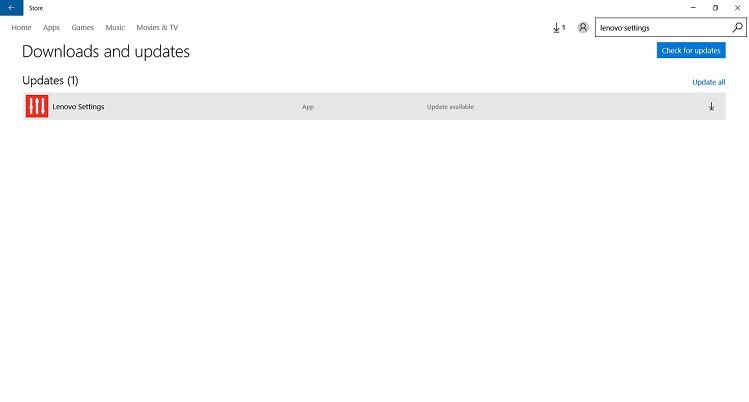
Lenovo Settings app updated for Windows 10

lenovo settings app windows 10 update

The update comes in at a size of 16.7 megabytes, which might be considered as a hint that it’s a small update and doesn’t bring in any new features. And, indeed, when I checked the app, and while I don’t use it this often, I wasn’t able to spot anything different. If you did, then please leave your comment below and let us know what did you spot.

lenovo settings windows 10

If you still don’t have the app, but you want to give it a try, make sure you install it only on a system with a x86 processor. Many customers who’ve downloaded it have left a negative review, so I guess this update is meant to fix some of the problems which were causing these complaints.

Explore the ocean with a biomechanical robot in Abyss for Windows 10

The console game, Abyss, has just relaunched in the Windows Store and now works across devices running Windows operating systems from Windows Phone 7 through to Windows 10 Mobile. An official announcement from the game developers, Game Troopers, states that the game now works on PC but that functionality appears to be limited to certain Windows 10 hardware (it is not currently compatible with my Windows 10-powered first generation Surface Pro).

Users who do get it running on their Windows 10 desktop however can enjoy support for Xbox controllers and up to 20 Xbox Achievements to unlock with a Gamerscore totalling 200.

Here’s the official description:

In Abyss you will control Nep2no, a biomechanical robot created by humans to explore the depths of the ocean in seek of a new source of energy called “Gaia”. Abyss is a dark exploration through submarine caves and dangerous ocean trenches. Guide the brave Nep2no in his mission through mysterious grottos, discover forbidden depths, unfold secret passages, and gather all the Gaia to save humanity. A fantastic rework of the console classic, only for Windows.

While a console game coming to Windows PC used to be quite unusual, more and more games have started making the transition and several major titles coming out in 2016 such as Quantum Break and Killer Instinct Season 3 will be getting both an Xbox One and Windows 10 PC release, likely on the same day. Last year’s hit Xbox One title, Rise of the Tomb Raider, also recently launched on Windows 10 and there are reports that other games such as Forza 6 could follow suit.

Abyss has a reputation for being a rather challenging game so it may appeal to those gamers who are after more than casual puzzle games or shooters on their Windows device. Have you played Abyss yet? Let us know what you thought of it in the comments below.

Abyss
Abyss
Developer:
Game Troopers
Price:
Free

Wunderlist releases Outlook integration

Wunderlist is a task management solution that Microsoft purchased in 2015 to flesh out their line of cross-platform productivity solutions. Today, Wunderlist has announced an integration between their solution and Microsoft’s email service, Outlook.

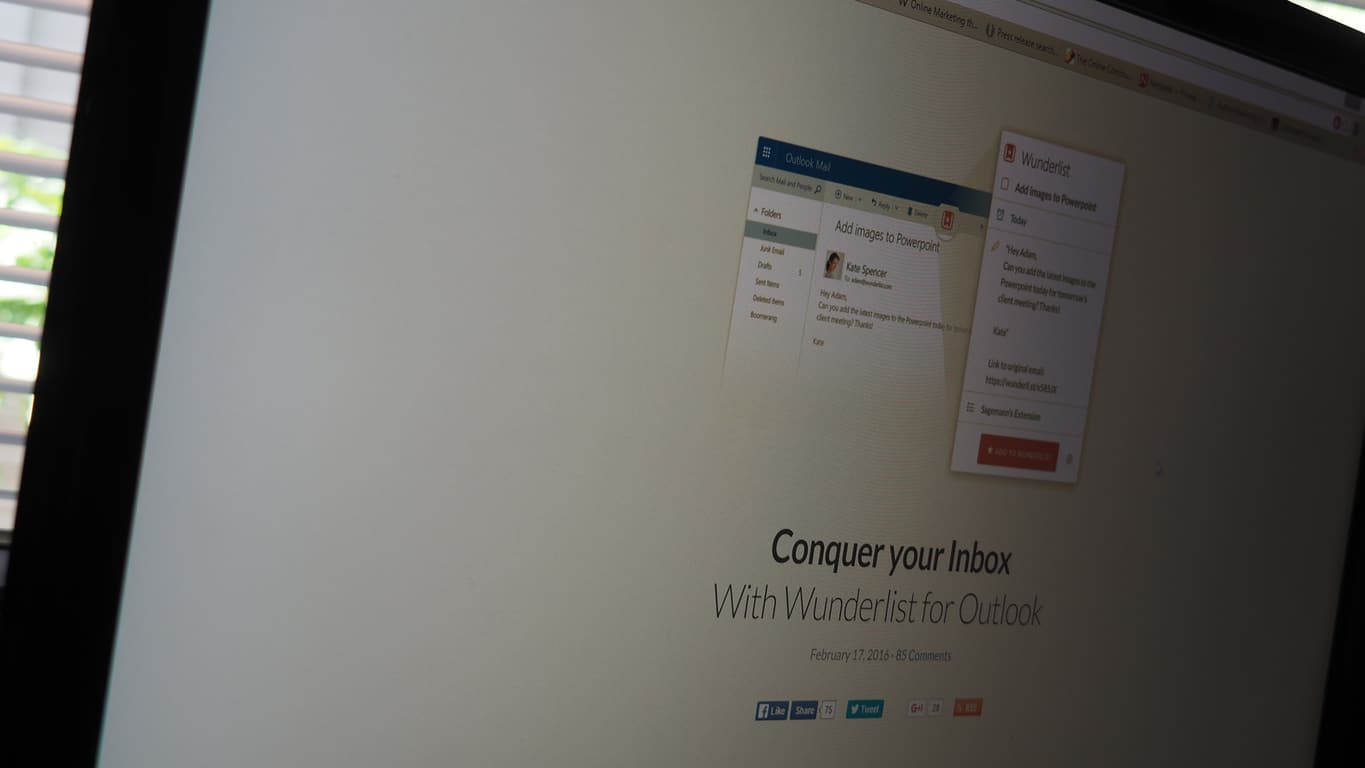
Going forward, users of Microsoft’s Outlook.com, Outlook 2013, Outlook 2016 and Outlook for Office 365 will have access to new option when checking email, allowing users to add emails directly into Wunderlist. If you have an important meeting to attend, for example, simply click on the button “add to Wunderlist” and you will be prompted with an add-in slide. Once activated, the email will convert automatically to a task in Wunderlist, and from there you can add a new subject, details, reminders and click “add to Wunderlist” to finish the process.

This new add-in can help to quickly read email, organize them, and add important items to Wunderlist, without ever leaving Outlook. In addition to integration with your Inbox, lists you create in the app can now be easily shared with anyone, right from Outlook. When composing an email, simply click on the Wunderlist button and any lists you’ve created from the app will be available to share. By selecting the list you can bring friends in on your vacation plans or share a grocery list with a loved one.

Wunderlist Outlook
Wunderlist for Outlook

Wunderlist is an app for organizing all your life’s “to-do” lists, projects, schedules, notes and more. What Wunderlist helps you to do  is to stay on top of the day to day tasks, and by integrating across nearly every platform, carrying over your list to different devices is now potentially easy and efficient. Signing into your account will bring up any new changes and lists that have been added to whatever device you are using. In addition, working with a team, friend, or partner, you’re also able to comment on lists to stay informed of jobs completed, changes, and ideas.

The Wunderlist integration will be rolling out first to users of Outlook.com, Outlook 2013, Outlook 2016 and Office 365 subscribers in North America. Later, other parts of the world will get access to this new add-in. If you are not seeing the add-in while in Outlook, you can also install it directly from the Office store. With the power of Outlook and Wunderlist together, how do you see your productivity increasing with this integration? Let us know in the comments.

Stack Overflow, built on Microsoft technologies, reveals some impressive performance numbers

In a recent blog post, Nick Craver goes over some recent changes to Stack Overflow’s architecture. For the non-technical people out there, Stack Overflow is a website for experienced and novice programmers to find help to solve programming problems. Craver is a Software Developer and Systems Administrator for Stack Exchange and is responsible for keeping Stack Overflow up and running.

With over 4.7 million subscribers, Stack Overflow certainly has a great database of programming knowledge to help you solve even the most complex problems. Even Scott Guthrie, Corporate Vice President of Microsoft’s Cloud and Enterprise group, pointed out Carver’s post on Twitter.

Craver posted extensive statistics taken from changes to Stack Overflow’s architecture from November 12, 2013 to February 9, 2016. Craver points out all the things that Stack Exchange needs at their disposal to run Stack Overflow and what changes they made from their hardware used in 2013:

  • “4 Microsoft SQL Servers (new hardware for 2 of them)

  • 11 IIS Web Servers (new hardware)

  • 2 Redis Servers (new hardware)

  • 3 Tag Engine servers (new hardware for 2 of the 3)

  • 3 Elasticsearch servers (same)

  • 4 HAProxy Load Balancers (added 2 to support CloudFlare)

  • 2 Networks (each a Nexus 5596 Core + 2232TM Fabric Extenders, upgraded to 10Gbps everywhere)

  • 2 Fortinet 800C Firewalls (replaced Cisco 5525-X ASAs)

  • 2 Cisco ASR-1001 Routers (replaced Cisco 3945 Routers)

  • 2 Cisco ASR-1001-x Routers (new!)”

For more detailed technical (programmer-speak) information, and pictures on all the changes that were made to Stack Overflow’s architecture, check out Nick Carver’s personal blog post.

How to use your Band 2 music controls with Bluetooth headphones

The Microsoft Band marked Microsoft’s venture into the wearable industry, followed up a year or so later with the more evolved Band 2. Focused on the fitness aspect of the wearable technology industry, the Microsoft Band 2 includes GPS mapped running guides, elevation monitoring, heart rate monitoring, and many other features.

Microsoft has continued to add to the list of features on the Band, and recently updated the device’s firmware back in December to include music controls, activity reminders, and an improved exercise tile. With all that in mind, today, we can deliver you a tip to get that music control function working correctly with your Bluetooth headphones.

Essentially, users have run into the issue of the music controls not functioning when a Bluetooth headset is attached that also has integrated controls. According to the tip provided by Twitter user @Shepdad, connecting music controls on the Band 2 before connecting bluetooth headphones could potentially offer a fix.

As always, your milage may vary based on Bluetooth headset being used. Nevertheless, give this tip a try, and let us know in the comments if it is or is not working for you.

We at WinBeta have a page dedicated to Microsoft Band Tips and tricks, and you can check it out to get the most out of a new Microsoft Band device.  Once you’ve checked that out, you can go ahead and add our Microsoft Band news hub to your favorites to stay up to date on Band updates and more.

Microsoft adds Windows 10 Education edition to Windows Insider program

In the past, teachers and students running Windows 10 Education Edition were excluded from the Windows Insider program. Windows 10 Education is a version of Microsoft’s newest OS that’s available exclusively through the company’s volume licensing program and is also available to students in schools that participate in Microsoft’s DreamSpark program.

Along with the new Windows 10 Insiders build 14267 announcement, Microsoft also provided the news about Windows 10 Education:

If you’re a student or teacher running the Windows 10 Education Edition – you can now go to Settings > Update & Security > Advanced options and opt-in your PC to receive Insider Preview builds. By joining the Windows Insider Program and running Windows 10 Education – you can help to shape the future of Windows for education customers. You can be a part of the ongoing process of improving the features and functionality of Windows that has helped us build the best Windows yet. Windows 10 Education is available through Microsoft Volume Licensing. Individual students in schools participating in the DreamSpark program or eligible for the Windows student use benefit may also be able to download Windows 10 Education as a benefit of their school’s partnership with Microsoft.

We’re always happy to see Microsoft expands its preview programs to more users. The more users, the more feedback and the better Windows 10 can become. Of course, schools will likely impose their own limits on who can test the new OS, but, at least, Microsoft has made the option available.

Microsoft is testing an Outlook.com Premium service, to include custom domains

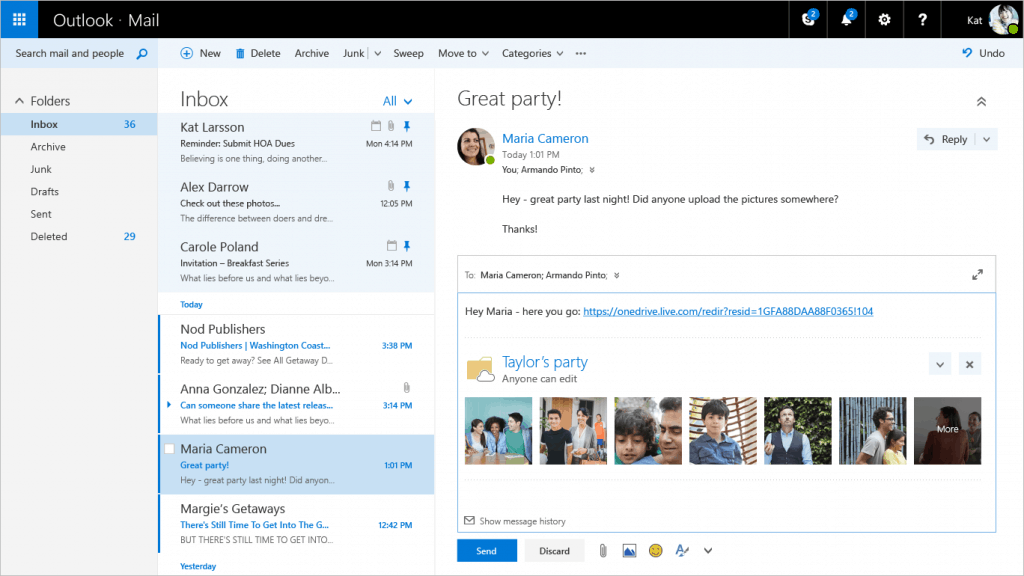
We just learned yesterday that the new Outlook.com experience was starting to roll out worldwide, offering a number of enhancements that have been available to preview users for a while. Today, Mary-Jo Foley from ZDNet has reported that Microsoft is currently testing a new premium Outlook.com service with custom domain option.

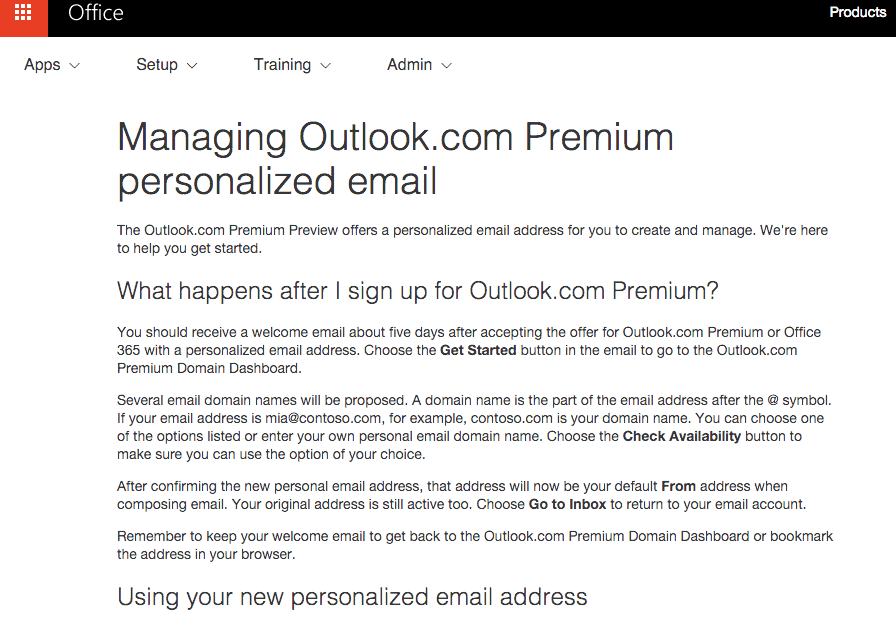
This pilot program is not the same as the ad-free Outlook.com experience that Microsoft is currently offering for a $19.95 yearly subscription, but according to this official help page “offers a personalized email address for you to create and manage.” Here are the most interesting bits from this help page :

  • After confirming the new personal email address, that address will now be your default From address when composing email. Your original address is still active too.
  • After setting your new personal email address as an alias, you can login to any Microsoft service with your personal email address and the same password that you use for your Outlook.com account. You should keep your original Outlook.com email address as an alias on your account.
  • Microsoft has partnered with GoDaddy to supply the email domain you choose to power your personalized email address.
Outlook premium help
Outlook Premium Help page

Microsoft previously offered a free option to use Outlook.com with your custom domain, but the company ended support for it in 2014 while existing users were allowed to keep their account for free. Since then, the only way to get an email address with a custom domain from Microsoft is to subscribe to Office 365 for business, which clearly is overkill for happy Outlook.com users.

A Microsoft spokesperson explained to Mary-Jo Foley why the company is running this pilot program:

We are evaluating interest in custom domains for Outlook.com. At this time, we are testing with a limited number of users in the United States and will evaluate the experience over time. The previous program required the user to manage the process of purchasing a domain. We are evaluating the appeal of custom domains but with Microsoft managing the processes of procuring the domain.

We’re always investigating new features based on the wants and needs of our users, and we have nothing more to share at this time.

So that’s it, folks. We don’t know yet if Microsoft will go forward with this Outlook premium service and if Microsoft will include it in a Office 365 consumer subscription or sell it as a standalone service. But the new capabilities would certainly be a welcome addition for Outlook.com fans and “prosumers” who would want to use their favorite email service with their own domain. Please tell us in the comments if you would be interested in Outlook Premium!

Microsoft is working to link Skype to Aadhaar, India’s national ID database

What if people in India could soon use Skype as an authentication service? According to a report from Indian Express, Microsoft is currently working with the Indian government to link Skype with the national ID database Aadhaar to see if the service can be used to enable authenticated communications with government institutions.

Aadhaar is a unique 12-digit identity number affected to Indian residents and linked to centralised government database collecting biometric and demographic data. It’s currently voluntary and not mandatory, but because of the privacy concerns some Indian civil liberty groups have opposed what could be one of the world’s largest national identification number project. However, Microsoft’s President and Chief Legal Officer Brad Smith told Indian Express that the company has embraced the universal ID system:

We have been pursuing work, initially on a pilot basis, to use this specific technology and integrate it with Skype. We see Skype evolving in a way that will enable someone at home to authenticate themselves with using that ID system with a fingerprint or iris scan and then communicate with someone on the other end, maybe even a government agency, which will know that person is the same as he or she is claiming to be”.

Skype is not the only messaging app to try to go beyond simple private conversations, as we’re already seeing other services like Facebook Messenger and Whatsapp trying to get business on board and use their platforms to communicate with consumers. But by working with a government agency, Microsoft is trying something different here to enable authenticated communications between citizens and government institutions. As Aadhaar is still not mandatory, Microsoft is probably right to experiment, but we can understand you if you find it a bit scary to link a personal service like Skype to centralised government database like Aadhaar.

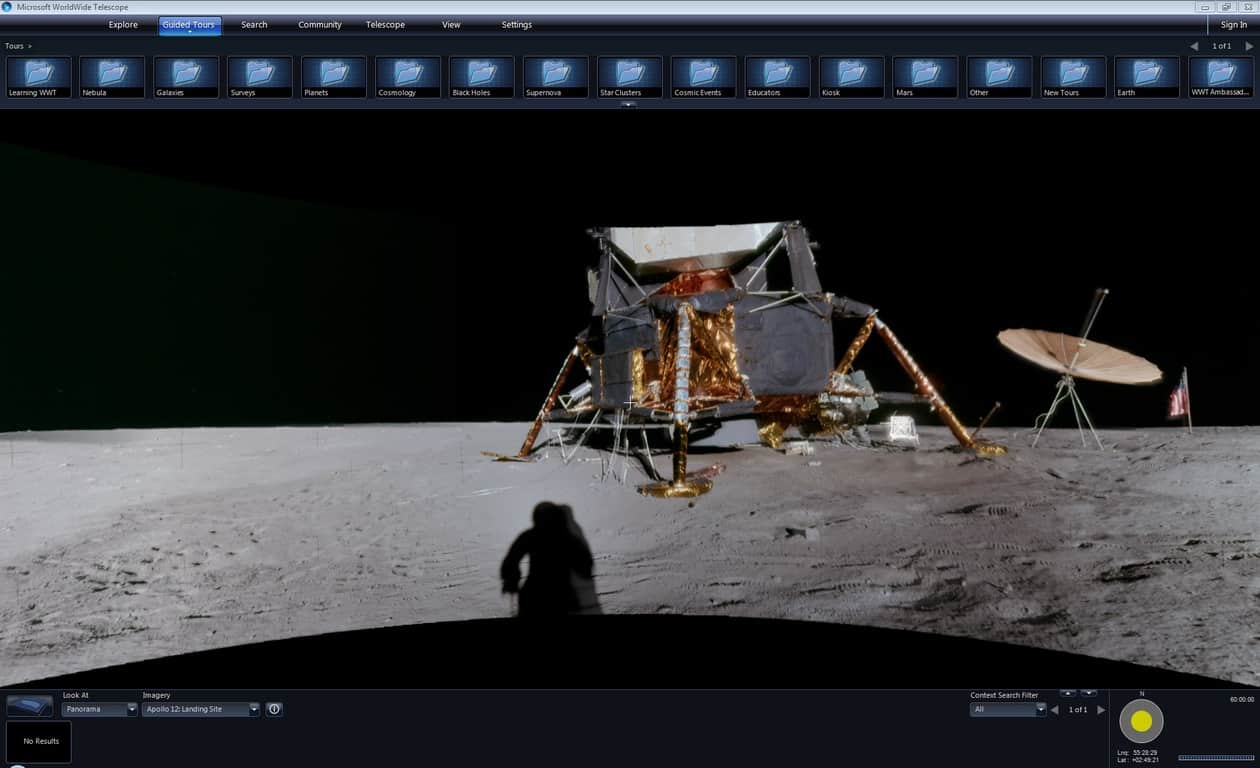
Microsoft’s WorldWide Telescope gets a new home at the American Astronomical Society

In 2007, WorldWide Telescope (WWT) started as a “dream project” for Jim Gray, Curtis Wong, and Jonathan Fay; all software engineers at Microsoft Research. WWT became an open source project in July 2015. Now in 2016, the open source labor of love and tribute to Jim Gray’s legacy is migrating to the American Astronomical Society with the help of Microsoft Azure.

Founded in 1899, the AAS helps share the scientific understanding of the universe with all of humankind. WWT will breathe new life into AAS with Microsoft Research working with scientists to enhance everyone’s understanding of the universe as a whole.

Microsoft Azure would have helped develop WWT at a much faster rate; Azure helps manage global WWT users, makes collaboration much easier, and provides resources for new projects as needed. Azure helps WWT keep up with the latest technology, software, and data without the limitations of maintaining a physical server.

Over the course of the last eight years, WWT worked with the public to enhance the way they see the universe. From novice to even the most seasoned astronomers, Azure allows astronomy data to be shared openly to provide a deeper understanding of the universe and help make new astronomical discoveries.

Here is a overview video what WWT does and what it is capable of.

The main goal of WWT has always been about collaboration and the sharing of data among the scientific community. Microsoft Research worked extensively with astronomers and astronauts to make WWT as accurate as scientifically possible. WWT hopes to inspire the next generation of scientists and explorers. With WWT being an open-source project, managed by the AAS, and now powered by Microsoft Azure, WWT will be able to increase its reach and impact in the scientific community.

If you are interested in trying out WorldWide Telescope for yourself, download WorldWide Telescope 5.2 for Windows here.

Gmailify your Outlook account to gain features without using Gmail

Gmail app for Android give users the ability to sign in to the app with their existing non-gmail account such as Outlook or Yahoo. However, if you’re a fan of Gmail’s features such as improved spam protection and better inbox organization without ditching your existing Outlook email address, Google has a solution for you.

They call it Gmailify, which give users the ability to login with their existing Outlook or Yahoo account, and use all the Gmail features without the need of a Gmail account.

The process is quite simple: it doesn’t require users to install anything on their device or PC. All you have to do is login with your Outlook account in the Gmail app, and tap on Gmailify — it’s that simple. After enabling, you’ll be able to use all the exciting Gmail features on your Android device with your existing Outlook address.

At any point in time, if you wish to unlink your account and use the default features, you can do so from within the app. Google said the company is working to bring more email providers to the compatibility list, but at the moment, it’s only Yahoo and Outlook/Hotmail. In the meantime, check out the video below to see it in action:

Of course Microsoft is upping its game, too, rolling out the latest Outlook.com improvements from preview, but if you’re stuck in a Gmail paradigm, this may be the app for you.

Yahoo reveals how they made their Yahoo Mail Universal Windows Platform app

One of the benefits of developing a Universal Windows Platform (UWP) app in the Hosted Web App format is that developers can essentially repackage coding they’ve already written for web apps and use that work as a basis for their Windows 10 app.

Several companies have taken advantage of this convenient app development method and released rather impressive apps on the Windows Store. Spotify is one such company who designed their app this way and Yahoo is another, who used the Hosted Web App process to build their Windows 10 Yahoo Mail app.

In an interview with the Windows App Team, director of product management for Yahoo Mail, Josh Jacobson gave some insight into why they decided to go with a Hosted Web App as opposed to a full Universal Windows Platform app which would have had to be coded from scratch. “We saw that Microsoft could let us essentially wrap our web app in a desktop app and get the best of both worlds,” he says of the decision and mentions the need to produce an app of some form on the Windows 10 ecosystem. “We looked at what things we’re limited to in a browser and what things in a desktop app we could really utilize to help users return to Yahoo Mail and use it as part of their daily workflow.”

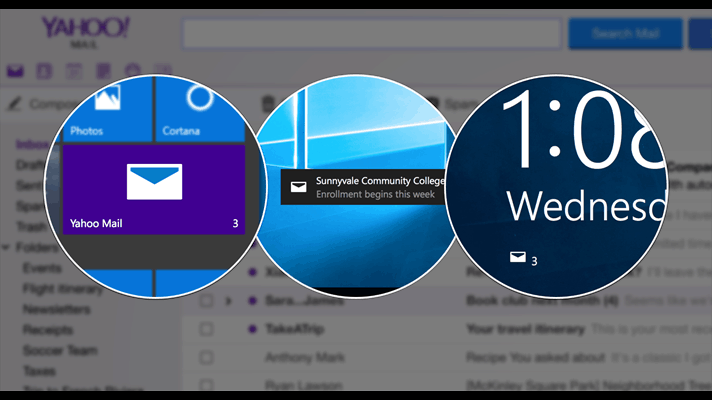
Some of the app features he refers to are lock screen integration and Live Tiles which both allow for the display of information when the app is closed. “It’s the kind of thing that you don’t necessarily expect as a user, but when you see it, you’re happy that it exists,” he said of the extra functionality.

As for the publishing process and their experience with the Windows Store itself, Josh appeared very positive. “The Windows Store itself, for us, was an awesome experience because users are prompted automatically to give reviews,” said Josh. “We didn’t have to do a lot of work to get users to leave reviews, and we got lots of reviews right away as soon as we launched.”

Do you use the Yahoo Mail app on your Windows 10 device? Let us know your thoughts in the comments below.

Yahoo Mail
Yahoo Mail
Developer:
Yahoo Inc
Price:
Free+

Minecraft Windows 10 and Pocket Edition updated to v0.14.0, brings Redstone Specialist skins pack (updated with changelog)

Minecraft Windows 10 Edition Beta has been getting updates alongside the Pocket Edition of the game, and today reached version 0.14.0. Since the last update to both versions of the game last November, Microsoft has released the first few Redstone Insider builds, so it’s nice to see the update include some great new skins for players to dress their characters in.

At this time, no official changelog has been added (see below for the changelog) to the store page for the Windows 10 Edition Beta or the Pocket Edition store pages, but the new version, as seen in the main menu, is 0.14.0. The update has yet to roll out to the Pocket Edition on Android, so that version is still at 0.13.2.  Below, you can see what the new skins look like.

Minecraft Windows 10 Edition Beta 0.14.0 Redstone Specialist

Checking around for what was new, the skins featuring various Minecraft Redstone-related designs are the only obvious change. There are fifteen new skins with two available to try for free. The full list of character skin names are:

  • Artisan
  • Composer
  • Vanguard
  • Duster
  • Scholar
  • Trapper
  • Redstone Miner
  • Coder
  • Protector
  • Prospector
  • Architect
  • Rail Rider
  • TNT Tech
  • Redstone Miser
  • Tinkerer

Artisan and Composer are the free skins in this pack, and to slip into any of the rest will cost players $1.99, just like the other skin packs Mojang has released for Minecraft in Microsoft’s ecosystem. Once an official changelog is released, we’ll update this article.  Microsoft has indeed added a changelog:

What’s New in Version 0.14.0
– More Redstone components! Comparators, repeaters, dispensers, droppers, hoppers, trapped chests, and various additional Minecart types
– Spooky witches and their huts, complete with cauldrons filled with random potions and the ability to dye Armor
– Item Frames to display your coolest loot
– Slime blocks
– Wearable pumpkins
– Red sandstone
– Improved chicken jockey mobs
– 15 new Redstone Specialists skins for your Redstone engineering, mining, rail-riding and TNT-ing!

Microsoft Mechanics shows what’s new in Office 365 Groups

Today Microsoft’s Office Blog released a video showcasing updates to Office 365 Groups. Office 365 Groups is a way for organizations to share work spaces, collaborate on projects and share information. Available to businesses and education departments, this feature of Office 365 allows the creation of groups for the use of shared calendars, sharing notes, emails using planning tools for different tasks.

In today’s video, the Microsoft Mechanics, a YouTube channel focusing on Microsoft technology and news, covers the newest updates to Office 365 Groups.

A couple of highlights from this video are worth discussing.

First, the ability to create groups to easily identify teams in an organization and keep information shared, organized in its proper place was highlighted.

Another great feature that has been introduced is data involving the completion and progress of projects. Called Planner, this feature allows users to assign tasks to different team members and get updated results on the percentage of their completion and the overall project.

Taking collaboration further is the integration of video calls through Skype and the use of note taking with OneNote. Utilizing Skype gives users the power to quickly begin a conference call with all parties in a team. While in a conference call, OneNote is integrated to allow the taking of notes on meeting information, attendance, and things like specific dates for projects.

To aid in usability, Microsoft has also taken the time to update the Discover Page and header of Office 365 Groups. The header for Office 365 Groups now lets users quickly access the core experience of Office 365 Groups with shared calendars, notebooks, files and conversations. The Discover page gives users the ability to find groups of their peers  within their organization that pertain to their interests, project, or other information that they may need.

On the Administrative side of things, Office 365 Groups was updated with these latest features:

  • Dynamic Membership: Use Azure management to create groups rule-based memberships
  • File Quota Management: Set quotas on groups, that underlines SharePoint to help shared storage of group files and consumption
  • Send Email with Group name: Members have the ability to use Outlook on the web or the application, replying to emails with the group name from Office 3645 Groups
  • Multi-Domain Support (coming soon): Soon to arrive will be the ability to specify the domain used for each group created

That rounds up the latest updates for Office 365 covered by the Microsoft Mechanics in today’s video. Microsoft is steadily working towards deeper integration with all their products and services, and to get ongoing glimpses at future of updates, users can look at that Office Fast Track page, highlighting upcoming updates and those currently released.

With this latest update, how do you see Office 365 Groups helping within the team work environment? Let us know in the comments.

How disability helped change Microsoft’s design principles for Cortana and Bing

Imagine for a minute, if you will, waking up without the ability to walk, see, or hear. August de los Reyes, the design lead for Xbox, experienced just that, and his discovery has helped him shape and redefine Microsoft’s Cortana experience.

In an interview with Cliff Kuang of FastCo.Design, de los Reyes examines how much of the recent technology enjoyed by all came by way of empathy and a need for accessibility by the impaired, and how that realization helped focus Cortana’s development.

Recently, suffering from a fractured spine that permanently robbed him of his ability to walk, de los Reyes was thrust into a parallel universe that remarkably resembled the world he once took for granted. Previously overlooked obstacles such as curbs and overturned trash cans now presented the wheelchair-bound de los Reyes opportunities for innovative thought, along with a few frustrating realizations.

“After the accident, he had methodically set about trying to do as many things as he’d ever done. Yet the limitations soon become obvious. He’d try to meet friends at a favorite restaurant, only to discover that he couldn’t quite get inside because of one tiny curb that some contractor had overlooked. He’d be steering his wheelchair down the sidewalk, only to be met with a tipped-over garbage can, which would force him to circumnavigate an entire block.”

2890407974_99b4e03f93_z

Rather than become sullen or dejected, de los Reyes saw the obstacles as a limitation of many thoughtless designers around him. The idea of disability being a personal problem rather than being a problem of unfortunate careless architecture is what ‘radicalized’ de los Reyes and prompted him to lend a hand in redefining how Cortana’s design could help everyone.

When newly appointed CEO of Microsoft, Satya Nadella promoted Albert Shum to Microsoft’s design director for the entire company, de los Reyes saw an opportunity to lend a hand. Shum, primarily responsible for Microsoft’s infamous flat design (for better or worse), had to chew on what exactly design meant beyond a two-dimensional sense, and de los Reyes was there to help. Using his previous curb experience as a metaphor, de los Reyes prompted the idea of universal design. Something as simple as a curb cut out benefits almost everyone while hindering relatively no one. Microsoft’s designs needed to be as abstractly and finite as a curb cut-out design.

microsofts-chefdesigner-gespraech

Paired with Shum and Microsoft’s principle design director Kat Holmes, de los Reyes sought to do more than turn Microsoft into a curb cut-out company. Holmes, tasked with figuring out Microsoft’s digital assistant Cortana would behave, came across de los Reyes ideas on universal design. Interestingly enough, de los Reyes ideas helped Cortana become more than a Siri clone that attempted to ape human-like qualities.

“Making Cortana behave like a human would be like the new skeuomorphism.”

The three design heads came to the understanding that making Cortana pretend to be something it is not, would not only be poorly received by the masses but go against modern design principles established in the 20th century. After studying actual personal assistants and watching the movie Her, Holmes sought the help of Harvard’s Allen Sayegh and Ontario College’s Jutta Treviranus alongside de los Reyes to infuse Cortana with what is dubbed as inclusive design. The concept of inclusive design stems from the study of building adaptive products for often overlooked communities such as the blind, dyslexic, deaf, or mute.

Kat-Holmes_5D603F72

As Kuang puts it:

Let’s say you’d like to build a phone that’s easier to interact with while you’re driving. You could just try to study people driving with their phones. Or you could actually study how the blind use their phones. How do they know when their phones are paired with another device? What aural feedback do apps need to provide, when opened? You could build those features into a phone, so that by serving someone disabled, you serve everyone else better.

The Microsoft design group sees it as “reframing disability as an opportunity.” The design principles of inclusive design are being mandated throughout the company and have given birth to several dozen projects seeking to improve the lives of users universally. A newer project that deals with font and system text wrapping should be surfacing soon from the company to help those with dyslexia read more easily.

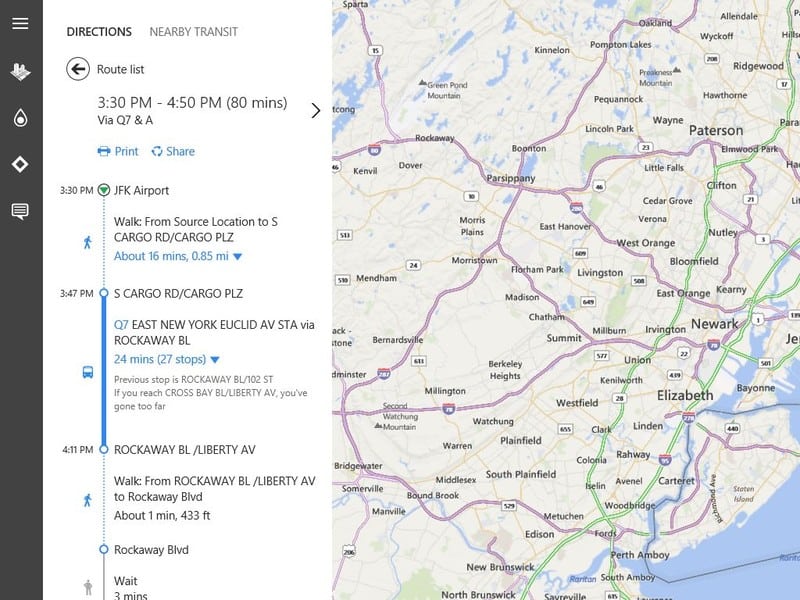
Even more impressive is landmark functionality being built into Bing maps. While a user is navigating by landmarks, Bing maps need to work that much harder to stay updated and relevant; studies have shown that women often navigate by landmarks and visual cues over more rigid cardinal directions. Rather than, “head southeast for 6.7 miles and turn right on Park Ave,” Bing Maps will begin to use slightly more nuanced language such as “head south for 6.7 miles, turn right at Dunkin Doughnuts. Now you’re on Park Ave.”
bing_maps-preview

Similar to de los Reyes, subtle observations and implantations such as the Bing Maps landmark navigation or Cortana’s ability to adapt to its surrounding input, Microsoft is building products and processes that benefit everyone. Microsoft’s adoption of inclusive design may seem similar to kitchen sink approach it takes with Windows development, but the understanding behind it is miles apart.

Rather than building for specific use-cases in a sort of whack-a-mole approach, those in charge of design and functionality within Microsoft are beginning to research overall usability and flexible elements from the beginning. For more details on de los Reyes and the direction Microsoft is headed, please take time to read Cliff Kuang’s brilliant piece.

Windows 10 Redstone pumps up Continuum with 2K resolution and touchscreen support

Shortly after Microsoft released what it dubbed Windows 10’s Threshold at the end of July 2015, some Windows users began to look towards the horizon for future updates to the operating system. According to leaked roadmaps, Windows users will see another substantial upgrade to Windows 10 in the form of Windows 10 Redstone. While many believe that the two-part release of Windows 10 Redstone will finally round out the development of Windows 10, questions remain as to what the update will actually include.

Recently, reports have been surfacing suggesting that Redstone will include a focus on Continuum. Specifically, Redstone could usher in touchscreen support and higher resolutions for Microsoft’s crown jewel productivity feature.

Redstone’s Continuum support news surfaced from a German site titled Winfuture, which claims to have information deriving from PC manufacturing sources that can attest to several feature additions that should appear in the Windows 10 Redstone release. Other improvements claimed by Winfuture include performance boosts to wireless transfers and Continuum’s higher resolution limits should increase to 2K.

As with most news that comes from anywhere other than Microsoft itself, we caution readers to accept this news with a grain of salt. While Windows 10 Redstone, in theory, could bring these changes and more, there is no guarantee that they will appear.

EA Sports UFC 2, with Ronda Rousey on the cover, set to launch March 15th, pre-order and pre-download now

Larry Hryb, aka Xbox’s Major Nelson, announced that EA Sports UFC 2 is now available to pre-order and pre-download for Xbox One. Available March 15, 2016, UFC 2 features Ronda Rousey and Conor McGregor on the game cover and, according to the game description, improves on the gameplay of its predecessor:

“EA Sports UFC 2 is the complete fighting experience you have been waiting for. With a bigger roster of fighters, stunning character visuals and a revolutionary new Knockout Physics System, finishing the fight has never been more real and satisfying. Whether you want to battle for the belt in a deep Career Mode or just brawl with buddies in the all-new KO mode, EA SPORTS UFC 2 offers a mode for every fight fan. So step back into the Octagon and finish the fight!”

Here’s the official gameplay trailer.

Currently, two different 2 versions of EA Sports UFC 2 are available:

  • EA Sports UFC 2 Standard Edition features special Day 1 character access to “Iron Mike” Tyson,  and playable MMA legends Bas Rutten and Kazushi Sakuraba.
  • EA Sports UFC 2 Deluxe Edition features a number of bonus content, includes everything in the Standard Edition, plus “Legacy” Mike Tyson, complete with his face tattoo, and up to 30 UFC Ultimate Team Premium Packs delivered over 15 weeks.

As a reminder, EA Access members get an additional 10% off the original price, so become an EA Access member for the discount and access to other free-to-play EA titles available. EA Access costs $4.99 a month or $29.99 for one year. For fans of the UFC, this is a must-have Xbox One game, so pick the EA Sports UFC 2 edition that is right for you.

EA Sports UFC 2 Standard Edition ($59.99)

EA Sports UFC 2 Deluxe Edition ($69.99)

Minecraft 1.9 coming next week, pre-release available now

Minecraft once again made the news today with their announcement that they would deliver real world “Mine Chests” for $30/month. There is now even more Minecraft news to report on, and this time it has to do with the actual game.

A pre-release of Minecraft 1.9 is now available, and it has entered its final stage before a final version is officially released next week, on February 25th. While a complete list of changes won’t be out until the final release, Mojang has listed the usual release notes on their website:

Notable changes:

  • Bugs fixed
  • Increased durability of shields
  • Some crystals in the end are protected by cages again
  • Added 34.7% more hype for Minecraft 1.9

Bugs fixed:

  • [Bug MC-96863] – Marker ArmorStand Should Not Have Passenger Offset
  • [Bug MC-97217] – Weird placement of player while riding an entity after swimming with elytra
  • [Bug MC-97235] – Resource pack in minecraft world save file not working
  • [Bug MC-97251] – Rail Duplication Glitch

To get the pre-release, you first need open your launcher and press the “new profile” button. Next, name that profile “snapshots” (without the quotes) and check the box which says “experimental developmental snapshots.” To end the process, simply hit save. If you want to switch back to the normal version, you can select it from the dropdown menu at the bottom left corner of the launcher. You should, however, be sure to back up your worlds, as snapshots can corrupt your world.


US Department of Defense to move to Windows 10 by February 2017, upgrading 4 million seats

Windows 10 recently surpassed the 200 million device mark, and with 76% of enterprise and education customers using it, Windows 10 has also been gaining popularity in the enterprise world. Today, Microsoft has announced that one of the largest enterprises anywhere, the US Department of Defense, has joined in to plan Windows 10 deployments.

From laptops, to desktops, and even mobile devices, the Secretary of Defense has directed all DoD agencies to begin a rapid deployment of Microsoft’s Windows 10 on devices throughout their organizations. The deployment is targeted to be complete within a year, and is an unprecedented move for a complex organization such as the DoD.

Windows 10 has even been certified for specific government criteria and standards. The National Information Assurance Program, the arm of the US government responsible for evaluating commercial IT products for use in National Security Systems, has certified Windows 10 against the Mobile Device Fundamentals Common Criteria protection profile.

A few of Windows 10 security features might be incorporated into the DoD’s plans. For instance, using Windows Hello, the department can identify individuals and restrict access through integrated multi-factor authentication using biometric mechanisms like facial recognition or fingerprints. There is also Enterprise Data Protection, which is currently being tested and would provide separation between both corporate and personal data, preventing corporate data from being copied to non-corporate files and locations, such as public website or social channels.

Security is important to the Department of Defense, it being a large target for cyber criminals. The blog post explains:

With the DoD spending approximately $44 billion annually on cybersecurity and IT, (US DoD CIO Terry) Halvorsen said the DoD needed to deploy innovation faster to ensure systems are more secure, more efficient and cost-effective, and standardized on one platform.

Because the U.S. Department of Defense is a prime target of cyber criminals and one of the largest and most complex organizations in the world, its leaders know the importance of securing its baseline systems.

The intention to move to Windows 10 started back in November when Terry Halvorsen, CIO for the DoD, issued a memo directing all Combatant Commands, Services Agencies and Field Activities to rapidly deploy Windows 10.  A deployment that would improve the Department’s cybersecurity, lower the cost of IT and streamline the IT operating environment, and now that deployment is expanding to encompass the entire Department of Defense.

Microsoft says Surface Pro 4 has experienced ‘unprecedented demand’ since launch

Could the Surface Pro 4 be Microsoft’s most successful Surface ever? According to a new report by CRN, Microsoft is currently experiencing “exceptional demand” for its Surface Pro 4 as some UK resellers are complaining from shortages of high-end i7 versions of the hybrid tablet. Microsoft’s Windows and Surface Business Group lead Ryan Asdourian explained the situation to CRN:

“While we are not happy that we can meet all demand today, we are really excited about the customer interest and demand that this demonstrates. Our goal is to make sure everyone who wants a Surface Pro 4 is able to get one, so we are working hard to expedite and produce those machines as fast as possible and as soon as we do that we will make sure we are getting them out to our resellers and distributors.”

The Surface Pro 4 is retailing between £1,299 and £1,799 in the UK, and the two-in-one device seems to be a popular buy among creatives and company executives as one Microsoft Authorised Device Reseller told CRN: “You often get the directors buying themselves the i7s and then buying staff the i5s, which is the run-rate business”. Asdourian told CRN’s sister publication the Inquirer that Microsoft is seeing “unprecedented demand” for some versions of the Surface Pro 4, saying:

“On the Surface Pro 4s, I think one of the things this shows is the customer excitement in the fact we are having trouble producing them fast enough to meet customer demand”

Microsoft’s flagship tablet has been reviewed as the best iteration of the formula, and while the device has been plagued with software and sleep issues that the company is still working to fix, hybrids device like the Surface Pro 4 and iPad Pro are clearly leading the “detachable tablet” revolution as their shipments more than doubled in Q4 2015 according to IDC.

As Microsoft will finally start shipping its Surface Book hybrid laptop to some European markets starting tomorrow, we’re really hoping the company will be able to resolve this supply issues as soon as possible. By the way, if you’re interested in the Surface Pro 4, remember that the US Microsoft Store is currently offering a $100 discount on some models until February 27.

Plex app for Windows 10 gets anonymous application metrics to help drive future improvements

Home theater owners should be familiar with Plex – a popular media server/playback software suite for all types of media, and a viable alternative to the previously dominating Windows Media Center suite, now discontinued in Windows 10. Plex has been an early staple of the Windows Store both on PC and mobile, and has continue to evolve along with the platform. The newest update, however, is following a trend that may sound negative to some users.

Specifically, the new update, pushing the app to version 2.1.2.30, introduces “anonymous data collection metrics to help drive future improvements”, which can be disabled in the Advanced section of the app’s Settings menu. There is no information to specify what kind of data is collected, but most likely it’s simple anonymous usage metrics, bug reports and other usability information.

plex-data-collection-windows-10

While metrics collection for app improvements is now a part of every modern piece of software, it continues to be a sensitive issue among privacy advocators and paranoid users; Microsoft has come under fire a lot recently for its policy on Windows. It’s great that Plex is being partially transparent about data collection, but the company will most likely get some backlash with this new update.

Besides the new data collection feature, the app also get some compatibility fixes for Windows Phone, including startup performance improvements, landscape UI fix, and other general usability and stability improvements.

Plex
Plex
Developer:
Plex
Price:
Free

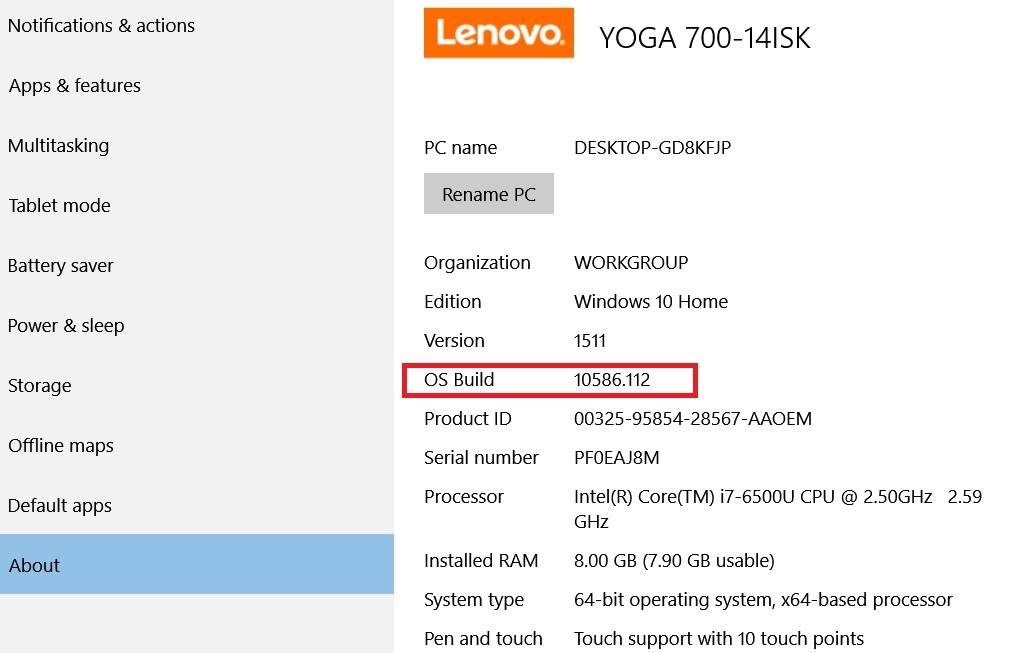
KB3140742 Updates Windows 10 v1511 to OS Build 10586.112

The KB3140742 was released basically a few hours ago, and we’ve decided to install and see what happens. There were no notable new features and options (at least we didn’t manage to find any), which hints to the fact that there were some background improvements.

KB3140742 pushes Windows 10 to 10586.112

KB3140742 windows 10 os 10586.112 update

However, what did change, and it might not be a minor change, is the fact that the OS build now points to 10586.112, as you can see from the above screenshot. The version that I was running before was 10586.104, which is the one brought by update KB3135174. KB3140742 windows 10 os 10586.112 new

This was the single big change that we were able to spot, and the fact that the OS build has been updated, as well, could mean that Microsoft will deliver the update soon via the usual Windows Update distribution system.

As we’ve seen from its recent moves, Microsoft likes to have the same version across all of its devices, which made us believe that Windows will be updated to 10586.107, which is the latest version for Windows 10 Mobile insiders.

And on a personal note, after getting KB3135174 update on my hybrid Windows 10 device, I have a feeling that the Windows Store is now somehow snappier, but we’ll have to wait for confirmation from Microsoft’s side on this.

We’ll be keeping an eye on this particular update and will add more details as soon as more Windows 10 users install it, or if the support page gets update to reflect the changes.

Watch The Walking Dead with the Windows 10 AMC app

Microsoft is reminding fans of the popular horror/drama, The Walking Dead, that they can enjoy the show on their Windows 10 device via the recently updated AMC app.

The official AMC app was updated to the Windows 10 Universal App format in December 2015 and was also given more functionality with enhanced Cortana commands, redesigned Live Tiles, and Lock Screen integration. One example given of a Cortana voice command that can be used is, “Go to ‘The Walking Dead’ on AMC” which will immediately open the app and self-navigate to the series.

While the AMC app is a good option for those that use it, The Walking Dead is also available via other Windows 10 apps such as Microsoft’s Movies & TV (or Films & TV) app which allows users to purchase digital versions of a season or individual episode to download and view at a later time when away from an internet connection.

AMC
AMC
Price:
Free

Game Subscription Service Origin Access Arrives in India

Origin recently launched its own subscription service, Origin Access. The service allows you to play some of the latest EA games, for the price of €3.99 a month. Origin Access now made its way to India, where it allows users to play EA’s latest titles for the price of ₹315 a month.

Origin Access in India is for now limited to 14 EA titles, mainly released during past couple of years. All users who subscribe to Origin Access in India will also receive a 10% discount when buying EA games that are not included in the Origin Access Package.

Here’s the list of games currently available to play with Origin Access in India:

  • Battlefield 3
  • Battlefield 4 Digital Deluxe
  • Battlefield Hardline Digital Deluxe
  • Dead Space
  • Dead Space 2
  • Dead Space 3
  • Dragon Age II
  • Dragon Age: Origins – Ultimate Edition
  • FIFA 15
  • Need for Speed Rivals: Complete Edition
  • Plants vs. Zombies Garden Warfare
  • SimCity
  • The Sims 3 Starter Pack
  • This War of Mine

The package now consists of only 14 games, but EA will certainly include some more titles eventually.

Single purchase vs subscription

By launching Origin Access, EA introduced something that other game distribution platforms still don’t have, a subscription service. A lot of gamers, especially in less-developed countries, are not willing to give $50-60 for every game they play, so the subscription service might be the right thing for them.

On the other hand, with a subscription service, you’re not allowed to play any game you want, as you’re limited to the service’s offer, at least that’s the case with Origin Access. Microsoft is also making some radical changes when it comes to distributing games via Xbox, so we’ll see how these new ways of buying games will be accepted by users.

What do you prefer more, to buy the game you want and pay more, or pay less for a monthly subscription? Tell us in the comments.

Dovetail Games to Release Two Flight Simulation Games for Windows 10

Dovetail Games is preparing two new flight simulation games for Windows 10, Flight School and Flight Simulator. The first game, Dovetail Games Flight School is set to arrive to Windows 10 in April, while Flight Simulator is hitting the store later this year.

Dovetail Games acquired rights for Microsoft’s flight simulation technology back in 2014, and the company is now developing its own games to help pilot students and all other people who want to be introduced to the world of virtual flying.

Educational software for young pilots

Dovetail Flight School is not just an ordinary game for regular players who want to pilot a virtual plane in their spare time. This game is designed as an educational software for future pilots, and it teaches them the basics of flying a light aircraft, as well as some essentials of flight simulation environment.

“Flying an aircraft is a rewarding, awe-inspiring experience unlike any other and we want to give more people the opportunity to enjoy that by breaking down the barriers that make flight simulation feel inaccessible,” said Stephen Hood, Creative Director at Dovetail Games. “By empowering players to handle the controls of the aircraft, we will help them to immerse themselves in the very best and most thrilling aspects of flying in an up-to-date and technically cutting edge environment.”

Gameplay of Flight School, if we can call it that, will allow you to pilot some iconic training aircrafts, and will feature a lot of tutorials and training missions. The game will also have a Free Flight mode, which allows you to relax, and pilot your plane how you want.

So, if you’re attending a flight school, and you’re studying to become a pilot, Flight School and Flight Simulations will be great games to sharpen your piloting skills, at least they’re certainly safer than a real plane. If you like flight games, do check out as well flight simulator game F18 Carrier.

Rocket League for Xbox One is available for download, a few hours early

If you’ve been looking forward to playing Rocket League on the Xbox One, then you’ve probably been waiting patiently for tomorrow, February 17, 2016. That’s the date that the much-anticipated multiplayer sequel to Supersonic Acrobatic Rocket-Power Battle-Cars was slated to release. If so, then you’re in luck: apparently, the developers decided to go ahead and push the button a little early.

A number of users on Reddit are already reporting that the game is indeed live and that they’ve been lucky enough to start playing. So, if you’ve been waiting with bated breath for the game’s release, then wait no longer. Get that game installed if you’ve already pre-ordered. If not, then head on over to the Xbox Store and get that credit card going.

Eve Technology is crowdsourcing the Pyramid Flipper Windows 10 convertible

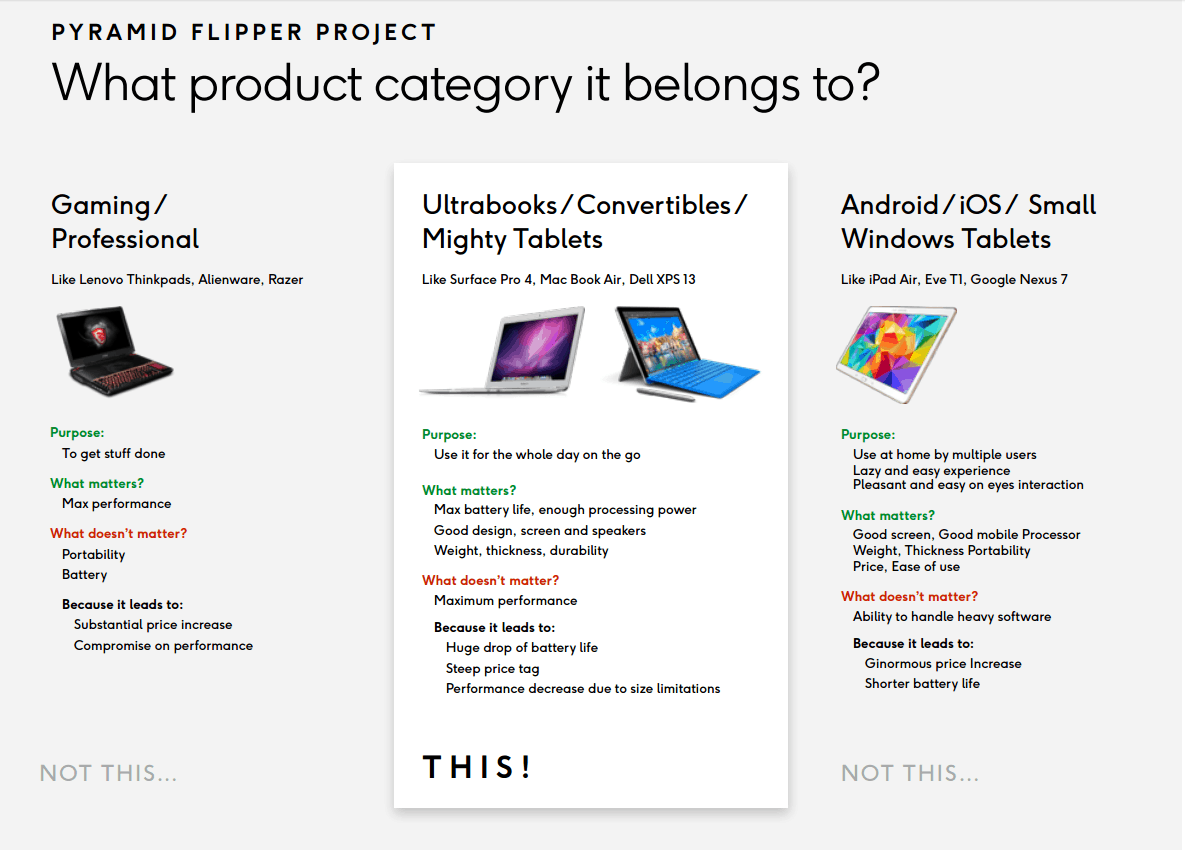
Usually, companies do copious amounts of market research, develop a product, and then put it on sale and measure its success by how many units are sold. The notion of crowd-sourcing changes all of that, by gaining the market’s approval of a product’s design anything is actually produced. Eve Technology is taking the concept a step further, by using crowd-sourcing to actually design the product itself.

Eve Pyramid Flipper Project
Eve Pyramid Flipper project.

Here’s how the company describes things:

Pyramid flipper is the first device that is being created by end users from day one*. This Windows 10 machine is build to create the whole new edge to your productivity. All day battery life, portability of a tablet and enough power to handle work just as your laptop would. Stay ahead of others by being able to DO stuff in a whole new way!

*You read it right! It is being developed as you read this sentence! Join our community and help us create a device Windows ecosystem needs so much!

Members of the Eve Community can provide constant feedback on the project’s development and suggest features, marketing materials, and more at the community site. Presumably, all of the provided feedback is being used to guide the Pyramid Flipper’s development. In addition, specific elements of the end product will be available for voting; currently the machine’s display is on tap. Every click takes you to a new section of the community where you can provide feedback and comment on other ideas.

The company has some experience with this sort of project, having already developed the Eve T1, a small Windows tablet created by “a small team of passionate tech enthusiasts.” The Pyramid Flipper project is clearly more ambitious, and it would be interesting to see if they can succeed in the real cat-herding process that it could become.

Eve T1 Tablet
Eve T1 tablet.

Head on over to the community site and put in your two cents worth, if you’d like to help guide the development of a Windows 10 convertible. If you don’t take part, then you won’t be able to complain about the end product, whatever it may end up becoming.

Former Windows architect designs open source alternative to PowerPoint called Swipe

Former Windows 95 and 98 lead architect, Satoshi Nakajima, has resurfaced with a new productivity project that could challenge the likes of Microsoft’s PowerPoint and Sway, Apple’s Keynote, and Google’s Slide software. Nakajima’s new project, dubbed Swipe, comes by way of an open source initiative to enable users to build the ever coveted media-rich presentation.

According to a report from GeekWire, a recent Swipe announcement explains, “users can build media-rich documents with animations, video, vector graphics and audio via any touch-enabled device.” Furthermore, Nakajima appears set to demo and debut the project at the Silicon Valley Comic-con that’s scheduled for March 2016.

Since departing from Microsoft some time ago, Nakajima has been busy with his duties at UIEvolution, where he currently resides as interim CEO for the time being. UIEvolution specializes in customized software development for clients in hospitality, automotive and retail. Perhaps in relation to his position, UIEvolution will be the first company to adopt and deploy the newly open sourced project. UIEvolution’s adoption of Swipe would expose the cloud-based service to some 18,000 screens across hotel and cruise ships.

Swipe’s current advantage over more established solutions such as PowerPoint, Keynote, Slides and even Sway, is that it was built from the ground up with touch in mind. Additionally, being an open-source platform allows users to build the Swipe engine document viewer into other projects, essentially jump-starting cross-device interoperability.

Swipe’s potential could be ever expanding once the open source community gets it hands on the code to build out various user-focused experiences such as step by step audio and visual interactive presentations that replace the traditionally one-sided PowerPoint experiences.

Fortunately, Microsoft appears to be in the midst of redefining its presentation suite as it builds out more functionality into the cloud-connected Sway software that sounds similar in functionality to Swipe. For those interested, Swipe can be demoed on the iPhone as an app in the Apps Store or by accessing the open source code at the GitHub repository.

‎Swipe Engine
‎Swipe Engine
Developer:
Satoshi Nakajima
Price:
Free

Delve is getting a new people profiling experience in Office 365

Microsoft has just announced an update to the Office 365 people profile experience under Delve. The update which will be delivered to those on Office 365 Enterprise E1–E5 and Office 365 Business Essential and Premium subscription plans, consolidates the profile and activity pages under Delve. This means it will be to easier for you to discover relevant content, connect with your colleagues and find experts inside your organization.

As part of the update, a new profile page will now give you a place to learn more about your colleagues. Amongst the content that you already have permission to see, contact information, a photo, who they work for, and a summary of their experience and expertise will all now appear on profile pages in Delve. You can now also start a Skype chat, or even email a colleague right from the profile page.

Delve’s profile page can now also be customized for a more personal look. You can upload a profile photo, choose a unique background, or edit your expertise. You can also even quickly and easily get back to your documents, as well as see documents your most frequent contacts are working on.

The new profile experience will roll out to First Release tenants over the next several weeks, and it is expected to spread out to all eligible Office 365 customers by the second quarter of 2016. The update almost certainly makes Delve more useful, and intuitive. It will also keep you in the know more than ever thanks to these new features.

Here’s the ‘23.5 billion’ reason Microsoft is doubling down on gaming

If you have been following us closely, you may have noticed the abundance of gaming-related news from Microsoft as of late. Microsoft is certainly putting more effort into game market, and some new statistics on the industry from VentureBeat may explains why (hint: it’s all about the money).

Gaming is big

The statistics were announced by the Entertainment Software Association (ESA), who found that the U.S gaming industry made $23.5 billion in revenue 2015 – that includes console sales, game sales, and all other digital products – a $1.1 billion increase from 2014’s revenue of $22.4 billion. Sales of software alone, which consists of both physical and digital games, mobile games, subscriptions, and DLCs, made $16.5 billion last year, a 7 percent increase from 2014. The growth in revenue is attributed to great sales of consoles, mobile games and AAA games.

With such impressive numbers and healthy growth, it is no wonder that gaming is considered more and more as a lucrative market, even for companies traditionally not too involved in the industry: indeed, Apple focuses on gaming as a feature for its TV streaming box and iOS mobile devices, and Google is doing the same with Android.

Microsoft’s trump card: Xbox integration

Unlike its competitors however, Microsoft has always been a big player in the gaming space, at least ever since the introduction of its own gaming console brand, the Xbox, which through 3 generations has become the second most popular console on the market. Windows’s dominance as the definite operating system of the world has also given it much leverage in the gaming department when compare to alternatives like Mac OSX or Linux, the latter of which has only received recent attention with Valve’s push through Steam.

Despite this long history with gaming, Microsoft has botched most of its attempt at dominating the gaming market, even on its own OS. The Games for Windows program was a complete failure, that got decimated by Steam’s rise in popularity and power. Despite many attempts, Windows 8 Store and its phone counterparts never got the traction with small game developers like its mobile competitors, one of the main reason for their paltry user base. Even on Xbox, after championing in the last-gen console race with the Xbox 360, Microsoft caused some PR disasters with the Xbox One, with those effects still plaguing console sales today.

Windows 10 signifies a new age for Microsoft however, one where they finally realize their vision of unifying all device form factors under one platform, and along with it, Microsoft seem to have found their niche. With the Xbox One getting ever closer to a PC in architecture, and soon to run Windows 10, Microsoft is at the unique position where they can utilize the already-venerable repertoire of the Xbox brand to provide blockbuster gaming experiences on the Windows App Store for any Windows 10 PC with cross-link to the Xbox – something none of its competitors have been able to achieve (even Android’s most high-end gaming experience is restricted to a sorry number of specific Nvidia hardware).

Sure enough, the company seem to have been doubling down on this special capability: exclusives after exclusives makes the jump from Xbox to the Windows Store and stays there as exclusives for Windows 10, starting with critically-acclaimed Rise of the Tomb Raider, followed by Quantum Break, and many more in the future. Not just AAA experiences from the Xbox, even a high-quality multi-platform game has tested the water.

For some, the future of gaming is about immersive experiences provided by virtual reality technology, the likes of Oculus Rift and Sony VR. While Microsoft’s HoloLens is not as immersive, utilizing augmented reality to blend technology with the real world instead, Microsoft demonstrated its gaming capabilities, and also how it can function as a supplement to a gaming platform. Given how the HoloLens will also run Windows 10, a three way integration for the ultimate gaming experience is not out of the questions.

A bright future

More games need to be coming before we can fully assess the result of Microsoft’s strategy; nevertheless, the potential is enormous, especially if Microsoft can complete the Xbox-Windows integration. It will be interesting to see how the Windows Store will grow as a gaming platform in the future.


Microsoft teams up with Singapore in new Internet of Things project

Singapore aims to use the power of the Internet of Things (IoT) to transform various industries; from healthcare to business. Singapore strives to be the first “Smart Nation” in the world. A “Smart Nation” is a country that uses technologies like the cloud, IoT, and analytics to solve some of the biggest societal problems in government, academics, and businesses.

Singapore is using IoT to solve one of its biggest problems; traffic management. With new cars being built with more sensors than ever before, along with the amount of data that traffic cameras and traffic lights gather, that’s a lot of info that needs to be utilized. Microsoft knows that a traffic analytic hub to analyze all of that data and turn the information into real time insights that can provide better plans to improve traffic in densely populated areas in-and-around Singapore.

Starting in 2011, the Land Transport Authority of Singapore (LTA) used its vast amount of land transport data on Microsoft’s Azure platform to provide real time insights to improve transportation. LTA has made their traffic information available to the public in a “Data Mall,” to help developers build mobile apps that draw from LTA’s traffic data.

Microsoft helped to inspire LTA’s initiative to utilize Singapore’s young population to create innovative solutions to some of the country’s most complex urban issues. Singapore has gained the assistance of over 50 IT partnerships to help public and private businesses use the power of IoT to analyze and use their company data to help grow and reinterpret the way they do business.

Jean-Philippe Courtois, President of Microsoft International, sees an important role that IoT plays in another area ripe for transformation,  healthcare across the globe:

“As the average age of our global population increases, healthcare is another area that could reap significant benefits from IoT. I’ve been impressed by the leaps and bounds healthcare has taken thanks to the help of technology. I expect to see this continue in 2016, with big data, analytics, and AI helping us to better understand complex health problems, and wearables (Microsoft Band) allowing individuals to effectively track their health and well being beyond their heart rate. Sensors and devices on individuals can also provide up-to-date information on vital signs, and could help healthcare professionals to monitor outpatients remotely. Being able to gather larger data sets could also provide some hints as to the cause of diseases, enabling doctors and scientists to diagnose conditions earlier and, perhaps one day, identify a possible cure.”

While Singapore is the first Smart Nation, it should not be the only one harnessing the power of IoT. Microsoft’s CityNext initiative is aimed at helping cities become smarter by improving its residents’ lives.

Singapore shouldn’t be the only country taking advantage of the benefits of IoT. Microsoft aims to partner with more countries and businesses to make IoT play a vital role throughout the world.

Layers of Fear, Mitsurugi Kamui Hikae bring horror, Japanese schoolgirls to Xbox One

Two new indie efforts are coming to the Xbox One, and from the looks of it, they are bringing some different tastes to gamers tired of AAA games and the usual retro indie.

The first is Mitsurugi Kamui Hikae, from Japanese developer ZENITH BLUE. A 3-D pure hack-and-slash, the game stars Japanese high school student Misa –  the titular “Mitsurugi”, or katana-weilding demon-slaying swordswoman – fighting against waves of humanoid demons while chasing and occasionally clashing with another high school girl and main antagonist Suzuka.

The game is a throwback to the Japanese arcade game philosophy: heavily skill-based, levelling system and scarcely any story. Using Misa’s overwhelming sword techniques, players will slice, dice and dodge waves after wave of enemies to gather points that can be spent to upgrade the character’s abilities, allowing for even more slicing and dicing, and so on.

The key draw for the game is in its satisfying combat system and fancy move sets; it is also rather gory for such cutesy main characters (you can decapitate enemies, who will go down in fountains of gushing blood). While it may get repetitive after prolonged play, for the price of $11.99, Mitsurugi Kamui Hikae should still be a good time-waster of an action game, and a nice break from other brain-heavy titles.

Get Mitsurugi Kamui Hikae for the Xbox One

The second title is Layers of Fear, from developer Bloober Team. Layers of Fear is a first-person horror game with a unique, psychology-inspired setting. The player takes control of a mad painter as he drive into his insane mind palace resembling a Victorian-era mansion filled with surreal artworks, strange visions and manifestation of his fears, in order to uncover the secrets of his madness, and finish his ultimate Masterpiece of Fear. The game is often compared with P.T., another psychedelic horror game that served as a tease for the ill-fated new Silent Hill.

The gameplay is typical of narrative-driven walking simulator, and is mostly about experiencing the creepy atmosphere, horrifying visuals, unique settings and unsettling storyline. Interestingly, the developer has also provided a demo version of the game for free – atypical for a game of this genre, seeing how the allure of the story is usually lost after a play-through. Those who like the game enough can get the full version for $12.99. With raving reviews and overwhelming positive reactions on Steam, the game looks set to be a horrifying experience you won’t soon forget.

Get Layers of Fear for the Xbox One.