India may soon get the Surface, "the perfect device to showcase Windows 10"

India will soon get the Surface devices, maybe around the launch of Windows 10

This year at the Worldwide Partner Conference this year Microsoft didn’t share a whole lot of details concerning new products, but Surface did get some news concerning its retail channels. Currently the Surface can only be purchased directly from Microsoft or from a couple hundred retail partners like Best Buy, Fry’s, Costco, Walmart, but soon there will be a few thousand resellers of the device. Opening up the retail channels also opens the device to more markets.

Neowin picked up on The Times of India interview with Vineet Durani, Director – Windows Business Group at Microsoft (India) who said Surface would be coming to India, without much further detail. However Durani did say,

“We feel there’s a market in India for all devices including high-end convertibles and the Surface is the perfect device to showcase Windows 10, which adapts to 2-in-1s easily with seamless switching between PC and tablet UIs,”

This statement alludes to Microsoft releasing the Surface after or on the launch of Windows 10 on July 29th. Microsoft has already commented they will be selling Surface devices with Windows 10 preloaded and that may also coincide with when devices will come to their new retail channels and new markets like India. Hopefully this will all become more clear after July 29th when Windows 10 has launched and there is less mystery surrounding the launch devices.

Previously Microsoft didn’t target India because of “the price sensitive nature of the market” and the Surface is a premium device with a big price tag. In these markets the Surface could be hurt by the pricey extras which most users would want such as the keyboard and pen. Instead of releasing a flop Microsoft had previously taken a pass. Now with a couple versions at different price points Microsoft must see the Indian market as more viable.

Microsoft's Bing partnerships could be hurting Google more than direct competition

Image Credit: Bing Blog

As Microsoft makes its departure from display advertising, US paid search numbers are rolling in for the quarter. According to a Digital Marketing report published by the firm Merkle RKG and gathered by Search Engine Land, search ad spend growth slowed in the US. CPC (cost-per-click) growth for the quarter was hindered by advertisers wising up and maintaining more efficient search programs rather than exhibiting more traditional spending habits. On average, clicks rose a mere 3% in the quarter, which is a 14% drop from last years Q2 results. On the other hand, CPC’s did show a rise of 11% for the quarter.

As tablet news and sales have begun to slow, predictably so has the click return for those devices. Tablet clicks accounted for a meager 3% increase in Q2 of this year, but ultimately clicks are down 14%  year over year. Once again though, CPC’s managed to show an increase of 11% year over year in Q2. On the plus side, phone revenue shows signs of improvement and the trend points to continued growth. Last year, the RPC (revenue-per-click) for phone revenues were 66% lower than that of desktops. This year however, the gap has shrunken to 58% revenue-per-click.

As far as traffic for the large search engines are concerned, Google’s growth is slowing but its Brand CPC’s are offsetting the decline. According to the Merkle Report, “Google’s share of the paid search market among Merkle RKG clients fell from the previous year but remained steady from Q1. The year-over-year decline is in large part to Yahoo’s deal with Firefox to be the default search engine. The report found that Google lost roughly 2 percent of overall click share as a result of the deal.”

Image Credit: Merkle RKG

Bing, on the other hand, saw increases in Search ad spend to the tune of a 27%. However, the search engine’s CPC stumbled along the way. Bing CPC’s were only up 2% in year over year reporting. Other areas of note for Bing came from click volume. While Bing’s growth slowed, it managed a 24% increase on the back of the recent Yahoo and Firefox deal. Specifically, 10 points of the click volume growth Bing experienced could be traced back to the Firefox deal. Merkle notes that the recent deal between Yahoo and Firefox may have played a role in the small declines Google experienced in the paid search market. In many ways, Bing continues to benefit from the newly formed Yahoo and Firefox deal.

The Firefox and Yahoo deal presented a new platform for Yahoo to utilize called Gemini. Gemini was originally designed to serve only mobile search ads, but after some negotiations with Microsoft, a new deal was struck. Now Gemini can serve ads to the desktop as well.The new platform months into its launch now accounts for 15% of the total Yahoo and Bing consortium of search as clicks on all devices. 

Image Credit: Merkle RKG

Microsoft’s decisions that resulted in the company stepping away from display advertising, renegotiated terms with Yahoo, as well as a new deal with AOL, could have Bing reaping rewards from a multitude of avenues. The Merkle report explains, “For Merkle RKG clients, Google search partners generated 8 percent of Google’s overall search ad clicks, and partner AOL generated 1 percent of those clicks in Q2 2015. In a 10-year deal signed last month, Bing will begin serving search results and ads on AOL in the beginning of 2016 .” Microsoft has chosen to stop going head to head with Google in various search aspects and would now rather support other companies doing so.

Microsoft’s new approach is already having some effect on Google’s numbers, but we’ll have to wait and see if this quarter is an indirect anomaly or the start of a direct trend.

Two lucky fans in South Africa can be a part of an invite-only Windows 10 launch celebration

Image Credit: ???

July has been a busy month for Microsoft. Amid more restructuring announcements that cost the jobs of over 7,800 employees as well various emails outlining strategic movements by Microsoft, the company is also pushing out, quite possibly, its most vital operating system release. As of July 29th, Microsoft will be releasing its pivotal Windows 10 upgrade. Over the past two years, Windows 10 has been reported as the culmination of an extensive range of philosophical, structural and engineering changes that have been occurring within Microsoft.

Along with those changes, comes a change in how Microsoft plans to release and celebrate Windows 10’s public arrival. Previous iterations of Windows released alongside massive marketing efforts, flashy events and arguably poor video spots for the OS. While the details of how Microsoft plans to celebrate Windows 10 are a bit sparse now, the company has gone on record explaining that this release will be different.

Microsoft is moving away from ‘fancy launch spectacles’ to instead, focus on Windows fans. Specifically, this is what the company has to say:

“From the beginning, Windows 10 has been different – built alongside our fans, delivered as a service and offered as a free upgrade. Our approach to launch is also different and in support of a more aspirational goal, inspired by Windows 10. You won’t see fancy launch spectacles from Windows – our broader aspiration is to celebrate and empower those who upgrade the world every day. Our events are designed to celebrate our fans. They will offer hands-on opportunities, experiential demo’s, entertainment and opportunities to meet the Windows team. These events will be invite-only, designed for our fans in each market.”

Image Credit: Nokia

Recently, Microsoft published on its Microsoft South Africa Facebook page some details and disclaimers about the ‘how’s’ and ‘what’s’ of an invite-only celebration for the Windows 10 launch. As of two days ago, Windows 10 fans in South Africa could sign up to be a part of a contest that will grant them invite status to their local Microsoft Windows 10 launch. The contest runs from July 15th until 12 am (local time) on July 25, 2015.

“To enter the Contest, individuals must participate by submitting a voice recording, text post or image of their favorite Windows moment via Twitter or Facebook with the competition hashtag #Windows10.  Individuals who submit their favorite Windows moment during the stipulated competition period with the stipulated hashtag on Twitter or Facebook will be eligible to win a prize.”

The prizes for the lucky contestant winners include access to the private Windows 10 launch event in Johannesburg on July 29th and or tickets to Rage Expo for later this year.

There are other disclaimers and notations worthy of reading. Interested parties are encouraged to visit the Facebook page for details. As we reported earlier, unlike previous releases, not every Microsoft Store in every country will be participating in the exclusive release celebration. Participating cities include Sydney, Tokyo, Singapore, Beijing, New Delhi, Dubai, Nairobi, Berlin, Madrid, London Sao Paulo, New York and Johannesburg. While those are the highlighted cities for the invite-only celebration, it does not exclude the possibility of local Microsoft Store participation. News also surfaced a few days ago of Microsoft Stores supporting the Windows 10 launch with free in-store upgrades. No word yet if any other location will be allowing fans a chance to be a part of the private celebrations — but we’ll be keeping an eye and we will let you know when and where you can sign up.

Pre-order Windows 10 on USB drive from Amazon, available August 16th

Pre-order Windows 10 on USB drive from Amazon, available August 16th

The release of Windows 10 on July 29 is getting real close, and will be a free upgrade to users of Windows 7 and Windows 8.1. However, not everyone qualifies for the free upgrade offer. 

For users who do not have a valid copy of Windows 7 or 8.1 or prefer to do a fresh install of Windows 10, Microsoft has them covered. The good news is that Microsoft has put flash drives with Windows 10 for pre-order on Amazon. The flash drives come available in Windows 10 Home for $119 as well as the Pro edition for $199 if you prefer.

The USB sticks won’t be available until August 16, though. Nevertheless, you can still pre-order them by clicking one of the links below. 

Will you be pre-ordering a Windows 10 flash drive? Let us know what you’ll be doing in the comments below. 

That new unified Apps on Windows web experience? It's not the new "Windows Store"

Windows Store confusion

Earlier today, we posted on a report from Windows Central that Microsoft had released a new unified “Apps on Windows” experience on the web, to replace the separate Windows and Windows Phone web experiences. In that post, we referred to Microsoft launching a “universal apps store”, in this case meaning both Windows and Windows Phone apps. This however, is not the same as the upcoming Windows Store, which has not been released yet and will feature “universal Windows apps”, meaning apps that run on both Windows and Windows Phone (and Xbox and HoloLens and etc.)

A Microsoft spokesperson reached out to us and offered this clarification:

“The Apps on Windows site lets you browse both Windows and Windows Phone apps, but is not the new unified Windows Store. We’ll share more on the Windows Store soon.”

You can still now (or soon) get both Windows and Windows Phone apps from a single place, at https://www.microsoft.com/en-us/store/apps/, but the “Windows Store” is still yet to come.

Hope that clears up any confusion.

Microsoft acquires FieldOne, for Dynamics CRM

Microsoft acquires FieldOne, for Dynamics CRM

Today, Microsoft announced the acquisition of FieldOne Systems LCC, makers of the cloud based field services management software FieldOne.

In an announcement by Bob Stutz, Corporate Vice President of Microsoft Dynamics CRM, today’s acquisition is described as a “great fit” for Dynamics CRM to help expand its customer service capabilities. The strengths of FieldOne that Microsoft hopes will bolster Dynamics, their Customer Relations Management software platform which competes with other platforms such as Salesforce.com, are described as:

“Their industry-leading solution specializes in delivering a full set of capabilities that include work order management, automated scheduling, asset contract, inventory and procurement management, workflow capabilities and mobile collaboration – providing enterprises with a comprehensive modern field service solution. This gives companies the ability to do things such as adjusting routing on the fly and delivering service arrival estimate times within a smaller window, which is essential for more personal customer engagement.”

In today’s announcement, Stutz also says that the purchase of FieldOne is part of Microsoft’s investment in delivering true systems of intelligence. Stutz goes on to say that Microsoft will help companies leverage predictive field services through a combination of FieldOne, Azure IoT, and Cortana Analytics; offering a solution that moves away from a reactive field service model of just fixing things when it breaks, to a predictive model.

If more predictive intelligence is brought to Dynamics in addition to this acquisition, Dynamics CRM would gain abilities greater than the sum of its parts, potentially differentiating the CRM solution from its competitors.

Office 365 integration will help the Air Force and Department of Defense save money

Image Credit: Microsoft

Office 365’s cloud connected nature has seen Microsoft’s productivity suite expand to various usage scenarios beyond previous iterations of Office. Schools are utilizing tools such as OneNote and OneDrive in much broader communicative use-cases between teachers and students. Enterprise customers are using the cloud sync options to foster better collaborations while keeping the flow of information up to the minute. Office 365’s cloud first approach enables much-needed scalability for uses that range from a single person licenses to government contract deployments.

Over the past year, we’ve been reporting on the broad swath of success stories piling up at Office 365’s adoption doorstep. A recent agreement between the U.S. Air Force and the Defense Logistics Agency (DLA) will add yet another story of Office 365 adoption and deployment to a quickly growing list. The U.S. Air Force has entered into a partnership with the DLA to award more than 100,000 seats of the Department of Defense dedicated version of Microsoft Office 365 to Microsoft, Dell and General Dynamics.

Image Credit: NORAD

According to Microsoft senior director Leigh Madden, this agreement signals one of the largest commercial cloud contracts the DoD has issued in its history. Leigh has specialized insights into how the contract will specifically benefit the parties involved, as he heads up Microsoft’s U.S. Air Force business unit. The Department of Defense is looking to Office 365 to help the Air Force and DLA significantly reduce cost over the next three years. According to Leigh, using Office 365 is “helping the agency communicate more easily across active, civilian, and reserve personnel and move toward a consolidated mobile and messaging platform.” The contract will take effect during the next government fiscal year and will enable the Air Force access to secure email, calendaring, Office Web Applications, Skype for Business as well as other collaborative tools.

The use of Office 365 was under careful consideration and ultimately chosen as it aligns with the Air Force’s commitment to building a successful DoD Enterprise Email initiative. In addition to further encouraging the Air Forces initiative, Office 365 will also be supporting the DoD’s unique security requirements and best practices.

The recent DoD contract is yet another example of Microsoft’s cloud-first and secure Office suite meeting the ever-expanding demands of users big and small.

HP is shipping their new Windows 10 PCs a day before Dell

https://www.onmsft.com/wp-content/uploads/oldwinbetafiles/news/hp_2.jpg

The race is on to have as many PCs with Windows 10 pre-installed available for customers to buy as close to the new operating system’s 29th of July launch date as possible. Last month, Dell announced that customers could pre-order devices from them and they would ship on the 29th and if customers selected same day shipping, they could get their computers delivered on the 30th (which obviously isn’t “same day” but is still pretty fast).

Today, HP has revealed their strategy for the launch of Windows 10 and they will begin shipping pre-orders for their computers on the 28th of July and will offer free next day shipping to allow customers to get their devices on launch day.

Naturally, you don’t need to purchase a new computer to get Windows 10. Microsoft’s new operating system will be a free update on launch day for all current Windows 7, 8 and 8.1 device owners. The majority of the population will simply be updating their current computer on the 29th of July and there really are very few reasons not to buy a new computer before then, enjoy its current operating system until launch and then update to Windows 10.

Due to the availability of Windows 10 as a free upgrade on most current devices, a new computer having Windows 10 pre-installed isn’t a selling point in and of itself. Where things get interesting is in regards to the several devices that have been specifically designed to work with the Windows 10 operating system. Several of Dell’s computers for example incorporate the use of specialized cameras and microphones to work with the new Microsoft Hello and Cortana features in Windows 10 and both Dell and HP have been developing all of their future products with Windows 10 in mind.                                                                     

Will you be buying new hardware for the launch of Windows 10 or will you just update your existing device? Let us know in the comments below.

Poll: Will you be upgrading to Windows 10?

Poll for the podcast: Will you be upgrading to Windows 10?

This week we have a very special poll for the podcast because it is written by one of the co-founders of Straw, Ben Rudolph. Straw is the polling platform that we use to power our polls and helps users get feedback from groups large and small. Ben is also the Worldwide Retail Sales Evangelism Director at Microsoft and is this week’s guest on the WinBeta Podcast.

You can watch this week’s episode live at 3PM EDT on Friday or check it out over the weekend on YouTube, SoundCloud, or your favorite podcast app.

With build 10240 (which is being reported as the RTM build) being released to insiders and the July 29 release to the public just around the corner, there’s plenty to discuss about the Windows 10 rollout. Please vote to share if you’ll be upgrading and discuss your reasoning in the comments below.

Problems with Windows 10 Mobile Technical Preview? Here’s a solution

Problems with Windows 10 Mobile Technical Preview? Here's a solution

As an average Joe Lumia Icon owner, I waited for what seemed like forever just to get the Lumia Cyan update on Verizon. Instead, Verizon chose to bypass Lumia Cyan altogether and release Lumia Denim instead. Once I got Lumia Denim, more and more people online start chatting up about what would soon become known as Windows 10 Mobile previews. Even when Windows 10 Mobile was set to get its first build, I thought, “Maybe they’ll include the Lumia Icon this time.” Nope.

Finally, when I was able to update to the first Windows 10 Mobile build 10080 for the Lumia Icon, I was excited to finally put it on my Icon. Now I know many of you are going to say, “you’re not supposed to use it on your daily phone, moron. Microsoft even says so.” I didn’t get an extra computer to test out Windows 10 Technical Preview, so I wasn’t going to buy another Windows Phone to test out Windows 10 Mobile Technical Preview either. So I threw caution to the wind and upgraded my Lumia Icon to Windows 10 Mobile Build 10080.

Problems with Windows 10 Mobile Technical Preview? Here's a solution

Needless to say, I found build 10080 extremely buggy and entirely unusable on my Icon. So, I accepted defeat and rolled back my Icon back to Windows Phone 8.1 with the Windows Phone Recovery Tool. I assumed there would be a future Windows 10 Mobile build that would be more stable. So, I waited, and waited. I dealt with the same problems with builds 10136 and 10149 on my Icon, so I found myself trying to upgrade again and again, only to then roll back to Windows Phone 8.1.

On my birthday, July 10, Windows 10 Mobile Build 10166 was released. From the YouTube videos I viewed online (like the one below), it seemed like build 10166 was smoother and faster than previous builds and I was determined to get the Windows 10 Mobile 10166 build on my Lumia. I grew sick and tired of seeing other people online showing off the latest Windows 10 Mobile features on their Lumia while I stood on the sidelines as a spectator. So after hours of tinkering, I came up with my own method of putting a clean install of Windows 10 Mobile on my Lumia:

  • 1. Back up all your data, either through Backup Assistant Plus through Verizon (in my case, or your preferred backup service cellular provider) and OneDrive, just to be safe.
  • 2. Hard reset your Windows Phone through the Windows Phone Recovery Tool to completely wipe your Windows Phone.
  • 3. After the hard reset, DO NOT restore from a previous backup, instead set it up as a new phone (last option).
  • 4. Download the Windows Insider app for Windows Phone.
  • 5. Open Windows Insider app and select Fast Ring or Slow Ring for Insiders based on your preference (Fast Ring is best).
  • 6. When your Windows Phone reboots, go to Settings>Phone Update, then download and install Windows Phone 8.1 Update 2 (if it is available for your Windows Phone).
  • 7. After your phone reboots, go back to Phone Update to download the latest Windows 10 Mobile Technical Preview Build.
  • 8. Once the latest Windows 10 Technical Preview Build is installed, go to Settings>System>About and factory reset your Windows Phone again.
  • 9. Setup your Windows Phone as normal and restore your apps through the Windows Store.

Please note: Not all of your Windows Phone 8.1 apps will survive the migration, but you’ll get a cleaner Windows 10 Mobile experience with fewer bugs experienced. I tried installing the Windows 8.1 Update 2 first before downloading the Windows Insider app and ran into a myriad of problems getting my Lumia actually to run Windows 10 Mobile consistently and bug–free. Sometimes, my Lumia would constantly reset itself for hours even though I followed all the steps that even Microsoft posts.

Microsoft releases new open source SDK for integrating Facebook into Windows apps

Facebook Login

Microsoft has always seen the value of Facebook. Even from the inception of the social media giant in 2007, Microsoft invested $240 million in the company. Lately, there have been some bumps in their relationship with Facebook changing their Facebook Connect Graph API, resulting in Facebook contacts not integrating with Microsoft’s People app. However, in early June, they announced a partnership on Oculus Rift. With Windows 10 supporting this popular headset, Microsoft now has a firm foothold in VR; which bodes well for the future of the company’s latest OS.

Today, Microsoft has announced the latest way for Windows app developers to integrate Facebook functionality into their apps. This new open source SDK works with all universal apps on Windows Phone 8.1, Windows 8.1 and Windows 10. The new SDK will enable developers to utilize Facebook features such as Likes, Facebook Authorization, Graph and Facebook Feeds.

The release of the SDK is a fairly big deal because it allows developers to tap easily into the Facebook community. If an app accepts Facebook Authorization, for example, that app becomes more attractive for a user to download and use it. When developers see a large accessible user base, they make more apps. This should translates into more apps in the Windows Stores.

Microsoft Stores promote their own 1 Day sale – great deals on laptops, more

Microsoft Stores promote their own 1 Day sale - great deals on laptops, more

Amazon.com is trying to create a new tradition by offering “more deals than Black Friday” In an event they’re calling Amazon Prime Day, taking place today, July 15th. A number of other retailers, including Walmart, have jumped on the bandwagon to promote their own 1 day sales, trying to counter Amazon’s marketing coup.  Not to be left out, Microsoft Stores has joined the fray and is offering a set of 1 day only deals of its own, including up to 53% off on laptops, up to 80% off on some headphones and accessories, up to 70% off on Xbox games, and deals on phones, monitors, and more.

In addition, Microsoft Stores are offering free two day shipping, with no minimum order required, so it’s a great time to take advantage of the snowball effect that Amazon has created and get yourself some new tech goodies just in time for Windows 10.

Windows 10 hits RTM milestone ahead of July 29th launch

Windows 10

The Verge is reporting that Windows 10 has reached RTM ahead of its July 29th launch, and WinBeta is able to confirm that this has indeed happened. In fact, we heard that Windows 10 had been confirmed as hitting RTM on Sunday. The RTM is what Microsoft considers a ready product to begin distributing to the public, and has already began distributing the RTM build to a number of partners and OEMs. Windows Insiders are set to receive the Windows 10 RTM on July 29th, just as it starts rolling out to the public.

Windows 10 has been in development for over a year now, which makes Windows 10’s development the shortest ever development cycle for a major Windows version. The typical development cycle of a major version of Windows is about 3 years, so for Microsoft to get Windows 10 out to the public after only 1 year of development is impressive. Admittedly, a number of features which were slated for RTM are now coming in future updates, but that’s not so bad.

For those interested, the RTM build is 10240. We have a screenshot gallery already up if you want to take a look. We’ll also have a video soon.

Windows 10 will launch on July 29th for free to anyone running Windows 7 and Windows 8.1. Those looking to purchase a new device with Windows 10 should start seeing those devices on July 29th too.

Screenshot Gallery: Windows 10 RTM Build 10240

Windows 10

Windows 10 is set to launch on July 29th, however the final build is already being distributed to Microsoft OEM’s and Partners in preparation of launch day. Of course, as the build get’s into more and more hands outside of Microsoft, screenshots begin to leak. WinBeta has obtained screenshots of what we believe is the Windows 10 RTM.

Although Microsoft has not yet made an official announcement regarding the RTM, build 10240 has passed all of Microsoft’s QA tests. It’s only a matter of time before the company announces that the RTM has been chosen. Until then however, check out these screenshots of build 10240, and let us know what you think below.

Windows 10

Windows 10

Windows 10

Windows 10

Windows 10

Windows 10

Microsoft Ends Support for Windows Server 2003

The support of Windows XP officially ended on April 8, 2014, and now, more than a year later Microsoft will shut down another Windows version. This time the company stopped supporting Windows Server 2003 on July 14th.
windows server 2003 win8apps
Windows Server 2003 was released on April 24, 2003, and now, twelve years after, Microsoft decided to officially end its support yesterday, on July 14th, as the company rolled out the latest batch of updates as a part of this month’s Patch Tuesday monthly cycle. After the update, users who are still using Windows Server 2003 may become vulnerable to various security attacks in case un-patched security holes are found in their system, because Microsoft won’t fix them anymore.

Microsoft will still provide support for Windows Server 2003, but for the specific price, just like it was the case with Windows XP. Company didn’t actually reveal how much the extended support will cost on a yearly basis, but we know that it cost approximately $200 in the first 12 months after end of support for each PC using Windows XP.

Although the support for Windows 2003 is now officially ended, a lot of companies still use it. For example, the study conducted by Dell showed us that more than 23 percent of businesses using this operating system for their servers said that they have absolutely no reason to upgrade, while 40 percent of businesses explained they will delay the upgrade process, because of application support requirements.

But decision to stick with Windows Server 2003 could be tricky for those who decide to do that. Because, as we said security of Windows Servers 2003 will be minimal now the support from Microsoft is officially over, so many believe that machines running this operating system will become the main target for hackers in the next few months.

Read Also: Windows 10 PCs to be Available in Retail Stores on Launch Day

Microsoft's fan-focused Windows 10 launch events will be invite-only

Microsoft's fan-focused events will be invite-only

Windows 10 launch is just around the corner — set to rock PCs across the globe starting July 29th. Earlier this week, Microsoft announced that it will hold fan-focused events special events in 13 cities around the world, including Sydney, Tokyo, Singapore, Beijing, New Delhi, Dubai, Nairobi, Berlin, Johannesburg, Madrid, London, São Paulo, and New York City, to celebrate the launch of the new operating system. 

The folks at Windows Central received a word from the Redmond-based company regarding the events which will take place on July 29th. It may disappoint some people, but these events will be invite-only. There’s no word on how the invites will be sent out, but Windows Insiders residing in areas near the above-mentioned location should keep an eye on their inboxes. The company’s spokesperson said:

“From the beginning, Windows 10 has been different – built alongside our fans, delivered as a service and offered as a free upgrade. Our approach to launch is also different and in support of a more aspirational goal, inspired by Windows 10. You won’t see fancy launch spectacles from Windows – our broader aspiration is to celebrate and empower those who upgrade the world every day. Our events are designed to celebrate our fans. They will offer hands-on opportunities, experiential demo’s, entertainment and opportunities to meet the Windows team. These events will be invite-only, designed for our fans in each market.”

Windows 10 is one of the most highly anticipated operating system releases from Microsoft, especially after Windows 8/8.1 which failed to gain as much user traction as Microsoft may have expected. Furthermore, the company initiated the Windows Insiders program to allow users to get the taste of how the new Windows 10 operating system works, and provide their valuable feedback to help the company polish the operating system before it’s official. The company announced lately that there are over five million Windows Insiders.

Stay tuned to WinBeta to get an extensive coverage of the new operating system once it’s available for users across the globe.

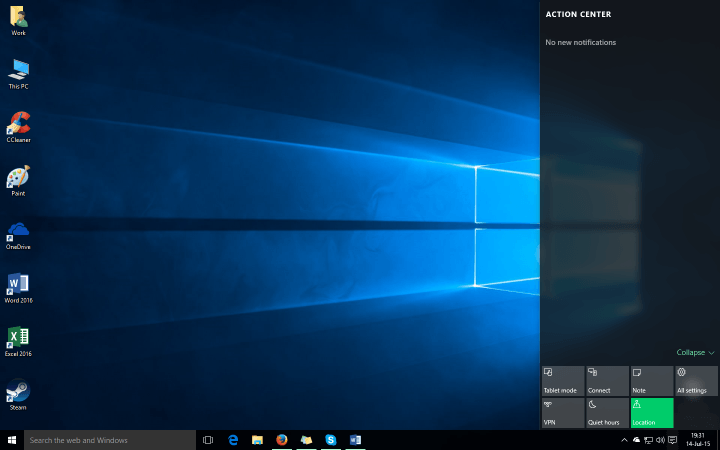
Action Center in Windows 10: How to Use It

The Action Center in Windows 10 shows your notifications and quick settings in one place. Here’s how to open it, use it, and customize it.

🧭 What Is the Action Center in Windows 10?

The Action Center is a slide-out panel on the right side of your screen. It shows:

  • App and system notifications (like email, updates, security alerts)
  • Quick settings (Wi-Fi, brightness, Bluetooth, Focus Assist, etc.)

📍 How to Open Action Center in Windows 10

Method 1: From the Taskbar

  • Click the speech bubble icon in the bottom-right corner of your screen (next to the clock)

Method 2: Keyboard Shortcut

  • Press Windows key + A to open the Action Center instantly

⚙️ What You Can Do in Action Center

1. View Notifications

  • See missed emails, app alerts, system messages
  • Click a notification to open it
  • Right-click to clear or disable future alerts from that app

2. Use Quick Settings

  • Toggle Wi-Fi, Bluetooth, Airplane Mode, Night Light, and more
  • Adjust brightness or project your screen
  • Expand the panel to see all available quick actions

3. Use Focus Assist

  • Mute notifications during work, gaming, or presentations
  • Set automatic rules for quiet hours

🛠️ How to Customize Action Center

  1. Go to Settings > System > Notifications & actions
  2. Click Edit your quick actions to rearrange or remove toggles
  3. Turn notifications on/off per app
  4. Enable Focus Assist modes based on your preference

❌ If Action Center Is Missing

Try this:

  • Restart Windows Explorer from Task Manager
  • Run System File Checker with sfc /scannow in Command Prompt
  • Make sure it’s enabled:
    Settings > Personalization > Taskbar > Turn system icons on or off

FAQs

Where is Action Center in Windows 10?
Click the chat bubble icon at the bottom right of the screen or press Win + A.

Can I turn off Action Center?
You can hide notifications and quick actions from Settings > Notifications.

Is Action Center available in Windows 11?
Windows 11 replaced it with Notification Center and Quick Settings as separate panels.

Microsoft kills 2 security bugs

Microsoft kills 2 security bugs

Two new security bugs have been squashed by Microsoft as part of Patch Tuesday, making computing safer for everyone.

The first involved a security flaw in the latest version of Internet Explorer 11 on Windows 7 and Windows 8.1 devices. One of the three companies credited with reporting this vulnerability was Vectra Networks, which discovered it through monitoring an online conversation between a security researcher and malware developer Hacker Team regarding the sale of information relating to the flaw.

The second security flaw was discovered by Google’s Project Zero and First Look Media’s Morgan Marquis-Boire who found it in a Hacking Team data dump. The flaw provides a, not so serious, escalation of privileges on a user’s computer but when combined with a separate Flash security flaw, allows for the installation of malware.

Both of these Windows security flaws have now been fixed and have been labelled, CVE-2015-2425 and CVE-2015-2387 by Microsoft respectively. Adobe has also fixed the Flash security bug in addition to several others earlier this week.

Is security something that concerns you? What steps do you take to stay safe?

Microsoft finalises termination of Barnes & Noble partnership with payment and account changes

Microsoft finalises termination of Barnes & Noble partnership with payment and account changes

Barnes & Noble terminated their relationship back in December 2014 and the book giant has now informed its customers that as a result of this termination, the use of Microsoft payment information will no longer work as of the 7th of August 2015 and MS Login will cease to function by the 30th of October 2015.

Barnes & Noble and NOOK users are encouraged to update their information ahead of those deadlines and, if needed, create a new BN.com account which can be linked to any existing Microsoft account information so users can maintain ownership of their purchased books and magazines.

Microsoft’s partnership with Barnes & Noble always had a lot of potential but very little became of it. The two companies even came to blows in a lawsuit related to patented technology. There was speculation that Microsoft would use Barnes & Noble to release their own, Windows branded, e-reader and Microsoft even created their own group called, “Xbox Music, Video, and Reading” but the “Reading” aspect was never really explored.

Would you have liked to see more come from the Barnes & Noble and Microsoft partnership? Share your shattered dreams in the comments below.

Microsoft is launching a fan-focused ad campaign celebration alongside Windows 10 release

#UpgradeYourWorld

Windows 10 is perhaps the biggest and most exciting future release of the Windows operating. It feels completely refreshed, and almost feels completely new. With that, Microsoft wants to create new Windows fans with the launch of a new advertising campaign happening on the day of release of Windows 10, which is expected on July 29. 

Microsoft is hosting several celebrations for its 5 million insiders in 13 cities all over the world including New York, London, Tokyo, Beijing, Singapore, and others. The events will give some Insiders the opportunity to test devices hands-on, as well as a possible opportunity to meet the the team behind Windows 10. 

The company is also starting some programs that will help new customers to upgrade to the new operating system. Retailers who are participating in this program include Best Buy, Walmart, Dixons, and others. 

Starting July 20 in the United States, and July 29 everywhere else, Microsoft will also launch a few video and television ads that promote Windows 10 and how it gives a “more human way to do” stuff. The advertisements will be promoting other things such as Windows Hello, which makes unlocking your device as quick and easy as a fingerprint or facial scan, and Microsoft Edge, the company’s brand new web browser. 

The theme of the campaign Microsoft is using is to “Upgrade Your World,” which is the company’s initiative to partner with over 100 nonprofits and help them to “upgrade the world”. In addition, the company will also be helping ten non-profits by investing a total of about $10 million to companies such as Code.org, CARE, Keep a Child Alive, Global Poverty Project, The Nature Conservancy, and a few others. 

For our readers who aren’t familiar with the release strategy of Windows 10, it’ll be a staggered release. Insiders will get it first, and it will eventually become available for OEMs and everyone else.

Microsoft Stores will update new devices to Windows 10 for free at launch

Microsoft Stores will update new devices to Windows 10 for free

Certainly there has been some confusion on whether there will be new Windows 10 PCs available for purchase when Windows 10 launches on July 29th. There is still a pre-order page on Dell’s website taking orders for their allegedly Windows 10-ready PCs. There are conflicting reports on whether Microsoft will have PC OEMs out there that will have Windows 10 PCs available for purchase. Microsoft is also not confirming any specific date as to when Windows 10 will become available on the Surface 3 or Surface Pro 3 tablets either.

Microsoft responded to an inquiry by Windows Central:

“As with any Windows launch, we are working quickly to stock shelves with Windows 10 devices, including Surface. While you can expect to see Surface devices running Windows 10 on shelves soon, Windows 8.1 devices still provide an exceptional experience and are easily upgraded to Windows 10 for free. Additionally, all Microsoft Stores have the ability to upgrade new devices to Windows 10 on site.”

While you may not be able to purchase a Windows 10-ready PC, you will likely be able to buy a Surface Pro 3 or Surface 3 and get an on-site upgrade at any Microsoft Store in North America when Windows 10 launches on July 29th. Nevertheless, Microsoft still doesn’t have a concrete date for when Windows 10 will be available on a Surface Pro 3 or Surface 3 without the need to upgrade from Windows 8.1. 

Dev Center receives new dashboard and crash reports for Windows apps

Dev Center receives new dashboard and crash reports for Windows apps

Microsoft is expanding the crash reporting function of Dev Center, allowing Windows and Windows Phone app developers to have quicker access to more detailed set of crash data.

The Dev Center’s new unified dashboard gives app developers more comprehensive crash information that was previously not available and sends the reports to the developer quicker. Before, only crash data associated with a .cab file (a compressed library of files) was shown. But now the new unified Dev Center shows crash data as soon as it is available regardless of whether there is a .cab file for it. The Dev Center also provides a number of new reports, some of which are:

  • Total Crashes and Events
  • Crash event breakdown – shows hangs, crashes, JavaScript exceptions and/or memory failures by OS version, device type, memory, storage or CPU speed
  • Failure by market – shows the failures by market
  • Failure log (shown below) – shows the logs that include a .cab file, and displays the stack trace directly in Dev Center, without the need of a .cab file. The percentage of events sampled, displayed above the failure log, indicates the percentage of events that had a .cab collected. Crashes reported by Windows 8.x and Windows Phone have less information than Windows 10 crashes, so reports show the OS version as ‘unknown.’
  • Data Export: Health: crashes and events: counts how many events happened of each type of failure
  • Data Export: Health: failure log: provides the details for the distinct types of failure, as well as the stack traces

Dev Center receives new dashboard and crash reports for Windows apps

The new reports can be found by going to ‘App overview’ in the Dev Center, in either the ‘Health’ or ‘Download Reports’ options under the ‘Analytics’ menu.

Today’s announcement also highlights a few steps a developer can take with the new Dev Center to start debugging apps and also asks the developer community to let Microsoft know what kind of additional information would be helpful for debugging apps.

Microsoft awarded patent for "hover sensitive" 3D Touch

Lumia 830 back

A patent has been granted to Microsoft for 3-D touch. We’ve known about Microsoft’s desire to use this technology for over a year but the panted was not granted until recently.

In the not so distant past, Microsoft had plans for a McLaren smartphone with 3-D touch that would let you hover over your screen to perform certain tasks and enter inputs. According to Windows Central, Microsoft still wants to utilize 3-D touch in a smartphone.

The official patent from the US Patent & Trademark Office is rather lengthy but begins with a brief description “Example apparatus and methods concern detecting an angle at which an object is interacting with a hover-sensitive input/output interface.”

The angle detection is likely a key factor here. Being able to identify which way a hand or finger is pointing would be useful, if not required, to make a 3-D touch phone unique. Of course, this is only a patent being granted that we’ve known about before. It could be for a new phone, it could be a patent leftover for the McLaren, or it could be for something else entirely.

Goldman Sachs claims Windows is holding Microsoft back

Goldman Sachs claims Windows is holding Microsoft back

Investment banking firm, Goldman Sachs, has reported that they believe Microsoft will report quarterly revenue of $US 22 billion, which is just under the $US 22.1 billion amount previously speculated.

Reasons for the lower profit estimation include the lack of enterprises using Windows 10 and earning Microsoft money through corporate contracts, the relatively low popularity of Windows Server 2003, and a reduced number of enterprises renewing their Enterprise License Agreements (ELAs).

Another factor mentioned for the low expectation was the PC market which had been a major source of income for the company during the last two decades but has now begun to shrink significantly. It wasn’t all bad though. Goldman Sachs reports that the cloud-based, Microsoft Office 365 shows particular promise and is doing fairly well, though admits its success isn’t great enough to make up for deficits in other areas.

It will be interesting to see how next year’s report reads as the launch of Windows 10 later this month is sure to shake up things up quite a bit in several sections of Microsoft’s business. Do you see Microsoft becoming more successful over the next year or do you expect the company’s profits to decline even more? Share your opinions with us in the comments.

Why Microsoft skipping this year's Tokyo Game Show is not that big of a deal

Why Microsoft skipping this year's Tokyo Game Show is not that big of a deal

Microsoft has confirmed that it won’t have an official presence at this year’s Tokyo Game Show though hints at the possibility of an alternate format for delivering news and information on the brand to its local consumers via another method or event to be announced at a later date.

While it’s well known that Microsoft’s Xbox One console is often outsold by Sony’s PlayStation 4 and Nintendo’s WiiU, any speculation that Microsoft’s absence from the Tokyo Game Show is a sign of the company’s withdrawal from Japan is premature. Despite being one of the largest gaming events in Japan, the Tokyo Game Show has nowhere near the equivalent popularity of North America’s E3. Also, companies that are remarkably successful in Japan, such as Nintendo, have never had an official presence at the show either, so involvement with the show shouldn’t be overanalysed as a sign of strength or weakness. There’s also the fact that this isn’t the first time Microsoft has refrained from appearing at the Tokyo Game Show in an official capacity and the company could always return for future shows (as they have done numerous times in the past).

It will be a shame to not see Microsoft at the Tokyo Game Show this year. Their 2014 presence was one of the strongest they’ve ever had and their section of the show floor became very popular with both the press and public visitors.

Tokyo Game Show is similar to E3 but is much smaller in scale. While E3’s main attraction is its massive press conferences where companies reveal new hardware, software and services, Tokyo Game Show features more technical presentations for developers and businessmen and women in the video game industry that offer very little in the way of breaking news and are more for making industry connections than advertising. Any news revealed at the show is often shown to press during one-on-one or small group interviews with game developers and is much more low-key than many Western presentations.

It should be noted that while Microsoft will not be having an official company presence at 2015’s Tokyo Game Show, there will still be plenty of Windows and Xbox One games on display due to the numerous game developers attending.

Microsoft recently reaffirmed their commitment to Japan during a small press conference last month which formally introduced Microsoft Japan’s new Vice President, Takuya Hirano. During his talk to the Japanese press, Takuya Hirano expressed his excitement for the upcoming launch of Windows 10 in Japan and also mentioned the Microsoft Band and HoloLens, both of which have yet to be given any specific launch window for the Japanese market.

What do you think about Microsoft’s strategy for the Xbox One in Japan? Do you think Microsoft taking a year off from the Tokyo Game Show was a bad decision or do you think they could find success in an alternate presentation model, much like Nintendo did with their internet presentations after their withdraw from E3 a few years back? Let us know in the comments below.

Microsoft will be attending IFA 2015 to show off new Windows 10 devices

Image Credit: IFA

With much of the massive Windows 10 development in the rear view mirror for Microsoft, now comes the time to sell its vision of computing to the masses. Selling Windows 10 to the public may prove to be a difficult endeavor after the reception Windows 8 received. Hopefully, this time around, Microsoft’s partners will offer the needed push to help Windows 10 wash away the dirt that became associated with Windows 8. PC manufacturers found it increasingly difficult to celebrate the virtues of Windows 8. Aside from touchscreen options, the OS offered little in the way of feature differentiation for hardware makers. Perhaps, Windows 8’s additional input method should have been enough. However, for a market that swelled with stagnation for so long, Windows 8 offered little to curb the trend.

While Windows 10 is being viewed as a return to more ‘traditional’ computing on PCs, the retooled OS will come with some bells and whistle, hardware manufacturers will be able to champion with new devices. Among the new features accessible to partners is the integrated digital assistant Cortana in Windows 10. There are reports of PC manufacturers designing brand specific implementations and interactions to help users engage with the service more.

Image Credit: IFA

At IFA 2015, OEMs will be able to showcase their integration of Windows 10 on their devices. OEMs will now be able to choose how they showcase Cortana, Windows Hello, a retooled tablet interface, fingerprint authentication support, virtual desktops, and other applications and service bundled into Windows 10. Nick Parker, Microsoft’s Corporate Vice President responsible for device partnerships will take the stage at IFA in Berlin on September 4th to talk about ‘new devices’ for Windows 10. Parker’s keynote is titled ‘Windows 10 Lights up New Devices,” and should discuss Windows 10 on 2-in-1s, premium notebooks, gaming devices and all-in-ones. 

While Microsoft has been withdrawn from the IFA conference the past couple of years, its Windows presence has remained. However, this year, Microsoft is making a personal appearance at the conference to help celebrate Windows 10 alongside the OEMs that will help shape the adoption of the new OS. It should also be noted, while Microsoft is “committed” to bringing flagship Windows 10 mobile devices to market, IFA will probably not be the place they announce them. Perhaps, other phone OEMs will finally step up and make an appearance for the Windows 10 mobile effort. However, phones with Windows 10 Mobile at IFA seem unlikely, as the Windows 10 team is still hard at work at finalizing the code.

Microsoft and Bromium announce new technical partnership for Windows 10

Microsoft and Bromium announce new technical partnership for Windows 10

Today at the World Partner Conference, Bromium announced a new technical partnership with Microsoft to ensure Bromium’s micro-virtualization security solutions are supported in Windows 10.

A company’s data is only as safe as the threats on the end user’s computer. When an employee clicks that suspicious link or downloads something they shouldn’t, the entire organization can be exposed to unwanted malware. To protect against the inevitable accidental click by an employee, Bromium introduced its unique endpoint security solution called micro-virtualization to isolate threats through virtualization of a device’s hardware so malware can’t infect a system of spread into an entire network.

Now with this new technical partnership, Bromium will be bring its micro-virtualization security solution to Windows 10 to help companies keep their systems and networks safe.

Ian Pratt, CEO and Co-founder of Bromium stated:

“Our strategic partnership with Microsoft is centered on a common technology heritage and a shared goal of hardening the endpoint to prevent enterprise breaches. This partnership validates micro-virtualization as a foundation for future desktop security and assures Bromium’s security products are compatible and complementary to Microsoft’s efforts to enhance security in Windows. Microsoft and Bromium together make Windows endpoints secure, defeating attacks by design and delivering real-time threat insights. We are proud to be working closely with Microsoft to help end the era of enterprise breaches.”

With Windows 10 set to introduce a number of new security features, notably Windows Hello, which hopes to kill off the dreaded password in favor of biometric logins, the newly announced support for Bromium will give companies more control and choice of how they keep their data secure.

Microsoft seeks to expand number of Surface Hub partners, delays initial shipping

Surface Hub shipments delayed until September 1 this year

Businesses and customers purchasing the new Surface Hub will have to wait longer than initially expected. The original shipping date was September 1, 2015 but that has been pushed back. No new date was specific but more details are on the way. The Surface Hub is a highly anticipated device within business circles and according to a blog post by Microsoft its popularity has required Microsoft to adjust their manufacturing process.

“Based on the early interest we see, we’re tuning our manufacturing process to prepare for production at broader scale. To do this, we are adjusting our product roll-out schedule to ensure we deliver a great customer experience and set our partners up for success. We will not start shipping on September 1 now.”

Surface GM Brian Hall added that they will “continue to take pre-orders” while they alter the manufacturing process.

The aim of the device is to help users collaborate. It has multi pen support, 55” and 84” models, works well with other devices, and is designed to facilitate collaboration in meetings. Some features of the Surface Hub were shown off at today’s Worldwide Partner Conference.

In addition to the announcement of the shipping delay, the blog post also states that Microsoft is increasing the number of partners that sell and service Surface devices from “a few hundred” to “a few thousand” around the world. It directs potential partners to the Microsoft Partner Network Device Partner Portal.

It’s also worth noting that Microsoft talks about the Surface line as a single brand in this post. They mention the Surface 3, Surface Pro 3, and the Surface Hub. This makes sense based on the naming convention that Microsoft chose to go with regarding the Surface Hub but also indicates that Microsoft is committed to selling the brand across multiple device lines.

Microsoft to kick off worldwide Windows 10 marketing campaign next week

Windows 10

On July 29, Windows 10 is set to debut worldwide in 190 countries as a free upgrade. Windows 10, in my honest opinion, will be the best Windows ever, and is made possible through the user feedback of millions of users. As part of the new Upgrade Your World initiative, Microsoft will be partnering with 10 global and 100 local non-profits to help spread Windows 10 across the world. Windows 10 is built to empower people to do great things. It has new innovations like Cortana, Microsoft Edge and the new and improved Xbox app.

When Windows 10 is available on July 29, Microsoft will look to deliver a smooth upgrade for the 5 million Windows Insiders that helped shape Windows 10. Microsoft will host global fan celebrations, join thousands of retailers to help customers upgrade to Windows 10, and push a new global advertising campaign through online content. The new year-long initiative, called Upgrade Your World, will work with global charities and companies that help and try to make a positive influence by helping others throughout the globe.

As part of the Upgrade Your World initiative, Microsoft announced nine of the global nonprofits: CARE, Code.org, Keep a Child Alive, Malala Fund, Pencils of Promise, Save the Children, Special Olympics, The Global Poverty Project, and The Nature Conservancy. Starting on July 29th, Microsoft will invite people across the globe to vote for the 10th global nonprofit to participate. 

Special Windows 10 events will take place in 13 cities around the world, including Sydney, Tokyo, Singapore, Beijing, New Delhi, Dubai, Nairobi, Berlin, Johannesburg, Madrid, London, Sao Paolo, and New York City. These celebrations will offer a hands-on look at Windows 10 exclusive features, experimental demos, entertainment, and a chance to meet with members of the Windows 10 team. Microsoft Stores will celebrate the launch of Windows 10 in more than 110 stores in the U.S., Canada and Puerto Rico. 

Microsoft is looking to hear about the big and small things that people are doing to make a positive impact in their community and how they spread their inspiration in helping people in need throughout the world. On July 29th, Microsoft invites everyone to share their stories through #UpgradeYourWorld on Twitter.

The Windows 10 celebration is sure to be epic; whether it be at a whether at a fan celebration event, at a retail store, or through sharing stories online through #UpgradeYourWorld. Don’t forget to register for your copy of WIndows 10 on Windows.com!

Watch Microsoft's WPC 2015 Vision Keynote LIVE here

WPC 2015

Microsoft is holding it’s annual Worldwide Partner Conference Vision Keynote today in Orlando, and those who are unable to attend the event can watch LIVE over the web. As per usual, we’ve embedded the live stream below for your viewing pleasure. Make sure you check out the comments section and let us know what your favorite announcements are throughout the event.

The event kicks off at 8:45am EDT, or 1:45PM BST.

Microsoft to hold press conference on September 4th at IFA 2015 in Berlin

Microsoft set to hold a press conference on September 4th at IFA 2015 in Berlin

IFA is a leading technology trade show for consumer electronics and home appliances, held every year in Berlin, Germany in September. This year, the event is set to take place between September 4th and September 9th, with many key players expected to take the stage to announce their new products. Microsoft was missing in the past few shows, holding separate events for product launches, but it seems the company won’t miss it this year.

Microsoft announced its press conference at IFA 2015 (via Windows Central) will take place on September 4th at the CityCube event hall on the Messe Berlin fairgrounds in Berlin, Germany. Nick Parker, corporate vice president, OEM Division, Microsoft, will deliver a keynote titled “Windows 10 Lights up New Devices” which will focus on several upcoming Windows 10 products, including tablets, gaming devices, 2-in-1 PCS, and more. 

“It’s about the software and the experiences it enables on devices!” said Jens Heithecker, IFA Executive Director. “Windows 10 is coming – with new capabilities and experiences for consumers and businesses. “We are excited to see Microsoft take the keynote stage at IFA to give us a glimpse at how its partners plan to incorporate that future into the devices we rely on for work, home and play.”

Before you get too excited, Nick Parker doesn’t deal with phones so it’s unlikely that the keynote will be focused about Windows 10 Mobile handsets. But, we’ll definitely see new Windows 10 machines and PCs at the big event in Berlin. As for Windows 10 Mobile handsets, it’s also expected to launch in September/October so there’s a possibility that Microsoft may hold a separate event, focusing solely on Windows 10 Mobile and devices.

Nick Parker also took the main stage at the Computex 2015 in Taiwan last month, and launched a number of new Windows 10 devices. Anyway, we’ll bring all the latest happenings from the show floor on September 4th so make sure to mark your calendars if you don’t want to miss anything related to Windows 10. 

This Week in PC Hardware: Processors throttle down, graphics boost forward, and storage scales up

This Week in PC Hardware: Processors throttle down, graphics boost forward, and storage scales up

Every week, we bring you the latest in PC hardware news, keeping you up-to-date with the interesting developments in the industry. We bring together the major announcements of new processors, graphics, motherboards, memory, displays, and other developments. So read on for your dose of This Week in PC Hardware.


Processors

This Week in PC Hardware: Processors throttle down, graphics boost forward, and storage scales up

There’s no good news for processors this week, only bad news from both major players. Starting with Intel, a couple of weeks back, we caught wind that the company was breaking away from its tick-tock release cycle and delaying its 10nm Cannonlake processors. Instead, the company would release Kaby Lake as the successor to Skylake. Because of the delays and pushbacks that started with Broadwell, Intel’s entire lineup of future processors will also be pushed back.

A recent report from DigiTimes claims that Kaby Lake will now be delayed from its intended early 2016 launch to September 2016 for consumer processors, and January 2017 for enterprise processors. These delays may not mean much for consumers as Intel nonetheless continues to deliver more efficient and more powerful processors, it is a testament that the industry is unable to mass produce chips using newer manufacturing processes.

This Week in PC Hardware: Processors throttle down, graphics boost forward, and storage scales up

Over at team AMD, the company has officially announced that it is cancelling all of its 20nm processor plans, taking a $33 million hit for a technology node transition from 20nm to FinFET. Last year, the company announced plans to produce the first hybrid x86-ARM APUs with integrated Radeon graphics, these SoCs were to be built using a 20nm process but it seems that’s not going to happen before AMD further develops them, and especially now that all 20nm plans are canceled.

The company has also lowered its revenue expectations for its current APUs. AMD is anticipating an 8% decrease in revenue in Q2, translating to around $950 million. The decrease is associated with lower demand for consumer PCs, which as a result, OEMs are ordering less APUs from the company. Although, the company is expecting next quarter’s results to be in line with its current estimates.

This Week in PC Hardware: Processors throttle down, graphics boost forward, and storage scales up

There is a silver lining to all this misery though. IBM, in collaboration with Samsung and AMD spin-off GlobalFoundries showed off the first fully-functioning 7nm FinFET chip. The chip isn’t pure silicon like other processors, it uses a silicon-germanium mix that allows for faster transistor switching and lower power requirements. Just to put into perspective how small 7nm is, look really, really closely at your fingernail and count up to 7 seconds. Your fingernail has now grown larger than 7nm. Did you notice? No? Maybe that’s because 7nm is just over the size of 3 stacked strands of DNA. It’s very miniscule, let’s leave it at that. It would make way for processors packing up to 20 billion transistors. That’s lot of power, in a very small, energy efficient package. Unfortunately, IBM has declined to estimate when the tech will be viable for mass production.

Graphics

This Week in PC Hardware: Processors throttle down, graphics boost forward, and storage scales up

What was a rumor last week, is official now. AMD and its partners have officially announced the Radeon R9 Fury. As rumored, this GPU is a cut-down version of the flagship Fury X. It features 3584 stream processors (compared to the 4096 on the Fury X), 64 ROPs, 4GB of high-bandwidth 4096-bit memory, and clock speeds of 1000 MHz and 500 MHz of the core and memory respectively.

Recent benchmarks show the Fury outperforming the NVIDIA GTX 980, particularly at 4K resolutions, where it just about matches the type of performance the newer GTX 980 Ti delivers. At $549, the Radeon R9 Fury is a bargain, with AMD once again hitting the sweetspot price-performance ratios it’s known for. Speaking of which, those of you on Windows 10 running an AMD graphics card, there’s a new Catalyst driver for you, we recommend you keep your drivers up-to-date for the best performance results.

This Week in PC Hardware: Processors throttle down, graphics boost forward, and storage scales up

NVIDIA partners have also been busy customizing the flagship GTX 980 Ti. Last week, we looked at one such offering from ZOTAC, which went crazy by factory overclocking the card by 25%. This week, Asus takes the spotlight, unveiling four new custom-designed cards. Soon, customers will get to choose from the ROG MATRIX, fitted with a custom PCB designed for extreme overclocking; the 980 Ti STRIX, which comes with a new DirectCU III cooling solution; the POSEIDON, which can be optionally water-cooled; and finally, the GTX 980 Ti 20th Anniversary Edition Gold Platinum to celebrate 20 years of GPU manufacturing at Asus. Details are scarce for most of these cards, so we don’t have info on detailed specs, pricing, or availability just yet, but we should hear more in the near future.

Displays

This Week in PC Hardware: Processors throttle down, graphics boost forward, and storage scales up

More curved PC displays! We saw one from Acer last week, and we have a new one for you to feast your eyes on this week. BenQ’s XR3501 is a 35” cinematic-widescreen display. It has a resolution of 2560 x 1080, a refresh rate of 144 Hz, 3ms response times, and a 2000:1 contrast ratio. Towards the back, it includes one DisplayPort 1.2 input, mini-DisplayPort, two HDMI 1.4, and analog input. Price hasn’t been announced yet, but it should be a lot cheaper than the $1000 Acer model considering it’s not 4K and doesn’t use AMD’s FreeSync or NVIDIA’s G-Sync technology.

Storage

This Week in PC Hardware: Processors throttle down, graphics boost forward, and storage scales up

Earlier this week, Samsung took the wraps of new 2TB drives. There’s nothing spectacular about the capacity, except for the fact that we’re talking about SSDs! The new 2TB EVO 850 and 850 Pro are based on Samsung’s 3D Vertical NAND and come in a standard 2.5-inch enclosure, meaning you easily install them in laptop computers. Read and write speeds for EVO 850 are 540 and 520MB/s respectively while the EVO 850 Pro comes in at 550 read and 520MB/s write. So they’re pretty fast drives.

The drives will be available in 50 countries and will cost $799.99 for the EVO 850 and $999.99 for the EVO 850 Pro. Certainly not cheap, but considering the capacity and speed, you may finally be able to use one SSD for all your storage needs. You may be wondering why the price discrepancy between the drives is so large despite the read/write speeds being very similar, that may come down to reliability. Samsung rates the EVO 850 at 5 years, or 150 terabytes written (TBW), but the EVO 850 Pro is rated at 10 years, or 300 TBW, so you get a much longer lasting drive.

That’s it for This Week in PC Hardware, and now it’s your turn. Let us know what you like or dislike from this week’s announcements in the comments section below. 

Windows 10 news recap: RTM sign-off, build 10166 and 10176, Windows Hello, and more

Windows 10 news recap: RTM sign-off, build 10166 and 10176, Windows Hello, and more

Yet another informative and exciting week of Windows 10 news has come and gone. Let’s take a quick look back at the biggest news stories of the week in a little feature we like to call “Windows 10 news recap.”

At the start of the week, we learned that Windows 10 RTM candidate build 10176 had been compiled and that RTM sign-off was imminent. For those that didn’t know, RTM stands for “Release to Manufacturing.” Generally, this means the software is complete, but with Windows 10, things are going to be a little bit different. Windows 10 RTM will be a build of Windows 10 that is stable and not buggy, and it will be missing a number of features that will be coming in later builds of Windows 10 as that is simply the nature of WaaS (Windows as a Service). 

For those curious how the sign off process works, our own Zac Bowden has an explanation: “Microsoft will compile a number of builds they consider ‘worthy’ of RTM, these are called RTM candidates. These builds will be tested, and if the builds are found to have no bugs or issues, will be then voted on by employees. The build which is voted for the most is then selected as the RTM build, and recompiled into the winmain branch. The build number then usually jumps to a number which is divisible by 16 and 100, like 10400.”

Screenshots of build 10163 leaked onto the internet at the start of the week, revealing nothing new. Microsoft also rolled out build 10162 to the slow ring for Windows Insiders. A few days later, Microsoft rolled out Windows 10 build 10166 to participants of the Windows Insider program. You can check out our hands on demo of the build below — showcasing game streaming, since there isn’t much else to show off that we haven’t already shown off.

Windows 10 build 10176 leaked onto the internet on Friday, and we also went hands on with this build. There are no new features in this build, but you will notice that there is no watermark (this is because the RTM will not have a watermark). Microsoft has also added the Windows 10 branding to the About Windows dialog. You can check out our hands-on demo of the build below. 

Microsoft rebranded Xbox Music to Groove earlier this week, and looks to reignite music on Windows 10. “The name Groove was chosen based on customer feedback from Windows fans, and it best represents Microsoft’s music strategy: to be fun, engaging and intuitive.” Joe Belfiore would further expound upon the necessity of Groove’s need for intuitiveness and how Xbox Music failed to accomplish that goal.

Alleged Windows 10 retail packaging box art leaked onto the internet, giving us a close look at what appears to be the retail box for Windows 10. You can check that out here.  

Microsoft has been working hard to beef up Windows 10 with enterprise-grade security, making sure that both consumers and businesses are protected from threats. One particular feature in Windows 10 is called Windows Hello, which allows users to seamlessly and securely log into their PCs. Check out the video below showcasing Windows Hello in action. Stay tuned for yet another exciting week of Windows 10 news!

Here's a video demo of the Windows Hello facial recognition feature in Windows 10

Here's a video demo of the Windows Hello facial recognition feature in Windows 10

Microsoft has been working hard to beef up Windows 10 with enterprise-grade security, making sure that both consumers and businesses are protected from threats. One particular feature in Windows 10 is called Windows Hello, which allows users to seamlessly and securely log into their PCs. Windows Hello supports three types of biometric entry, which includes fingerprint recognition, iris, and facial recognition. 

“With Windows Hello, you’ll be able to just show your face, or touch your finger, to new devices running Windows 10 and be immediately recognized.  And not only is Windows Hello more convenient than typing a password – it’s more secure!  Our system enables you to authenticate applications, enterprise content, and even certain online experiences without a password being stored on your device or in a network server at all,” Microsoft explained in an official blog post back in March of this year.

Using an Intel RealSense 3D Camera, the good folks over at WinSupersite have put together a video demonstration of Windows Hello on Windows 10. Thanks to the Windows 10 SDK build 10158 from two weeks ago, third party hardware can now use Windows Hello facial recognition. Check out the demonstration below.

Lenovo releases a PDF guide to help you get started with Windows 10

Lenovo releases a guide to help you get started with Windows 10

Windows 10 is set to launch in just a few weeks — it’s set to be made available globally on July 29th. The excitement is building up and Microsoft has already begun training retail professionals on how to sell Windows 10. Lenovo is jumping on board the hype train and has released its own guide on how to get started with Windows 10.

The guide is titled “Starting to use Windows 10” and helps Windows users find out everything new in the operating system. The 23-page guide is divided into different chapters, explaining various features and aspects of the new Windows 10 operating system. It’s divided into six chapters: “Unpack” Windows (OOBE); Microsoft account brings many benefits; The Start Menu and the Action Center; OneDrive extends your local storage; Windows Store makes getting apps easier; and Restore Windows. 

These are further divided into sub-categories going into detail of each aspect such as how to setup your new machine, benefits of using the Microsoft account on your computer, the return of the Start Menu and the Action center, pin apps, find them, how create a system backup, setting up OneDrive local drive on your computer, and lots more.  

As Lenovo explains, the operating system is a very important part of a personal computer and your experience correlates to your comfort levels with the operating system. Here’s how Lenovo describes the guide:

“The operating system is a very important part of a personal computer. Your experience with your computer will be at its best if you’re comfortable with the operating system installed on it. With that in mind, we have provided this publication to get you up and running with Windows 10. Once you feel more confident with the basics, you may refer to information provided by Microsoft to explore more advanced features of Windows 10. If there are conflicts between information provided by Lenovo and Microsoft regarding Windows 10, the information provided by Microsoft prevails.”

Stay tuned to WinBeta — we’ll update you as soon as the new operating system starts hitting existing computers. And as always, we’ll continue to bring you an extensive Windows 10 coverage.

Popular team management service Slack is "considering" a Windows 10 app

Popular team management service Slack is "considering" a Windows 10 app

Slack is a popular, real-time messaging application which give teams the ability to get in touch with each other, collaborate on projects and lots more. It’s more of a corporate app for business and a like to get together and communicate with each. The developer already has a Windows app which supports Windows 7, up to Windows 10 Technical Preview, but it seems the company is considering a dedicated Windows 10 app, as revealed on Twitter (via WMPU).

It’s good to see the developer working on its official app for Windows 10. There are apps for Android and iOS with the Windows Phone app said to be under development — there’s no official word about the launch of the app, but let’s just not lose hope.

Windows 10 is set to launch on July 29th, and since the company is considering an app for the new operating system — which they should — we may get to see it in the coming months. We’ll update you as soon as Slack releases an official Windows 10 app.