
SDMoviesPoint Not Opening or Working in Browser? 8 Fixes to Try Now


 4 min. read
  Updated on

When SDMoviesPoint refuses to load, the issue often relates to DNS errors, cache conflicts, network blocking, or inactive domains. These fixes help you restore access quickly.
Table of contents
- What Can I Do If SDMoviesPoint Not Open?
- 1. Check if the SDMoviesPoint Server Works
- 2. Clear Browser Cache and Cookies
- 3. Switch to a Different Browser
- 4. Use a VPN to Bypass Region Blocking
- 5. Change Your DNS Settings
- 6. Disable Browser Extensions
- 7. Try an Updated SDMoviesPoint Domain
- 8. Test a Different Network
- FAQs related to SDMoviesPoint issues
- Summing Up
What Can I Do If SDMoviesPoint Not Open?
1. Check if the SDMoviesPoint Server Works
The site often stops responding when the server goes down or the domain rotates.
- Visit an outage checker like DownDetector.

- Search for SDMoviesPoint.
- Confirm whether other users report downtime.
You avoid unnecessary troubleshooting when the domain stays offline for everyone. If you need a working stream while the site stays down, you can switch to reliable picks similar to SDMoviesPoint by checking these best SolarMovie alternatives.
2. Clear Browser Cache and Cookies
Corrupted browser data often blocks scripts or prevents the homepage from loading correctly.
- Open your browser settings.
- Go to the Privacy or History menu.
- Select Clear browsing data.

- Delete cache and cookies.
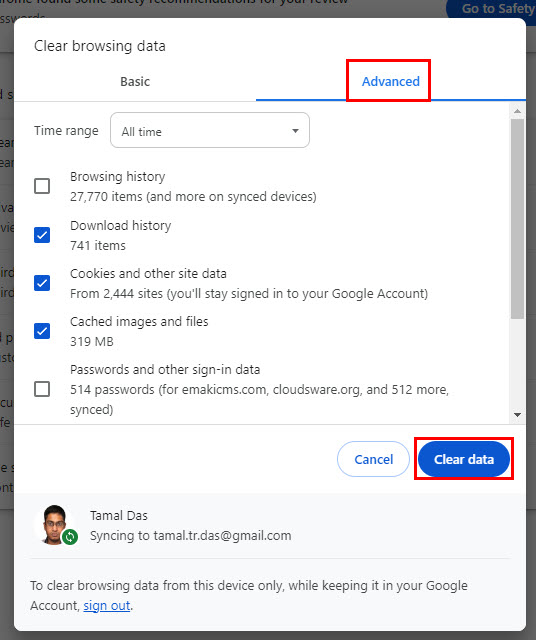
- Restart the browser.
Fresh browser data removes conflicts that stop the page from loading.
3. Switch to a Different Browser
Some browsers block streaming sites or run security filters that prevent SDMoviesPoint from opening.
- Install a different browser such as Chrome, Firefox, Brave, or Opera.
- Open it and load SDMoviesPoint.
- Compare the results.
Different browsers use different filters and often load restricted sites more easily. If another streaming site on your list fails to load as well, you can look at this guide for MyFlixer not working to compare symptoms.
4. Use a VPN to Bypass Region Blocking
Your ISP or country may restrict access to the SDMoviesPoint domain.
- Install a trusted VPN.
- Connect to a region like the US, UK, or Singapore.
- Reload the site.
A VPN routes your traffic through a location that allows access, which restores loading instantly.
5. Change Your DNS Settings
Slow or restricted DNS servers often prevent domains from resolving.
- Open network settings on your device.
- Locate the DNS configuration option.
- Replace default DNS with:
- Google DNS: 8.8.8.8 and 8.8.4.4
- Cloudflare DNS: 1.1.1.1 and 1.0.0.1
- Save the settings.

- Restart your device.
Fast DNS servers handle blocked or unstable domains better.
6. Disable Browser Extensions
Extensions and ad blockers often break site scripts.
- Open your browser extensions menu.
- Turn off ad blockers or privacy extensions.
- Refresh the page.
- Test in incognito mode if needed.
The site loads without interference when you remove blocking tools. If you face similar loading issues on other apps, this guide for My Family Cinema not working explains how extensions and filters affect streaming platforms.
7. Try an Updated SDMoviesPoint Domain
SDMoviesPoint frequently shifts to new mirrors.
- Search for “SDMoviesPoint new domain” on Bing.
- Verify which domain currently works.
- Replace old bookmarks with the updated link.
Active mirrors load normally while older domains often stop responding.
8. Test a Different Network
Some networks enforce firewalls that block streaming or download sites.
- Disconnect from your current WiFi.
- Use mobile data or another connection.
- Reload the site.
Changing networks helps you confirm whether your ISP or router blocks the domain.
FAQs related to SDMoviesPoint issues
The page often loads incorrectly when cache files break scripts. DNS problems or blocked extensions also cause blank screens.
Different browsers, different DNS, or strict desktop extensions block the site on PC even if mobile works.
Many ISPs restrict piracy related domains. You usually fix this with a VPN or an updated mirror.
High traffic and overloaded servers cause slow loading. Networks that throttle streaming also reduce speed.
Summing Up
These fast actions usually fix SDMoviesPoint not open issues on any device. If the domain remains unreachable, the site might have switched mirrors or gone offline temporarily. Checking new domains, switching networks, or using a VPN often restores access faster than waiting for the server to recover.

Read our disclosure page to find out how can you help Windows Report sustain the editorial team. Read more



Improve this guide



User forum
0 messages