
StageHQ Review: Transform Rooms with AI Virtual Staging


 6 min. read
  Published on
Key notes
- StageHQ AI styles and furnishes any room photo in seconds.
- Photorealistic virtual staging in up to 4K resolution.
- More than 30 room styles and custom prompting for personalized results.
- Ideal for real estate photo enhancement and interior design ideas.

StageHQ AI turns any empty or furnished room photo into a photorealistic staged interior in under 30 seconds.
Whether you’re in real estate, interior design, or simply renovating your home, virtual staging with StageHQ, is a fast and cost-effective way of visualizing your ideas.
Here’s everything you need to know:
What is Virtual Staging?
Virtual staging is the process of digitally adding or altering furniture, décor, and other elements in photographs of empty or sparsely furnished rooms. This provides a better idea of the space’s potential.
It’s a cost-effective and efficient alternative to traditional home staging, which involves physically moving furniture and accessories into a property. With the advent of AI and platforms like StageHQ, the process has gotten even easier.
What is StageHQ AI?
StageHQ is an AI virtual staging software that allows users to upload a photo of any room and generate fully furnished and decorated spaces. The web-based solution lets you select different styles and describe what you want to see with prompts, before generating high-resolution photorealistic photos.
The one-click staging process requires no design skills and most requests take less than 30 seconds to generate.
Paid users get commercial usage rights, making it ideal for real estate photo enhancement and exploring interior design ideas.
You can try StageHQ for free and purchase one-off packs based on the volume of photos you wish to generate.
Notable Features
After getting hands-on with StageHQ, here’s more about its standout features and how they work:
Staging For All Scenarios

Once you have uploaded your room photo, you can choose a staging mode for all scenarios.
Furniture Only – For photos that only require furnishing/refurnishing, choose “Precise Staging”. This maintains the surfaces, finishes, and overall geometry.
Full Decor – For photos that require “Creative Staging”, generating new accents, decor, and more stylish furniture.
Remodeling – When doing a full remodel, choose “Room Renovation” to completely transform the space, including the layout, furniture, fixtures, decor, accents, and finishes.
Furniture Removal – If your photo still contains old furniture and clutter, select “Remove Furniture” to strip the image, giving you a new base to work from.
With drag-and-drop and straightforward settings, it couldn’t be easier to get started.
Room Types and Design Styles
To ensure the result matches the room type of your source photo, you should select it from the extensive list. In the rare chance that a room isn’t listed, custom prompting can help refine the result.
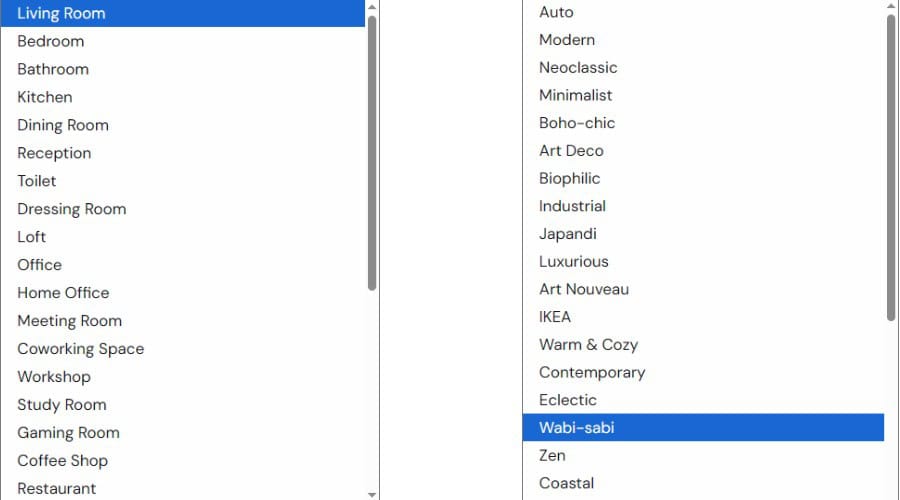
StageHQ offers over 30 interior styles, including popular choices like modern, minimalist, and Art Deco. As well as more fun and out-there styles such as Cyberpunk and Medieval.
There are even seasonal styles, including Christmas and Halloween, which are useful if redesigning your space for a specific event.
Custom Prompting
Although relying on the selections will always produce a unique outcome, I like that StageHQ gives you the freedom to enter custom prompts, so you can explore your personal ideas further.
If you have used AI before, the process is familiar. Simply enter descriptive keywords, separated by a comma. E.g., “Japanese furniture, rustic colors, warm lighting.”
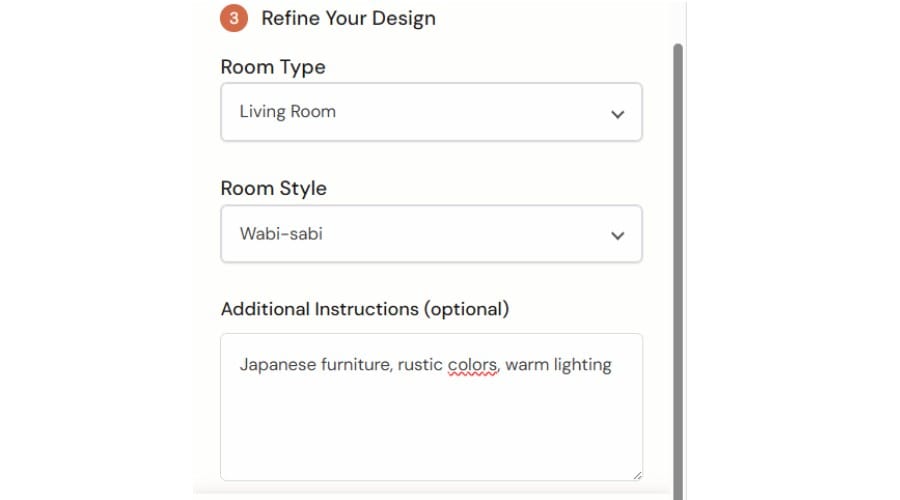
These prompts combined with style selections give you endless possibilities. What used to take hours or days, now only takes a few minutes.
Once done, hit generate and it will analyze the space and take no more than 30 seconds.
In my test example, I uploaded an empty living room photo, chose the creative staging option, and wabi-sabi style. The result was very impressive:

Overall, I found StageHQ produces very high-quality images. It is not a generic AI art generator, so you can be sure that every image is photorealistic and without imperfections or distortions.
While it’s best to use a high-resolution source image, the AI does a good job of upscaling and can output up to 4K standards.
The site supports JPG, PNG, and most other common image formats. Paid users get commercial usage rights.
Who is StageHQ for?
StageHQ is suitable for a wide variety of users that need interior virtual staging. Professionals and businesses involved in real estate and interior design might use it in their portfolios, listings, social media, magazines, or to show directly to clients.
From generating ideas or showing off what a room could look like, to forming the basis of a hands-on renovation, the tool is invaluable at every stage.
It’s also fun and useful for homeowners. Gone are the days of trawling magazines and websites for interior design tips, hoping the style will look good for your room. Now you can go a step beyond, creating your own styles and getting a realistic example before beginning work.
StageHQ can save time and money for:
- Real estate agents and property managers
- Homeowners and sellers
- Property developers
- Interior designers
- Marketing professionals
- Photographers and graphic designers
- Design related magazines and websites
Pricing
You can try StageHQ for free before purchasing one of its premium credit packs. All purchases provide watermark-free images and commercial rights.
Note: As of writing, the Summer Special offers a 10% discount. Just enter the code on the pricing page.
- 20 AI Stage Photos ($19)
- 100 AI Staged Photos ($39)
- 250 AI Staged Photos ($69)
High volume users can also contact StageHQ for custom pricing.
All purchases are final and non-refundable.
StageHQ Review – Verdict
To conclude this StageHQ review, it’s one of the most powerful yet easy-to-use home virtual staging tools available. While other virtual staging software exists, it usually falls into the trap of being too complex or too generic.
With StageHQ, its AI can generate a unique, professional, and high-resolution photo in seconds. You don’t get this with more traditional editing software or basic web tools.
Professionals will appreciate its speed and consistency, allowing you to quickly explore custom interior design styles and download the ones you like for your marketing, website, or clients.
Likewise, homeowners with no photo editing skills can now preview room styles without lifting a finger.
Whether you need to update lots of real estate listings or are just redecorating your living room, StageHQ is definitely worth considering.
Try StageHQ AI free, or start from $19 for 20 staged photos in up to 4K resolution with full commercial rights.


Read our disclosure page to find out how can you help Windows Report sustain the editorial team. Read more



Improve this guide




User forum
0 messages