
The classic Run Dialog on Windows 11 finally gets dark mode with KB5067103 update
A highly-requested feature is finally here


 1 min. read
  Published on
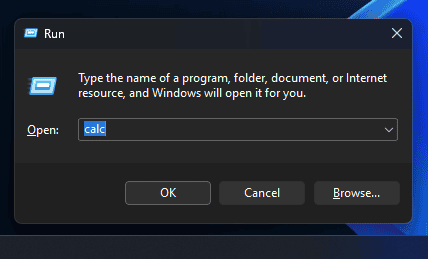
The latest Windows 11 Dev Insider Preview Build 26220.6780 (KB5067103) delivers a subtle but long-awaited change. After the update, Dark Mode support for the Run dialog will be live for you. This latest update is also live for Beta Channel testers under same KB update with Build 26120.6780.
The update aligns the classic Run window with modern Fluent Design principles, bringing a consistent look to one of Windows’ most familiar utilities. When the system is in dark mode, the Run dialog now matches it perfectly, removing the bright clash that existed before.
It’s a small visual tweak, but it reflects Microsoft’s ongoing effort to unify legacy and modern elements across Windows 11. The change is rolling out gradually for Insiders who have enabled “Get the latest updates as soon as they’re available” under Settings > Windows Update.
This update is part of the KB5067103, which also includes the Click to Do improvements and AI-powered Settings Agent for Copilot+ PCs. Not to forget, Microsoft is rolling out the new OneDrive icon in Accounts and Homepages in Settings.
As Microsoft continues updating the OS, these visual and workflow updates are shaping a Windows 11 experience that feels polished, intelligent, and seamless across every corner.

Read our disclosure page to find out how can you help Windows Report sustain the editorial team. Read more



Improve this guide




User forum
0 messages