
VA.gov Login: How to Sign In and Access Your Benefits


 3 min. read
 Published on
The VA.gov login page lets veterans access their benefits, health records, disability claims, and payments online. You can sign in securely using Login.gov, ID.me, or CLEAR.
How to log in to VA.gov?
Use the website
Follow these steps to access your account.
- Open the official VA.gov login page.
- Click Sign in if the website prompts you.
- Choose Login.gov, ID.me, or CLEAR.
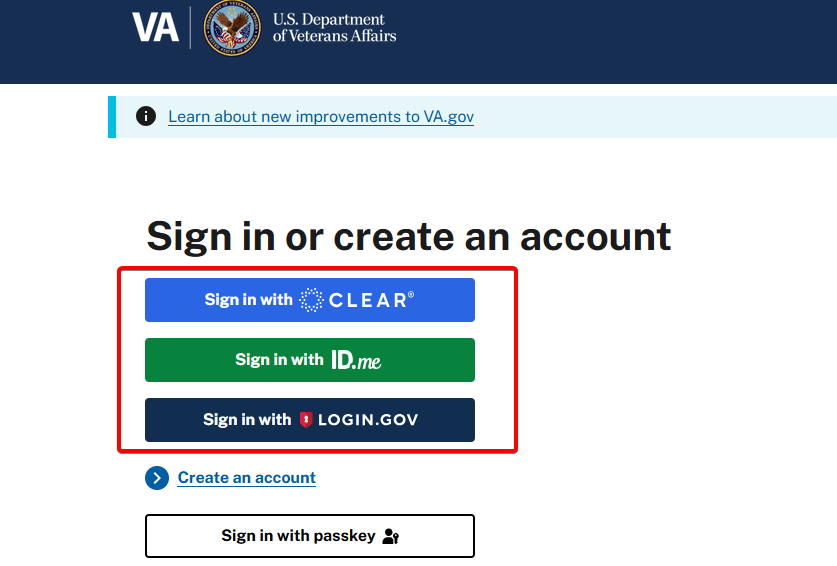
- Enter the email address and password associated with your selected account.
- Complete multifactor authentication using your verification method.
- Once you sign in, open My VA to manage your benefits, claims, and personal information.
VA.gov no longer supports signing in with My HealtheVet usernames or DS Logon credentials.
How to fix VA.gov login problems
If you cannot access your account, try these solutions.
- Incorrect password: Reset your password through Login.gov or ID.me.
- Verification code not received: Check your phone connection and try another available authentication method.
- Website not loading: Clear your browser’s cache and cookies, then try again.
- Account verification issues: Follow the instructions from your selected sign-in provider.
- Persistent login errors: Call VA support at 800-698-2411 for assistance.
You can also visit the official VA.gov sign-in help page for troubleshooting instructions.
Once you sign in, you can manage your VA benefits and services online. If you also need access to military email, check our guides on how to log in to Army email and access Army 365 with a CAC on Windows. For banking-related issues, you can also find solutions if the Navy Federal Credit Union app is not working.
VA.gov Login FAQ
Which sign-in options can I use for VA.gov?
You can sign in with Login.gov, ID.me, or CLEAR using the email address and password linked to your account.
Can I use My HealtheVet to sign in to VA.gov?
No. VA.gov no longer supports My HealtheVet usernames or DS Logon credentials for signing in.
What should I do if I forget my password?
Reset your password through the help page for your sign-in provider, such as Login.gov or ID.me.
Why am I not receiving my verification code?
Check your phone connection, confirm your contact information, and try another available multifactor authentication method.
Who can I contact for continued login problems?
If you still cannot sign in, call VA support at 800-698-2411 or visit the official VA.gov sign-in help page.

Read our disclosure page to find out how can you help Windows Report sustain the editorial team. Read more


Improve this guide
User forum
0 messages