
VS Code’s Latest Version Makes Multi-Agent Workflows Feel Native
The biggest upgrade is Agent HQ


 2 min. read
  Published on
Microsoft has launched Visual Studio Code version 1.107 as part of the November 2025 update. And, it’s all about agents. Microsoft is clearly steering VS Code toward a multi-agent workflow that feels more coordinated than before. Copilot and custom agents now work side by side instead of living in completely different parts of the editor.
The biggest upgrade is Agent HQ. It’s a central place to see and manage every agent you rely on. You can track what’s running, what’s idle, and what needs your attention. The idea is simple: let agents split tasks, run in parallel, and hand things off without forcing you to constantly bounce between tools.
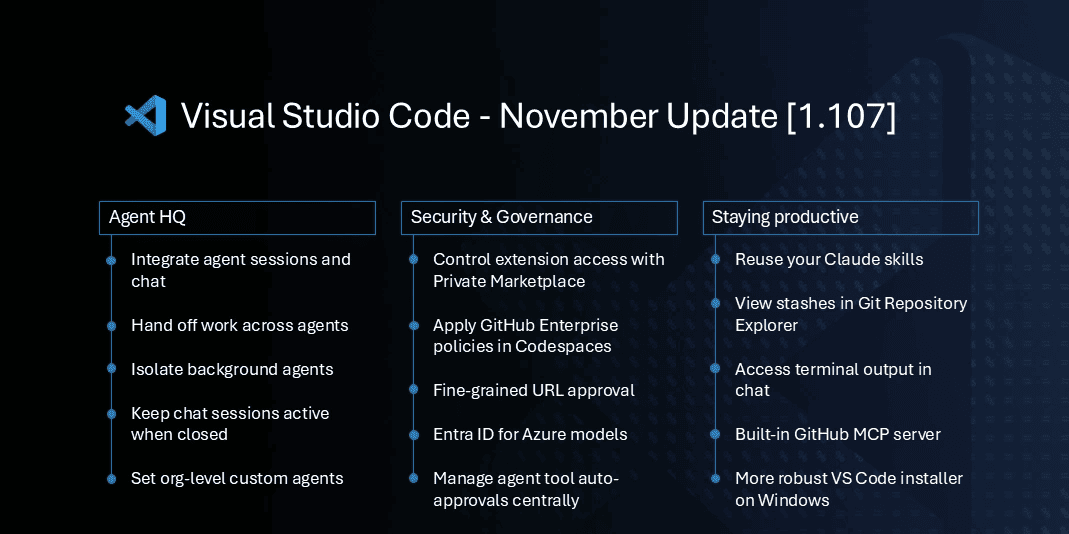
Agent sessions also have a new home. Microsoft has disabled the standalone Sessions view by default. Everything now comes into the Chat view. You can open the Chat and view active sessions, background tasks, progress bars, and file-change stats in one spot. Local agents also stay active when you close a chat. That’s a relief for tasks that run longer than a quick refactor.
Background agents get stronger isolation, too. Git worktree support lets you choose where they run. You can keep them inside your current workspace or give them a dedicated worktree to avoid file collisions.
VS Code 1.107 also upgrades the editor itself, as TypeScript 7.0 Preview is now supported. It’s a native rewrite with faster type checking and new features like better auto-imports, cleaner rename handling, and improved code-lens references.
There’s also experimental Git stash support in Source Control. You can view, apply, or drop stashes without touching the terminal. Moreover, you can install the update through Help > Check for Updates or download it for Windows: x64, Arm64 | Mac: Universal, Intel, silicon | Linux: deb, rpm, tarball, Arm, and snap.

Read our disclosure page to find out how can you help Windows Report sustain the editorial team. Read more



Improve this guide



User forum
0 messages