
Wait, Microsoft Edge Lets Copilot Work in InPrivate Mode Now? Yes, and It Just Appeared
Copilot now runs inside private windows in Edge, and the browser asks for approval before the assistant can read any content.


 3 min. read
  Published on
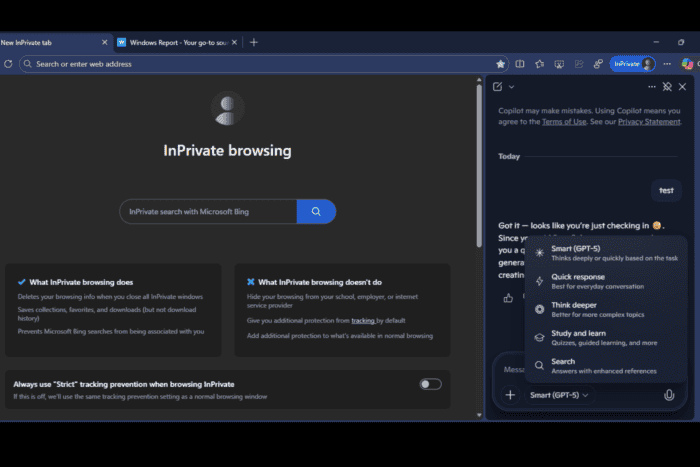
Microsoft Edge now loads the Copilot sidebar inside InPrivate windows. This did not work in earlier Stable versions. The sidebar stayed disabled in private mode, and users could only open the Copilot website. The change arrived quietly, and Microsoft has not added any help pages or release notes to explain it.
The feature works as expected when you use Copilot for the first time in a private session. When we opened a webpage in an InPrivate window and selected “Summarize the main points on this page,” Edge showed a permission prompt that directed us to the Copilot settings page to confirm page access.
The same prompt appeared when we tested videos and files, which shows that Edge blocks content access in private mode until the user approves it.
InPrivate does not keep past chats or personalization. Copilot shows a sign-in prompt inside the sidebar, and conversation history does not appear until you log into a Microsoft account.
We reported in July that Microsoft tested Copilot in InPrivate inside the Canary version of Edge. That test did not stay active. The same behavior now appears in Stable by default, and most users will not expect this.

You can open an InPrivate window today, select the Copilot icon, and the sidebar loads normally. Replies work as they do in regular browsing. The only difference appears when Copilot needs to read the page, at which point Edge asks for approval.

Copilot includes a global “Context clues” setting that controls page access. If you switch it off in a normal window, it appears off in InPrivate. If you switch it on, it appears on in InPrivate. Edge does not keep a separate preference for private browsing, but the session prompt still appears before Copilot can read anything.

The current behavior matches what Copilot described during our conversation. InPrivate asks for approval and does not allow content access until you confirm it. Microsoft has not explained this rollout or documented the change in any release notes.
Edge now gives users a complete assistant inside private browsing with a clear approval step for every session. We will update this story if Microsoft responds or shares more details.
It is not clear how wide the rollout is or when Microsoft plans to enable Copilot in InPrivate for all users.
Microsoft Edge is also testing Copilot Prompts on the New Tab Page and Copilot Vision that runs from copilot.microsoft.com.


Read our disclosure page to find out how can you help Windows Report sustain the editorial team. Read more



Improve this guide




User forum
0 messages