
Wattpad App Not Working? Here's Why & How to Fix It


 5 min. read
  Updated on
Finding Wattpad not working when you’re in the middle of an interesting chapter can be pretty annoying. The app might suddenly refuse to open, stories may fail to load, you could see a blank screen, or Wattpad might keep showing network errors even when your internet is working fine.
The good news is that most Wattpad issues are usually easy to fix and don’t require anything complicated. In many cases, the problem is caused by a temporary server outage, an outdated app version, corrupted cache files, or a simple connection problem. Before deleting and reinstalling the app, it’s worth checking whether Wattpad is down for everyone or if the issue is only happening on your device.
Wattpad app not working for you? Try these fixes
1. Check if Wattpad is down
Before changing anything on your device, make sure Wattpad isn’t experiencing a service interruption. Community outage trackers and Wattpad’s official support channels usually report widespread issues quickly. Make sure to try the following:
2. Restart the Wattpad app
Apps occasionally get stuck after running in the background for a long time. A complete restart refreshes the current session and often resolves temporary loading issues. Here’s what you need to do:
- Force close Wattpad
- Wait a few seconds
- Open it again
- Try loading a different story
3. Check your internet connection
A weak or unstable connection is one of the biggest reasons Wattpad app not working reports appear. Even if other apps seem fine, intermittent packet loss can prevent stories from loading. Make sure to try the following:
- Restart your Wi-Fi router
- Switch to mobile data
- Disable VPN services
- Move closer to your router
- Test another website or app
4. Clear the Wattpad cache
Corrupted cache files can prevent the app from loading correctly, showing stories, or syncing your reading progress.
- Open Settings
- Tap Apps
- Select Wattpad
- Open Storage
- Tap Clear Cache
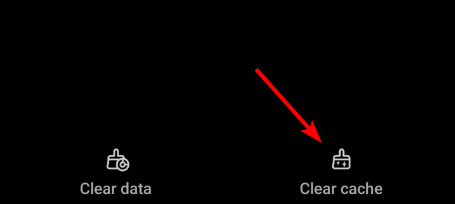
If that doesn’t work, clear app data as well. You’ll need to sign in again afterward.
5. Update the Wattpad app
Running an outdated version may cause compatibility issues, especially after server-side changes. You can update the app by heading to the following links:
Installing the latest version often fixes crashes and login errors.
6. Sign out and sign back in
If your account isn’t syncing correctly or your library won’t load, refreshing your login session can help. Make sure to do the following:
- Log out of Wattpad
- Close the app
- Reopen it
- Sign back in
7. Reinstall Wattpad
If the app still refuses to work, reinstalling it replaces corrupted installation files with a clean copy. Do the following to reinstall the app:
- Uninstall Wattpad
- Restart your device
- Download it again from the official app store
- Sign back into your account
8. Check if stories have been removed
Sometimes the app is working perfectly, but a specific story is unavailable because it has been deleted, unpublished, made private, or removed for policy reasons. If only one story refuses to load while everything else works, this is likely the cause.
Why is Wattpad not working?
There are several reasons why Wattpad is not working today. Some of the most common include:
- Temporary Wattpad server outages
- App maintenance or backend issues
- Poor internet connection
- Corrupted cache or app data
- Outdated Wattpad app
- VPN or DNS conflicts
- Account sync problems
- Device software compatibility issues
If you’re wondering why is my Wattpad not working, one of these causes is usually responsible.
Why isn’t Wattpad showing stories?
If stories aren’t appearing, the problem is usually related to:
- Temporary server issues
- Internet connection problems
- Corrupted app cache
- Account synchronization errors
- Stories being removed or unpublished
Refreshing the app, clearing the cache, or signing back into your account usually resolves the issue.
This isn’t the only app that can encounter issues and we wrote about Porofessor Overlay not working and Streamex not working in our earlier guides.
FAQs related to Wattpad not working
Is there any problem with Wattpad today?
It depends. Wattpad occasionally experiences server outages or maintenance that prevent users from reading stories or signing in. Checking Wattpad’s official support channels or outage trackers is the fastest way to confirm.
Why won’t Wattpad let me read?
This can happen because of server downtime, internet connectivity problems, corrupted cache files, or if the story has been removed or made private.
Why isn’t my Wattpad working?
If your app won’t open, crashes frequently, or refuses to load content, it’s usually caused by outdated software, corrupted app data, network issues, or temporary server problems.
Why is Wattpad not showing stories?
Missing stories are often caused by server synchronization issues, internet problems, cached data, or because the story has been unpublished or removed.
Is the Wattpad app offline?
No. Wattpad doesn’t have a permanent offline mode for all content. While some Premium features allow offline reading for downloaded stories, you’ll still need an internet connection for browsing, syncing, searching, and accessing most content.

Read our disclosure page to find out how can you help Windows Report sustain the editorial team. Read more



Improve this guide


User forum
0 messages