
How to Use Start11 to Get the Classic Start Menu in Windows 11


 2 min. read
  Updated on
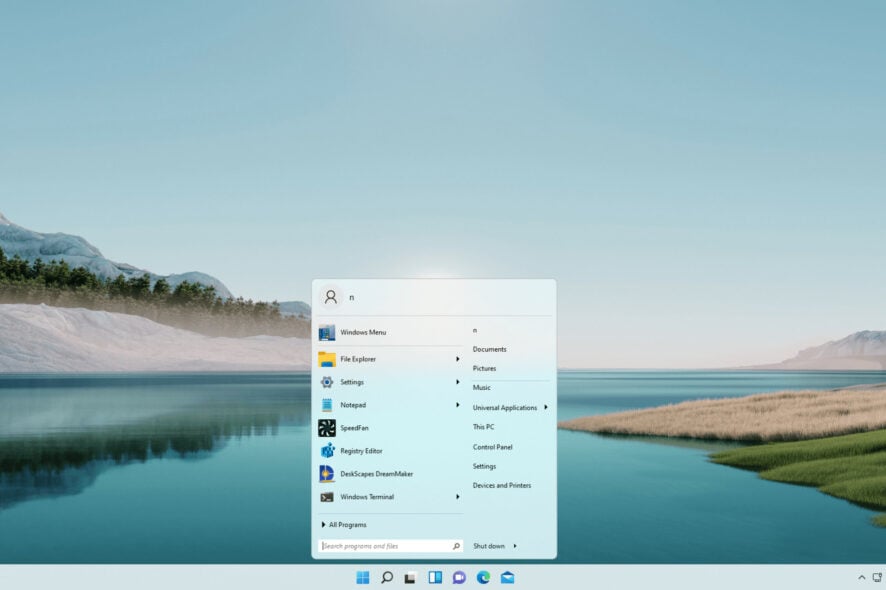
Windows 11 Classic Start Menu Start11 is the solution many users are turning to because the new OS Start menu doesn’t satisfy everyone’s expectations. While Windows 11 looks sleek, not all design choices hit the mark, especially when it comes to the Start menu experience.
How to Get the Classic Start Menu Back on Windows 11 with Start11
Table of contents
Step 1: Download Start11
- Head to the official Start11 page here: https://www.stardock.com/products/start11
- Grab the free trial or buy a license if you want full access.
Step 2: Install Start11
- Run the installer and follow the prompts.
- Once installed, Start11 will open automatically.
Step 3: Pick Your Start Menu Style
- In the Start11 control panel, click Start Menu from the sidebar.
- Choose your favorite look:
- Windows 7 Style (classic and familiar)
- Windows 10 Style (modern, clean feel)
- Modern Style (a fresh take with minimal design)
- Hit Apply and watch the magic happen.
Step 4: Customize It Your Way (Optional)
- Start11 lets you tweak:
- Transparency of the menu
- Icon size and spacing
- Search bar behavior
- Plus, under Taskbar settings, you can:
- Move the taskbar top or bottom
- Restore the classic right-click menu
- Ungroup taskbar icons like Windows 10
Windows 11 does offer some built-in options to adjust the Start menu and taskbar, like pinning apps or moving the taskbar icons to the left. However, these built-in tweaks don’t let you fully restore the classic Start menu layout or customize many aspects like Start11 does. You can read more about what Windows 11’s native options offer and where they fall short in this guide on changing Windows 11 to classic view.
Why Start11 Is Still Worth It in 2025
Start11 started as a way to bring back the Windows 7 Start menu look on Windows 10, but now it has evolved to fully support Windows 11 customization, even in its beta phase. For $4.99, you get more than just style; you get powerful tweaks that Microsoft has not included by default.
Stardock CEO Brad Wardell said the beta focuses on restoring functionality lost in the new Start menu, with plans to add features like pages, tabs, and better enterprise support.

Read our disclosure page to find out how can you help Windows Report sustain the editorial team. Read more



Improve this guide




User forum
0 messages