
Windows 11 KB5095093 Brings Major File Explorer, Bluetooth, and Networking Improvements


 4 min. read
  Published on
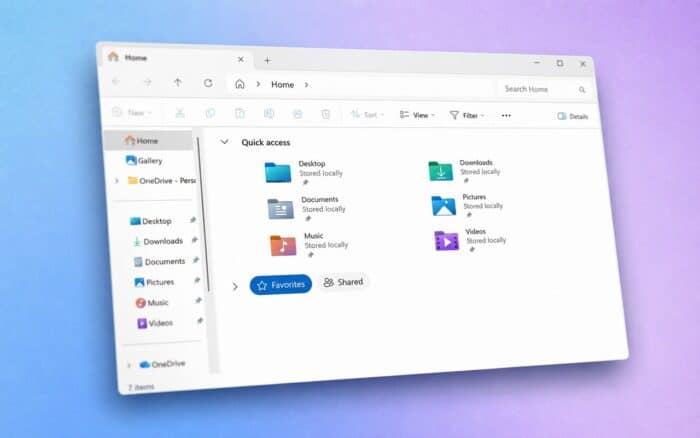
Microsoft has released the June 2026 optional preview update for Windows 11 under KB5095093, bringing the operating system to Build 26200.8737 on Windows 11 25H2 and Build 26100.8737 on Windows 11 24H2.
The update follows Microsoft’s recent rollout of new features such as Point-in-Time Restore and a redesigned update pause experience. However, KB5095093 includes a much broader set of improvements spanning File Explorer, Bluetooth connectivity, networking, voice typing, and system reliability.
File Explorer Gets Faster and Smarter
One of the biggest areas of focus in this update is File Explorer. Microsoft says users can now access quick actions directly from File Explorer Home by hovering over files. Available actions may include opening the file location or sending content to Copilot.
The feature now also supports work and school accounts that use Microsoft Entra ID.
Microsoft has also improved File Explorer startup performance and addressed several long-standing issues. The company fixed a bug that prevented the OneDrive shortcut from working correctly when File Explorer was launched with administrator privileges.
The address bar has received multiple improvements. It now properly supports paths that contain double backslashes and quotation marks, while the suggestion dropdown behaves more reliably and closes correctly after a selection.
Additional fixes include:
- OneDrive files no longer appear duplicated in Favorites on File Explorer Home.
- Text is no longer repeatedly selected while renaming files and folders.
- Case-only filename changes now sync correctly across local and cloud-stored files.
- The file rename experience has been refined.
Bluetooth Reliability Receives Major Upgrade
Microsoft has made extensive changes to Bluetooth performance and reliability throughout Windows 11.
The company says the microphone mute state now stays synchronized between the Windows audio mixer and Bluetooth Hands-Free Profile devices. Compatibility has also improved with several Bluetooth audio accessories.
AirPods users may notice faster pairing times, while microphone reliability has improved for Beats Studio Pro headsets.
Other Bluetooth improvements include:
- Faster reconnection for classic Bluetooth audio devices after hibernation.
- Better LE Audio reliability after connection interruptions.
- Faster audio playback startup when using LE Audio devices with active microphones.
- Improved voice call reliability for Hands-Free Profile devices.
- More stable Bluetooth settings pages.
- Better handling of Bluetooth device removal when radio hardware becomes unavailable.
Microsoft has also improved the interaction between Bluetooth devices and Phone Link. Outgoing calls initiated from a connected smartphone now remain on the phone while ringing and only transfer to the PC when the call is answered from Windows.
Additionally, incoming calls no longer ring on the PC when Do Not Disturb is enabled.
Voice Typing Expands to More Languages
Voice access and voice typing are gaining support for French, German, and Spanish.
Microsoft has also upgraded voice typing with real-time text improvement capabilities. The feature can automatically correct grammar, punctuation, and speech recognition mistakes while users dictate.
According to Microsoft, the updated dictation experience performs better even in environments with background noise.
Networking and Virtualization Improvements
The update delivers several networking enhancements aimed at both consumers and enterprise environments.
Confidential Virtual Machines now use SR-IOV hardware acceleration by default, helping improve network throughput in supported environments.
Microsoft also fixed a networking issue affecting nested Hyper-V virtualization configurations.
Additional networking changes include:
- Improved Windows networking stack reliability.
- Reduced Wi-Fi-related blue screen errors caused by power management issues.
- Better cellular (WWAN) connectivity.
- Improved IPv6 VPN support.
- Better compatibility with third-party VPN solutions.
- Improved support for SR-IOV server deployments.
- Preservation of network adapter settings and bindings after operating system upgrades.
Additional Reliability Improvements
KB5095093 includes several smaller reliability fixes throughout Windows 11.
Microsoft improved the reliability of the inbox HD Audio driver and fixed a taskbar issue that could affect opening the Start menu from the left edge when taskbar icons were left-aligned.
As with other C-release updates, KB5095093 is optional and available through Windows Update as a preview release. Features are rolling out gradually, which means not every user will receive all changes immediately after installation.
In other Microsoft news, the company recently patched the AutoGen Studio AutoJack vulnerability chain that could have allowed malicious websites to trigger unauthorized command execution in certain development environments.

Read our disclosure page to find out how can you help Windows Report sustain the editorial team. Read more



Improve this guide




User forum
0 messages