
Exploring Key Windows Optional Features and Their Benefits


 6 min. read
  Updated on
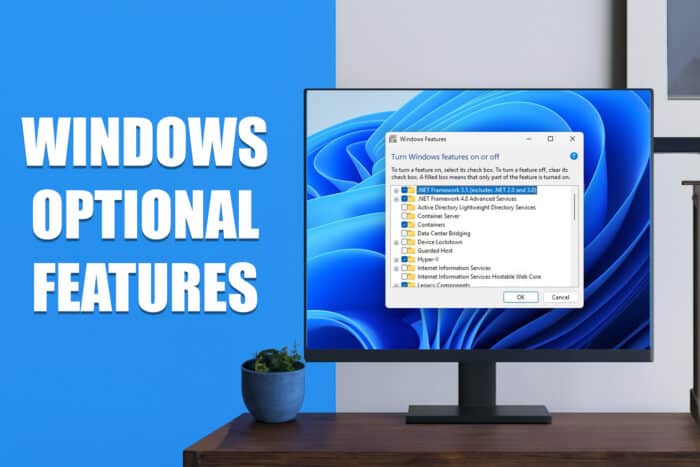
Windows provides a wide array of optional features to enhance its functionality. These features cater to different use cases such as virtualization, media management, network security, and more.
Windows Optional Features Explained

Below is a comprehensive table listing each optional feature and a brief explanation of its use.
| Feature Name | Description |
|---|---|
| .NET Framework 3.5 (including .NET 2.0 and .NET 3.0) | Needed to run applications written for various versions of .NET. Installed automatically when required. |
| .NET Framework 4.6 Advanced Services | Automatically installed when required to run applications developed with .NET Framework 4.6, including WCF and WF services. |
| Active Directory Lightweight Directory Services | Provides an LDAP server for authenticating users on a network. A lightweight alternative to Active Directory for business networks. |
| Embedded Shell Launcher | Replaces Windows Explorer with a custom shell. Useful for setting up kiosk mode in public-facing machines. |
| Containers | Provides services and tools for creating and managing Windows Server Containers for lightweight virtualization. |
| Data Center Bridging | A set of IEEE standards designed for data centers to improve network performance and reliability. |
| Device Lockdown | Secures systems in public settings by preventing drive writes, unbranded boot screens, and filtering keyboard strokes. |
| Guarded Host | Configures and runs shielded virtual machines (VMs) on a server, ensuring security in virtual environments. |
| Hyper-V | Microsoft’s virtualization tool for creating and managing virtual machines. Widely used by IT professionals and developers. |
| Internet Explorer 11 | A legacy browser that can be disabled if not required, as it’s now largely replaced by Microsoft Edge. Removed in Windows 11. |
| Internet Information Services (IIS) | A web server tool that allows management of websites, FTP servers, and web applications. |
| Internet Information Services Hostable Web Core | Allows applications to host a web server via IIS inside their own process. Required for certain apps. |
| Legacy Components | Includes older features like DirectPlay, which is part of the DirectX API and supports legacy applications. |
| Media Features | Includes Windows Media Player, a basic media player for audio and video playback. |
| Microsoft Message Queue (MSMQ) Server | An old service for improving communication over unreliable networks, often used in business environments. |
| Math Recognizer | Converts handwritten mathematical equations into digital text. |
| Microsoft Paint | A basic image editing tool for quick and simple tasks, such as drawing or editing images. |
| Microsoft XPS Document Writer | Allows the creation and saving of XPS documents, an alternative to PDF. |
| Microsoft Print to PDF | A built-in tool for printing documents directly to PDF format, useful for saving files in a universal format. |
| Microsoft Quick Assist | Enables Microsoft support to remotely access your device and offer troubleshooting assistance. |
| Microsoft WebDriver | Automates Microsoft Edge browser testing and hosts the EdgeHTML platform for developers. |
| Notepad | A simple text editor for editing plain text files. |
| OpenSSH Client | Enables secure access to remote machines using SSH, a protocol for secure communication. |
| Print Management Console | A tool for managing printers, print servers, and print jobs. |
| Print and Document Services | Enables management of printing, faxing, and scanning services on your network. |
| Remote Differential Compression API Support | Facilitates fast comparisons between synchronized files to detect changes (added/removed data). |
| Steps Recorder | Captures and records the steps you take on Windows with screenshots, useful for troubleshooting. |
| Simple Network Management Protocol (SNMP) | A legacy protocol for monitoring and managing devices connected to a network. |
| SMB 1.0/CIFS File Sharing Support | Allows file and printer sharing with older Windows versions, enabling compatibility with legacy systems. |
| Services for NFS | Enables access to files using the Network File System protocol, often used for cross-platform file sharing between UNIX and Windows. |
| SMB Direct | Improves file sharing using SMB 3.x by allowing remote direct memory access (RDMA) via network adapters. |
| Simple TCP/IP Services | A collection of old command-line tools for network administration, such as echo, discard, and daytime commands. |
| Telnet Client | A command-line tool for remote system management. It’s an outdated tool and should be used cautiously. |
| TFTP Client | A command-line tool for transferring files via Trivial File Transfer Protocol (TFTP), used for simple file transfers. |
| Virtual Machine Platform | Part of the native virtualization system for running virtual machines within Windows. |
| Windows Defender Application Guard | Isolates untrusted websites and resources in a secure environment to protect your system from malicious content. |
| Windows Fax and Scan | A built-in application for managing faxing and scanning tasks. |
| Windows Hypervisor Platform | An API used by third-party virtualization software for creating and managing virtual machines. |
| Windows Hello Face | Provides biometric login via facial recognition for quick and secure access to your PC. |
| Windows Identity Foundation 3.5 | A software framework used for building identity-aware applications. The newer .NET Framework 4.5 includes a more up-to-date version. |
| Windows PowerShell 2.0 | A command-line tool for automating tasks, similar to Command Prompt but more advanced. |
| Windows PowerShell Integrated Scripting Environment | A graphical editor for PowerShell scripts, offering a more user-friendly environment for script creation and debugging. |
| Windows Process Activation Service | Used for message-based applications, often in relation to Internet Information Services (IIS). |
| Windows Projected File System | Enables apps to create virtual file systems, providing more abstracted file management. |
| Windows Sandbox | A secure, isolated environment within Windows where you can run untrusted applications without affecting the rest of your system. |
| Windows Subsystem for Linux | Allows you to install and use various Linux distributions (e.g., Ubuntu, Debian) on Windows, useful for developers who need both environments. |
| Windows TIFF IFilter | Provides indexing and searching for TIFF files, useful for Optical Character Recognition (OCR) on image-based documents. |
| Wireless Display | Enables wireless screen projection from other devices to your PC, allowing for a wireless display experience. |
| WordPad | A more advanced text editor than Notepad, offering support for rich text formatting, images, and tables. |
| Work Folders Client | Syncs corporate folders between the network and personal devices, ensuring employees can access work files remotely. |
| XPS Viewer | A tool for viewing, printing, and managing XPS documents, a format similar to PDFs. |
FAQ
You can add or remove optional features by navigating to Settings > Apps > Optional Features, where you can either add new features or uninstall existing ones. For more details, check out how to manage optional features in Windows 11.
Some features, like the .NET Framework, are automatically installed when needed by certain applications. Others can be manually enabled or disabled based on your requirements.
Yes, many of these features can be enabled or disabled at any time through the Optional Features menu in Windows. You can activate them when needed and remove them later to save space.
Disabling unnecessary features can free up system resources, but ensure you are not disabling features that are required by apps or system services you rely on.
Conclusion
Windows offers a wide range of optional features that can be tailored to fit specific use cases, whether you need virtualization tools, media management, or network enhancements. By understanding and managing these features, you can optimize your system’s performance and functionality based on your needs.
For further insights on managing these features, visit turning Windows features on and off or read about why your optional features may be empty. Whether for development, security, or basic media playback, these features help make Windows more versatile and adaptable.
You can learn more about how OpenSSH works in Windows by reading this detailed guide on what OpenSSH is and how it improves secure remote access.

Read our disclosure page to find out how can you help Windows Report sustain the editorial team. Read more



Improve this guide
User forum
0 messages