
What Is OpenSSH On Windows and How Do You Use It?


 3 min. read
  Published on

Windows includes OpenSSH to help you manage remote systems securely. It lets you connect to servers, automate scripts, and transfer files through encrypted channels. Many users prefer it because it works directly from PowerShell or Command Prompt and fits well in mixed Windows and Linux environments.
Table of contents
What Is OpenSSH On Windows And How to Install it?
What Is OpenSSH On Windows?
OpenSSH on Windows provides secure remote access and encrypted file transfers. Windows 10 and Windows 11 include an OpenSSH Client and an optional OpenSSH Server, which lets you connect to other devices or accept SSH connections on your PC.
If you ever run into login errors, you can follow this guide on Windows SSH permission issues.
How OpenSSH Works On Windows
Core Purpose
OpenSSH encrypts the connection between your Windows computer and a remote machine, which protects your credentials and session data.
Key Components
- OpenSSH Client for connecting to servers
- OpenSSH Server for accepting incoming SSH sessions
- SCP and SFTP for encrypted file transfers
- SSH keys for stronger authentication
Why People Use It
OpenSSH improves security, supports automation, and works with both Windows and Linux workflows.
If you face configuration or permission errors, see the guide on SSH config file permission problems.
How To Install OpenSSH On Windows
Install OpenSSH Client
You can install it via Optional features:
- Open Settings, select Apps, then open Optional features.

- Select Add a feature, choose OpenSSH Client, and install it.
Install OpenSSH Server
Steps for OpenSSH Sever are almost the same:
- Go back to Optional features and install OpenSSH Server.

- Open Services, start OpenSSH SSH Server, and set the startup type to Automatic.

If you cannot find the menu, check the guide on Windows Optional Features.
How To Use OpenSSH On Windows
Connect To A Remote System
To connect, just follow these steps:
- Open your terminal.
- Enter the SSH command with your username and host.
- Confirm the fingerprint and log in with your password or key.
Transfer Files With SCP
- Open PowerShell.
- Enter the SCP command to upload or download a file.
- Authenticate when prompted.
How To Generate SSH Keys On Windows
SSH keys help you sign in more securely.
- Open PowerShell and run the SSH key generation command.
- Choose the save location and create a passphrase.
- Upload the public key to the remote computer using SCP or another transfer method.
How To Enable Firewall Rules For OpenSSH Server
You must allow SSH through the Windows firewall.
- Open Windows Security.
- Select Firewall and network protection.
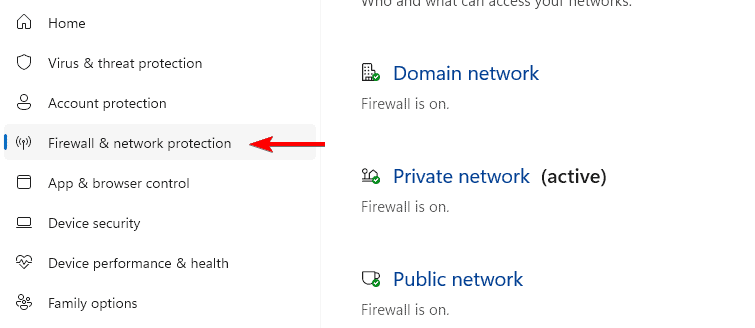
- Open Allow an app through firewall and enable OpenSSH Server.
FAQs
Yes. Windows 10 and Windows 11 include the OpenSSH Client automatically.
You only need it if you want other devices to connect to your computer through SSH.
Windows stores SSH keys inside your user profile’s SSH folder.
Yes. PowerShell supports SSH for automations and remote management tasks.
Conclusion
OpenSSH gives Windows users a secure and convenient way to manage remote systems, transfer files, and automate workflows. You can install it from Optional Features, create SSH keys, and enable the server service quickly. The guides on SSH permission issues, SSH config file problems, and Optional Features help you troubleshoot any setup problems and keep everything running smoothly.

Read our disclosure page to find out how can you help Windows Report sustain the editorial team. Read more



Improve this guide




User forum
0 messages