
WPS Office Review: The Best Free Alternative to Microsoft Office?


 9 min. read
  Published on
Key notes
- All-in-one suite for word processing, spreadsheets, presentations, and PDFs.
- Surprisingly lightweight considering cross platform support and cloud syncing.
- Powerful AI tools improve productivity at every step.
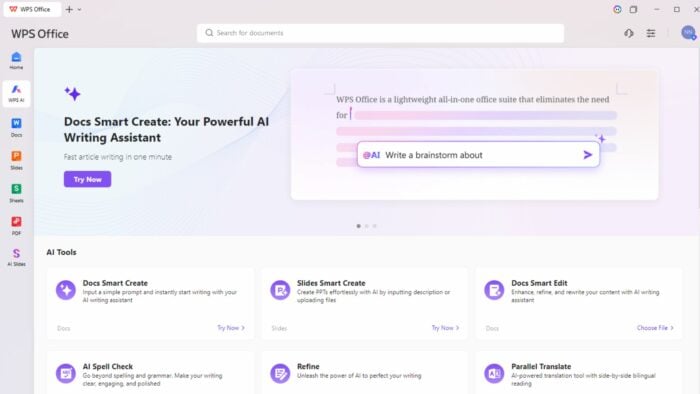
With Microsoft 365 becoming increasingly expensive and more people looking for lightweight alternatives, I decided to see what other productivity suites are out there.
One that tops the list is WPS Office. In this review, I get hands-on with the full premium version. Here’s everything you need to know.
What is WPS Office?
WPS Office is a cross-platform productivity suite that includes Writer, Sheets, Presentation, and PDF apps. These provide functionality similar to Microsoft Word, Excel, PowerPoint, and Adobe Acrobat.
WPS is available on Windows, macOS, Linux, Android, and iOS, and offers strong compatibility with Microsoft Office file formats. It also has a selection of powerful AI tools for writing assistance, summarization, translation, and content generation.
Basic features can be used for free before upgrading to an affordable premium plan, making it an attractive option if you’re seeking a lower-cost alternative to Microsoft 365 or something more powerful than Google Workspace.
Main Features
At first glance, WPS Office feels very familiar. The suite includes dedicated apps for documents, spreadsheets, presentations, and PDFs, covering most of the functionality that home users, students, and businesses typically need from Microsoft 365.
What makes WPS stand out is that everything is bundled into a single application rather than being split across multiple programs. This creates a more streamlined experience, allowing you to switch between documents, spreadsheets, presentations, PDFs, and cloud files from a unified interface.
Docs/ Writer
WPS Writer is the suite’s word processing application and will feel instantly familiar to anyone who has used Microsoft Word. It supports all major document formats, including DOC, DOCX, and PDF, while offering a clean ribbon-style interface that makes the transition from Microsoft Office seamless.

The app includes everything most users need for day-to-day document creation, from advanced formatting and styles to tables, headers, footers, references, and collaboration tools. During testing, I found it handled large documents smoothly and maintained formatting when opening files created in Microsoft Word.
One area where Writer stands out is its integration with WPS AI. Rather than relying on separate browser-based AI tools, features like content generation, rewriting, summarization, and grammar correction are built directly into the editor.
Slides/ Presentation
Presentation is WPS Office’s equivalent to Microsoft PowerPoint. It supports PPT and PPTX files and includes a large collection of professionally designed templates.

One of the most impressive features is AI Slides. Instead of building a presentation from scratch, you can enter a topic and related info, and WPS can generate a structured presentation complete with layouts, suggested content, and visual elements.
There is also a Slides from Doc feature that can convert existing written documents into presentation outlines automatically. This can save considerable time when preparing meetings, classroom presentations, or business proposals.
Sheets/ Spreadsheet
WPS Sheets offers a surprisingly powerful spreadsheet experience that closely mirrors Excel. It supports XLS, XLSX, CSV, and other common spreadsheet formats while maintaining excellent compatibility with existing Excel files.

The application includes formulas, pivot tables, charts, conditional formatting, data validation, filters, and advanced data analysis tools. Most users switching from Excel will find everything they need already available.
Performance is also excellent. Large spreadsheets opened quickly during testing, and calculations remained responsive even with more complex datasets.
While power users working with highly specialized Excel macros may still prefer Microsoft’s ecosystem, Sheets provides more than enough functionality for most people.
One of WPS Office’s biggest advantages is its built-in PDF functionality. Many office suites focus solely on documents, spreadsheets, and presentations, leaving users to purchase separate PDF software.

WPS integrates PDF reading, annotation, conversion, editing, signing, and management directly into the main application.
This means you can:
- Read PDFs
- Annotate documents
- Add comments and highlights
- Convert PDFs to Word
- Convert Word to PDF
- Merge PDF files
- Split PDF files
- Extract images
- Digitally sign documents
For many, this eliminates the need for an Adobe Acrobat subscription entirely.
WPS AI
AI is now a major focus across productivity software, and WPS has embraced this trend with a surprisingly comprehensive collection of AI tools.

Rather than limiting AI to a simple chatbot, WPS integrates AI functionality throughout the suite.
AI Summarizer
The AI Summarizer can quickly condense lengthy documents into concise summaries. This is particularly useful when reviewing reports, research papers, meeting notes, or academic materials.

Instead of reading dozens of pages manually, you can quickly identify key points and important information.
Smart Create for Docs and Slides
Smart Create lets you get started by generating content from simple prompts.
Slides from Doc
One of the most impressive features is Slides from Doc. This tool automatically converts written documents into presentation slides, extracting key information and organizing it into a logical presentation structure.
For anyone regularly turning reports into presentations, this can save hours of work.
Docs Smart Edit
Smart Edit functions as an AI writing assistant. It can:
- Rewrite text
- Improve clarity
- Adjust tone
- Expand content
- Shorten content
- Improve readability
Rather than switching to ChatGPT or another external AI tool, everything happens directly inside Writer.
AI Spell Check
Beyond traditional spell checking, WPS AI can identify grammar issues, awkward phrasing, and stylistic improvements.
This makes it particularly useful for students, non-native English speakers, and professionals producing client-facing documents.
Parallel Translate
View formatted translations side-by-side with support for more than 30 languages.
Chat Doc
Instead of manually searching through lengthy files, you can ask questions about the content and receive AI-generated answers based on the document itself.
For documents like research papers, contracts, manuals, and reports, this can dramatically speed up information retrieval.
Other Productivity Tools
While the core office applications are strong enough on their own, WPS Office includes a huge collection of additional tools and helpful features.
Cloud Sync
Cloud synchronization allows users to access documents across Windows, macOS, Linux, Android, and iOS devices. Changes are automatically synced, making it easy to move between desktop and mobile workflows.
File Conversion
WPS includes numerous conversion tools, including:
- PDF to Word
- Word to PDF
- Image to PDF
- PDF to Image
- Image to Text (OCR)
- PDF Compression
These tools remove the need for many standalone conversion utilities.
Extract Image from PDF
You can also quickly save embedded images from PDF files without taking screenshots or using specialist software.
Templates

As well as AI, the large template library means you never have to formulate content and documents from scratch. Just some of the template types include:
- Resumes
- Business reports
- Invoices
- Presentations
- Budgets
Resume Master
Resume Master helps users create professional CVs and resumes using guided templates and layouts, making it particularly useful for students and job seekers.
Splitter & Merger
This organizational tool allows you to split documents into two or more separate files or combine documents together. You can even merge different document types together and save it as your preferred format.
Batch Editing
For users managing large numbers of files, the batch tools can automate repetitive tasks like file conversion, printing, or renaming files.
User Interface and Performance
One of WPS Office’s greatest strengths is its user interface.
Rather than launching separate applications for documents, spreadsheets, presentations, and PDFs, everything runs inside a unified workspace. This creates a cleaner experience and makes switching between tasks much faster.
The interface feels heavily inspired by Microsoft Office, which is a positive thing. Most users will feel comfortable immediately, with familiar ribbons, toolbars, and menus throughout the suite.
The software is also remarkably lightweight. At around 250MB, it’s significantly smaller than Microsoft Office and runs particularly well on older hardware. During testing, performance remained smooth even with multiple documents, spreadsheets, PDFs, and presentations open simultaneously.
In an era where many software applications have become “bloatware,” consuming gigabytes of storage and demanding high RAM, WPS Office is a nice exception. This isn’t just about saving disk space; it’s about accessibility. Regardless of which devices you are using, old or new, you can get your work done.
Collaboration
WPS provides robust sharing mechanisms that allow you to generate links for documents, spreadsheets, and presentations instantly. These links can be configured with specific permissions, such as view-only or edit access, facilitating a seamless feedback loop with colleagues or classmates without needing to email static file versions back and forth.
Pricing
You can use the core Writer, Sheets, Presentation, and PDF reader entirely for free. While the AI and PDF editing features require a paid plan, there’s a lot of functionality here and is a great way to try the suite before committing.
- WPS Pro ($2.99/mo) – The Pro plan unlocks premium PDF editing features, advanced file tools, additional templates, 20GB cloud storage, and removes various limitations found in the free version.
- WPS AI ($9.99/mo) – The full suite of AI-powered productivity features, including AI writing assistance, document summarization, AI Slides, translation tools, and PDF Chat.
- WPS Pro + AI ($10.83/mo) – Combines the features of both plans.
Ultimately, WPS Office remains significantly more affordable than Microsoft 365, while offering many of the same core features.
WPS Office Review – Verdict
WPS Office succeeds because it understands what many users actually need. A familiar, lightweight, affordable alternative to Microsoft 365 that doesn’t sacrifice functionality.
Its excellent Microsoft Office compatibility, integrated PDF tools, extensive template library, and growing collection of AI features make it far more than just another free office suite. The software feels polished, responsive, and surprisingly comprehensive, especially considering how much functionality is available at no cost.
While users deeply invested in Microsoft’s ecosystem may still prefer Office 365, WPS Office is an excellent choice for students, freelancers, small businesses, and budget-conscious users looking to reduce software costs. Add in its AI-powered productivity tools and built-in PDF capabilities, and it becomes one of the strongest suites of its kind.


Read our disclosure page to find out how can you help Windows Report sustain the editorial team. Read more



Improve this guide


User forum
0 messages