
Microsoft Edge Just Moved the Address Bar Above the Tabs — Copilot Mode Might Be the Reason
The change is currently being tested in Edge Canary.


 3 min. read
  Published on
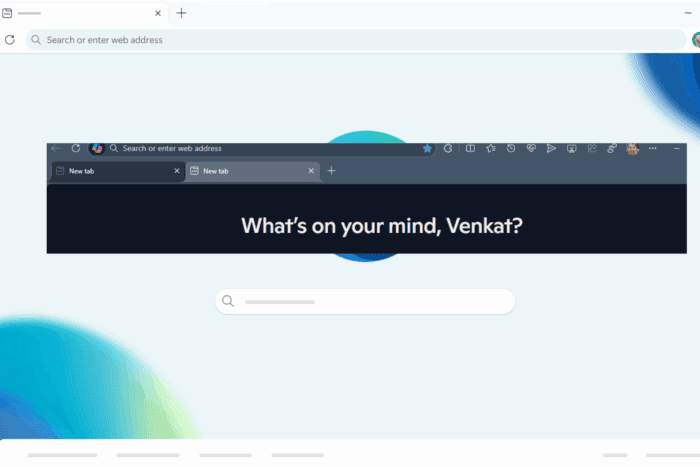
After launching Copilot Mode, Microsoft is testing a major visual change in the Edge Canary version. The new design moves the address bar, where you type web addresses, to the very top of the browser, above the tabs, rather than below them.
This isn’t just a small tweak; here’s what’s new:
Address Bar on Top: The web address and search box now sit in the topmost row.
Tabs Below: Your open tabs are shown in a separate row underneath.
Shorter Address Bar: The address bar appears more compact, creating more room for toolbar icons.
More Room for Tabs: This setup gives the tab strip more breathing room and a cleaner look.

This change could make Edge feel less crowded, helpful if you keep many tabs open. It might also be preparing space for new features in the top bar.
In contrast, here’s the layout most users are familiar with:
Tabs on Top: Open website tabs are in the top row.
Address Bar Below: The address bar sits directly under the tabs.

Right now, the new design is only in testing, so not everyone will see it. Microsoft hasn’t said if it’ll become a permanent feature.
Why this may be tied to Copilot Mode
Microsoft recently added Copilot Mode in Edge replaces the usual new tab page with an AI-powered assistant and moves the Copilot chat panel near the address bar.
This new layout might be designed to make the Copilot panel easier to find and keep the top of the browser clean and focused.
But there’s a small downside: The Copilot panel now overlaps part of the tab row. In the old design, tabs stayed fully visible above it. Now, you might need to move or close the Copilot panel more often to see or switch tabs.
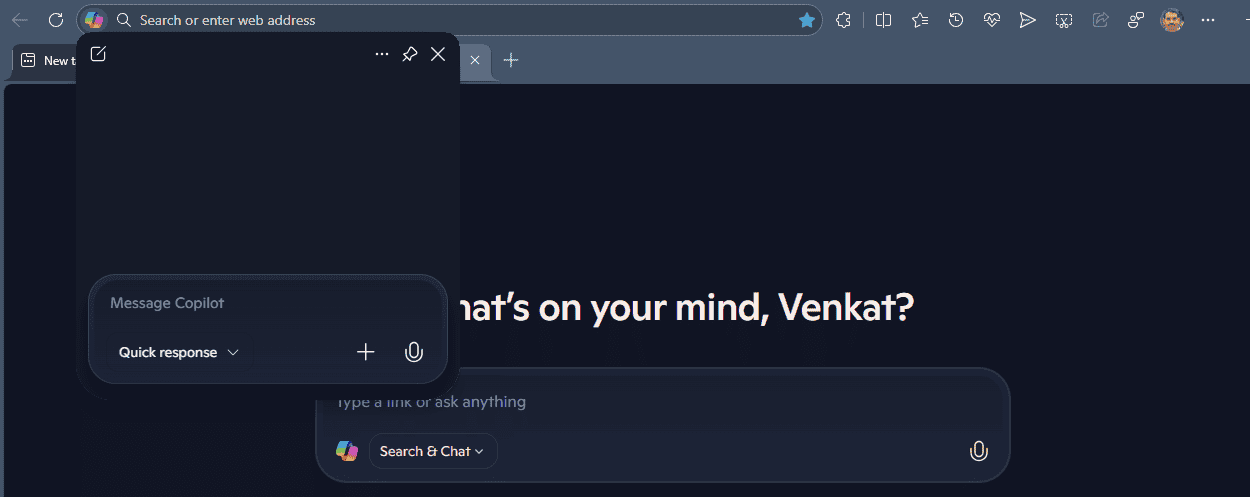
If you often juggle many tabs while using Copilot, this could slow you down a bit.
That’s not all. Microsoft is testing Edge Copilot in Private browsing mode, and Edge may show a comparison banner when you search for Chrome. Additionally, Edge Copilot is getting an Action Mode.


Read our disclosure page to find out how can you help Windows Report sustain the editorial team. Read more



Improve this guide




User forum
0 messages