
Desktop Visual Search Officially Confirmed for Microsoft Edge on Windows 11
Microsoft’s Visual Search is officially coming to the Edge desktop search bar on Windows 11, letting you discover info, translate text, and solve real-world questions using any image.


 3 min. read
  Updated on
Update [October 2025]: Microsoft Officially Confirms Desktop Visual Search for Edge
Microsoft has now confirmed this feature in its Microsoft 365 Roadmap. According to Microsoft:
“Quickly send images to Bing Visual Search from the Edge Desktop Search Bar to identify images, people, animals, and shows; extract, copy, and translate text while keeping its format. Solve questions quickly in various subjects and get trusted information to boost your knowledge. Discover products, fashion, recipes, identify a location and more. Available on Windows devices. Admins can control availability to this feature using the VisualSearchEnabled policy.”
The rollout is set to begin in October 2025.
After making Windows Power Saver optional in Edge, Microsoft is now testing Visual Search support in the Edge desktop search bar on Windows 11 in Canary.
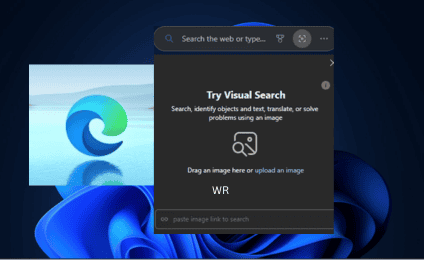
This new feature lets users search with images directly from their desktop, making it simpler to identify objects, translate text, or find information without opening Edge first.
The Edge desktop search bar is a floating search box on Windows, launched via Edge’s “More tools” menu. It lets you search Bing or open websites directly from your desktop, with results appearing in a new Edge tab, making it a lightweight way to access Bing outside the browser.
How Visual Search Works in Edge’s Desktop Search Bar

With this change in Edge Canary, the search bar gains a new camera icon. Clicking it opens a small window that lets you search using an image instead of text. You can:
- Drag and drop an image into the search bar window
- Upload an image manually
- Paste an image link to search (note: this option is currently limited)
Once an image is added, Edge opens a new tab with Bing Image Search results. From there, you can identify objects, extract text, translate, or even solve problems using the image.

This addition looks like an A/B test at the moment, so not everyone will see it right away. For those who do, it brings Bing’s visual search closer to the desktop, making image-based queries faster and easier without needing to first open a browser.
That’s not all. Microsoft could soon offer Discover Copilot Feed settings in Edge and is also testing a multi-tab summarization feature.


Read our disclosure page to find out how can you help Windows Report sustain the editorial team. Read more



Improve this guide




User forum
0 messages