
Everything New in Excel for July 2026: Citations, Connectors, and More


 2 min. read
  Published on
The Excel July 2026 update adds several Copilot features across Excel for Windows, Mac, and the web, including inline citations and Power BI integration.
Microsoft detailed the changes in its July 2026 roundup of new Excel features blog post.
Copilot responses now include inline citations
Copilot responses in Excel can now display inline citations. Users can open each citation to verify the information and review the original source.
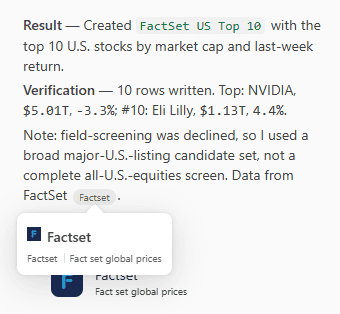
Microsoft has also updated the source attribution interface to make referenced content easier to examine.
Excel adds Copilot connectors and Power BI data
Synced Copilot connectors can bring organizational content directly into Excel. Users can analyze the connected information with natural-language prompts, while existing company permissions continue to control access.
Copilot can also analyze data from Power BI reports. Users can attach a report through the work content selector and ask Copilot to identify trends, summarize results, or generate insights.
Power BI account permissions still apply.
New branding and workbook design tools
The new @brand-kit skill can apply an organization’s branding to an Excel workbook.
Microsoft has also introduced the @theme-design skill, which can select coordinated colors, style charts, organize workbook layouts, and highlight important findings.
Copilot works without AutoSave
Excel previously required users to enable AutoSave before accessing Copilot on Windows and Mac.
Microsoft has now removed that requirement. Excel may recommend AutoSave, but users can dismiss the message and continue using Copilot.
The July update mainly targets Copilot users, with few major additions for people who do not use Excel’s AI tools.
Microsoft has also faced criticism over an unremovable Office upgrade banner and recently updated several Windows 11 applications.
Meanwhile, Copilot is coming to Outlook Classic in August 2026.

Read our disclosure page to find out how can you help Windows Report sustain the editorial team. Read more



Improve this guide




User forum
0 messages