
Microsoft Teams Redesign With Two-Step Sharing Is Rolling Out


 3 min. read
  Published on
The Microsoft Teams meeting redesign changes how users share screens, leave calls, and access frequently used controls. Microsoft has started rolling out the cleaner interface to most users, with broader availability expected by the end of August 2026.
The company designed the update to reduce two of the most disruptive meeting mistakes: accidental screen sharing and unintended exits.
Microsoft reorganizes Teams meeting controls
Microsoft is introducing a redesigned meeting interface that separates high-impact actions and makes essential controls easier to find.
In the previous layout, Teams placed several important buttons close together. Users could select Share while trying to access another option or accidentally click Leave during a meeting.
The redesigned interface groups Audio, Video, and Share controls near the top center of the meeting window. Microsoft has moved the Leave button to the far-right side, separating it from controls that users select more frequently.
Less commonly used tools now appear inside a new More menu. Users can also pin, remove, and rearrange meeting controls based on their preferences.
New sharing panel adds a confirmation step
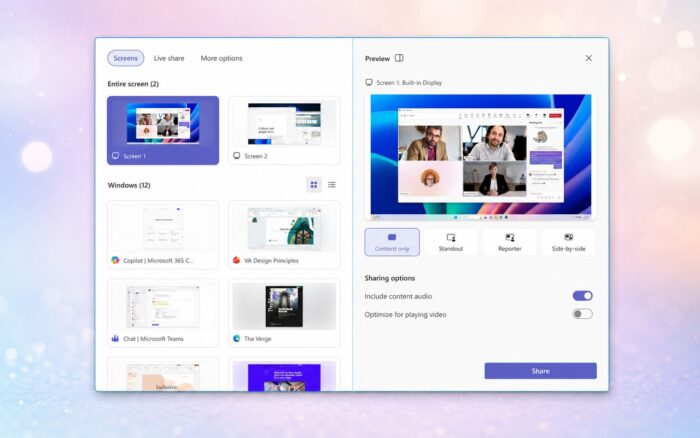
Selecting Share no longer starts the screen-sharing process immediately. Teams now opens a redesigned panel where users can review and confirm what they want to present.
Available screens, application windows, and other sharing sources appear on the left side of the panel. A large preview on the right shows exactly what other meeting participants will see.
Users must then select a final Share button to begin presenting. This two-step process should significantly reduce accidental screen sharing.
Teams adds presentation and audio options
The new sharing panel includes several presentation layouts such as Content only, Standout, Reporter, and Side-by-side.
Users can decide whether to include system audio before sharing starts. Teams also provides an AI-powered audio optimization option that can process sound before participants hear it.
These settings now appear in the same panel as the screen and window selection tools, allowing users to check their complete presentation setup before going live.
Teams meeting redesign rollout continues
Most Teams users are already receiving the updated interface. Microsoft expects broader availability by the end of August 2026, according to the updated MC1317197 roadmap notice.
The redesigned toolbar should give users faster access to their preferred controls while keeping disruptive actions further apart. The sharing preview and final confirmation button also provide a clearer safeguard against displaying the wrong screen or application.
In other news, Microsoft canceled planned Teams and Outlook features, while the company also confirmed plans for a Copilot “super app” scheduled to arrive this year.
Via Windows Latest

Read our disclosure page to find out how can you help Windows Report sustain the editorial team. Read more



Improve this guide



User forum
0 messages