
Windows 11 26H1 Beta Build Brings WinRE Wi-Fi Reuse And Personalization Upgrades


 3 min. read
  Published on
Microsoft has released Preview Build 28020.2818 to Windows Insiders, bringing many of the same changes that recently appeared in the Experimental channel.
Windows 11 gets several wallpaper and personalization improvements
Microsoft has made several changes to background settings, with a focus on reliability and better previews.
Windows 11 now supports DIB image files as desktop backgrounds. Microsoft has also improved slideshow transitions on newly created accounts and increased the resolution of background previews.
Background previews should also look better on portrait monitors.
The update improves reliability when users change wallpapers several times in quick succession. Slideshow wallpapers can now continue working across multiple desktops without Windows automatically switching the background setting back to Picture mode.
Microsoft also fixed an issue that caused the wallpaper to turn black after every reboot for some Insiders.
Magnifier gets a refreshed toolbar
Microsoft has refreshed the Magnifier toolbar to better match the rest of the Windows 11 interface.
The update introduces redesigned icons along with adjusted spacing and padding.
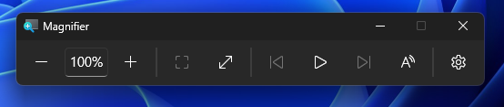
Microsoft has not changed the core Magnifier functionality. Views, zoom controls, keyboard shortcuts, and Read Aloud continue to work as before.
Windows 11 adds Emoji 17.0 support
Build 28020.2818 also introduces support for Emoji 17.0.
New additions include the distorted face, fight cloud, and hairy creature emoji.

Windows Recovery can reuse saved Wi-Fi profiles
Windows Recovery Environment can now reuse eligible Wi-Fi profiles from the main Windows installation.
This means users may no longer need to manually enter WPA2 or WPA3 passwords when connecting to a network from WinRE. Supported certificate-based Wi-Fi networks can also carry over to the recovery environment.
Microsoft enables the feature by default, although IT administrators can disable it.
Modern Print Management is temporarily going away
Microsoft is temporarily removing its modernized Print Management experience from Windows Insider builds.
The company plans to continue refining the feature before bringing it back in a future update.
Existing Print Management tools remain available, so the change does not remove the traditional printing management options from Windows 11.
File Explorer remembers Home section preferences
File Explorer Home now remembers whether users expanded or collapsed its sections.
This should prevent users from having to repeatedly adjust the Home layout after reopening File Explorer.
Taskbar system tray reliability improves
Microsoft has also addressed reliability when Windows 11 loads the system tray area of the taskbar.
The change forms part of the general reliability fixes included with this Beta build.
Keen-eyed Insiders may notice that these changes match those included in Experimental (26H1) Preview Build 28120.2824.
Users who prefer a more stable Windows 11 update can instead check out Windows 11 KB5120998, which recently introduced additional interface and security improvements outside these Insider changes.

Read our disclosure page to find out how can you help Windows Report sustain the editorial team. Read more



Improve this guide




User forum
0 messages