
How to Log In to Aidvantage and Manage Your Student Loans


 3 min. read
 Published on
The Aidvantage portal lets you manage your federal student loans, check balances, make payments, and review repayment plans. You can log in to your Aidvantage account through the official Aidvantage website using your User ID and password.
How do I log in to my Aidvantage account?
Use the web portal
Follow these steps to access your Aidvantage student loan account.
- Open the Aidvantage login portal in your browser.
- Click Log in button.
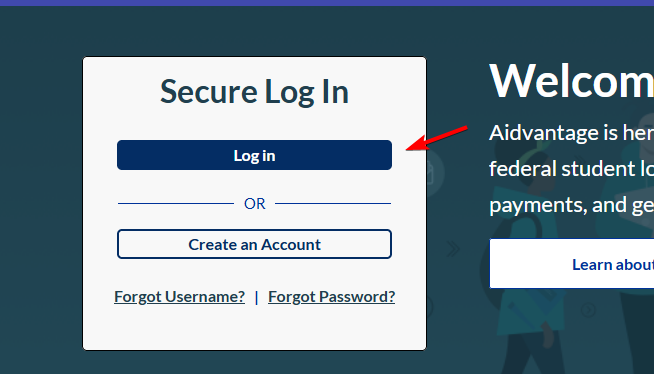
- Type the User ID associated with your Aidvantage account.
- Enter your account password in the designated field.
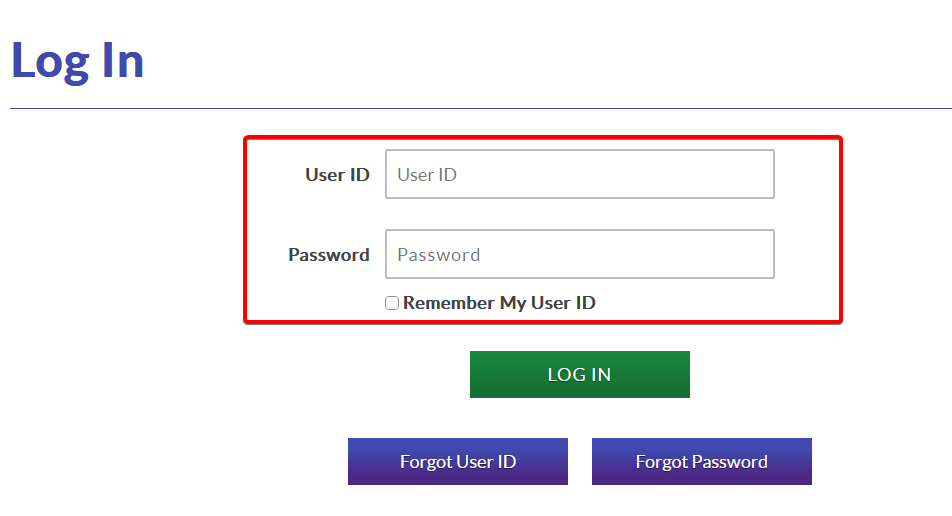
- Click LOG IN to access your account.
- Once you reach your account dashboard, you can view your student loan balance, payment history, upcoming due dates, and repayment options.
After signing in, you can make payments, manage Auto Pay, update your personal information, and access important loan documents.
How to fix Aidvantage login problems
If the Aidvantage login page isn’t working or you can’t access your account, try these solutions.
- Make sure you entered the correct User ID and password without extra spaces.
- Use the Forgot Password option if the website rejects your credentials.
- Clear your browser cookies and cache to remove outdated website data that might interfere with signing in.
- Open the website in an updated version of Chrome, Edge, Firefox, or Safari.
- Make sure your browser allows cookies and JavaScript for the Aidvantage website.
- Temporarily disable browser extensions that might block login pages or verification steps.
- Check your internet connection, refresh the website, or try another network.
- If the problem continues, contact Aidvantage support for account assistance.
As you can see, logging in to Aidvantage is straightforward once you have your account credentials. If you need help accessing other online accounts, check out our guides on Albertsons login, CVS login through the website and mobile app, and how to log in to Indeed.
FAQs
Can I log in to Aidvantage with my StudentAid.gov account?
Aidvantage uses its own User ID and password for account access. Your Federal Student Aid account lets you review your federal loans and identify your loan servicer, but you should use your Aidvantage credentials to access the servicer’s portal.
Why can’t I log in to my Aidvantage account?
Incorrect credentials, browser problems, disabled cookies, or temporary website issues can prevent access. Try resetting your password, clearing your browser cache, or using another browser.
Can I make student loan payments after logging in?
Yes. Once you access your Aidvantage dashboard, you can make payments, schedule future payments, view your payment history, and manage Auto Pay.
What should I do if my student loans don’t appear in Aidvantage?
Sign in to your Federal Student Aid account and check which company currently services your loans. If Aidvantage handles your loans but they don’t appear in your account, contact customer service for assistance.
Is the Aidvantage login website secure?
Yes. The official Aidvantage website uses an HTTPS connection and operates under the studentaid.gov domain. Always verify the website address before entering your credentials.

Read our disclosure page to find out how can you help Windows Report sustain the editorial team. Read more


Improve this guide


User forum
0 messages