
Albertsons Login: How to Sign In to Your Account Easily


 4 min. read
 Published on

Albertsons lets you access your grocery shopping account, manage online orders, check rewards, and use digital coupons. You can log in to Albertsons using the website or mobile app, and this guide will show you how to do it.
How do I log in to Albertsons?
1. Use your browser
You can access your Albertsons account from any computer or mobile browser. Follow these steps:
- Open your browser and visit the official Albertsons website.
- Click Sign In near the top of the page.
- Enter the email address or mobile phone number associated with your account.
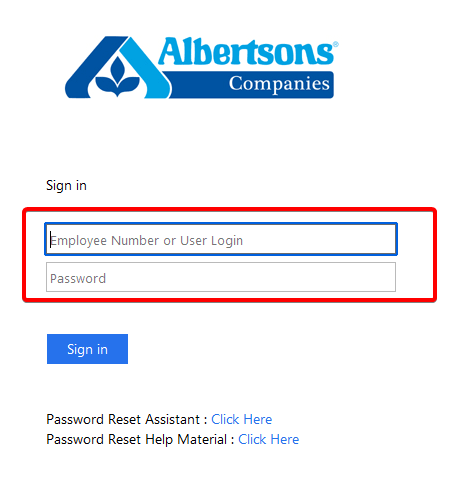
- Choose Sign in without a password to receive a verification code, or select Sign in with password.
- Enter the verification code or your account password, depending on your chosen method.
- Complete the sign-in process to access your Albertsons account.
Once you log in, you can browse groceries, view available discounts, manage your shopping lists, and check your orders.
You can also choose Sign in with Google if that option works with your account.
2. Use the mobile app
The Albertsons app allows you to manage your shopping account directly from your smartphone.
To sign in through the app, follow these steps:
- Download the Albertsons app from the Google Play Store or Apple App Store.
- Open the app on your Android device or iPhone.
- Tap Sign In.
- Enter your registered email address or mobile phone number.
- Follow the available verification or password prompts.
- Complete the login process to access your account.
After signing in, you can browse weekly deals, clip digital coupons, manage rewards, and shop for groceries.
You can also use the app to create shopping lists and review previous purchases.
How to fix Albertsons login not working
If the Albertsons website or app prevents you from signing in, try the following solutions:
- Check your login credentials: Make sure you enter the correct email address, phone number, or password. If you registered with your mobile number, try using it instead of your email address.
- Request a new verification code: Check your text messages and email inbox, including the spam folder. Request another code if necessary, and use the most recent one.
- Clear your browser cache and cookies: Open your browser’s privacy settings, clear cached files and cookies, and restart the browser. Keep in mind that this may sign you out of other websites.
- Update the Albertsons app: Open the Google Play Store or Apple App Store and install any available updates. Restart your phone if the problem continues.
- Try another browser or device: Switch to another updated browser or use a private browsing window to check whether extensions or stored data interfere with login.
- Contact Albertsons customer support: Visit the official Albertsons help center for assistance. You can also call 1-877-258-2799 for Albertsons for U account problems.
You can complete the Albertsons login process through the official website or mobile app using your registered email address or phone number. The service supports password-based and passwordless sign-in options.
If you experience similar problems with other grocery apps, our guides can help you fix the Giant app not working or troubleshoot the Hannaford app not working. You can also follow our Best Buy login guide if you need help accessing your retail shopping account.
FAQs
Can I log in to Albertsons without a password?
Yes. Albertsons offers a passwordless sign-in option. Enter your registered email address or phone number and follow the instructions to receive and use a verification code.
Why can’t I log in to my Albertsons account?
Incorrect login credentials, verification problems, outdated browser data, or temporary website issues can prevent you from signing in. Check your account details, request a new verification code, or try another browser.
Can I use my phone number for Albertsons login?
Yes. Albertsons allows customers to sign in using the mobile phone number associated with their account. Use the same number you registered with or previously used while shopping.
Is an Albertsons for U account free?
Yes. Albertsons for U is a free loyalty program that provides access to personalized offers, digital coupons, and rewards. Some additional subscription services may require payment.
What should I do if Albertsons says I already have an account?
This message usually means Albertsons already recognizes the email address or phone number you entered. Choose Sign In instead of creating another account. Use the password recovery option if you cannot remember your login information.

Read our disclosure page to find out how can you help Windows Report sustain the editorial team. Read more


Improve this guide

User forum
0 messages