
How to Log in to Your Best Buy Account: 3 Ways to do it


 4 min. read
  Updated on

After you log in to Best Buy, you can access your orders, saved products, and account details. This guide will show you how to do that on all your devices.
How do I login to Best Buy?
1. Use your PC
Best Buy’s website works on Windows, Mac, Chromebook, and most modern browsers. You can sign in before shopping or during checkout.
- Open your browser and visit BestBuy.com.
- Select Account near the top of the page.
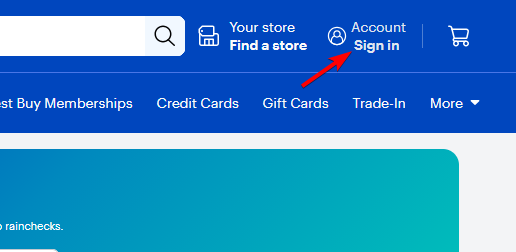
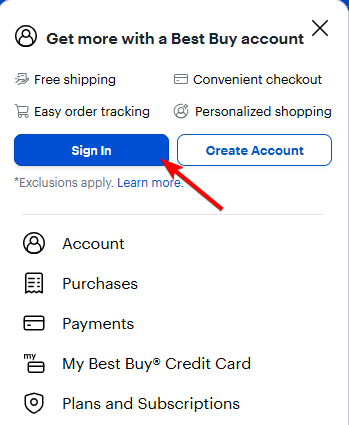
- Choose Sign In.
- Enter the email address linked to your Best Buy account.
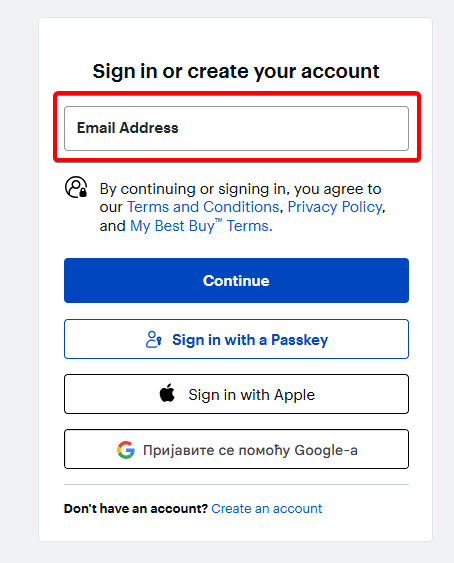
- Enter your password, then select Sign In.
If your credentials are correct, Best Buy should take you directly to your account.
Tip: Check the website address before entering your password. Avoid signing in through links from unfamiliar emails or messages.
2. Use the Best Buy app
You can also access Best Buy on phone:
- Install the official Best Buy app from your device’s app store.
- Open the app and select the account or sign-in option.
- Enter your email address and password when prompted.
- After signing in, access your account information, purchases, and other details in the app.
- Use the app to track orders and manage purchases while on the go.
3. Use your mobile browser
If you don’t have the app installed, you can access the service from your mobile browser:
- Open Chrome, Safari, Edge, or another supported browser and visit BestBuy.com.
- Open Account, then select Sign In.
- The mobile website is a convenient alternative if the Best Buy app is unavailable or not working properly.
Forgot your Best Buy password?
You don’t need to create a new account if you forget your password.
Select the password recovery option on the Best Buy sign-in page and follow the instructions sent to your registered email address.
If you no longer have access to that email account, recovery may require additional verification.
Why Your Best Buy Login Might Fail
Login problems can occur even when you believe you’re using the correct password.
A temporary website issue may prevent authentication, while cached browser data or extensions can sometimes interfere with the sign-in page.
Try these fixes:
- Recheck your email address and password.
- Reset your password if your credentials are rejected.
- Clear your browser cache and cookies.
- Try another browser or private browsing mode.
- Switch between Wi-Fi and mobile data.
- Update the Best Buy app if you’re using a phone.
- Check whether Best Buy is experiencing a wider service outage.
If the problem continues across multiple devices or browsers, contacting Best Buy support may be the next step.
Best Buy login should normally take less than two minutes. The most common problems are incorrect credentials, temporary browser issues, or problems with the Best Buy website or app.
Whenever possible, sign in through the official Best Buy website or app. Keep your password private and avoid saving login details on shared or public computers.
If you still can’t access your account, resetting your password or contacting Best Buy support should help you determine whether the problem is with your credentials or the account itself.
We also have guides explaining how to subscribe to Amazon Prime and how to cancel your Amazon Prime subscription.
Best Buy Login FAQs
1. Can I use Best Buy without an account?
Yes. You can browse and shop for products without signing in. A Best Buy account is mainly useful for managing orders, saved information, memberships, and other personalized features.
2. Why does Best Buy keep rejecting my password?
Check the spelling and capitalization of your email address and password. If the password is still rejected, use Best Buy’s password recovery process to create a new one.
3. Can I sign in to Best Buy from my phone?
Yes. You can sign in through the Best Buy mobile app or visit BestBuy.com using your phone’s browser.
4. Is my Best Buy account the same across devices?
Yes. You can use the same Best Buy account credentials across supported devices, browsers, and the Best Buy app.

Read our disclosure page to find out how can you help Windows Report sustain the editorial team. Read more



Improve this guide


User forum
1 messages