
Chrome Is Pushing Google AI Mode With New Prompts on the New Tab Page
Chrome Canary is showing Google AI Mode prompts on the New Tab Page, including “Brainstorm,” “Help me learn,” and “Write or edit.”


 2 min. read
  Published on
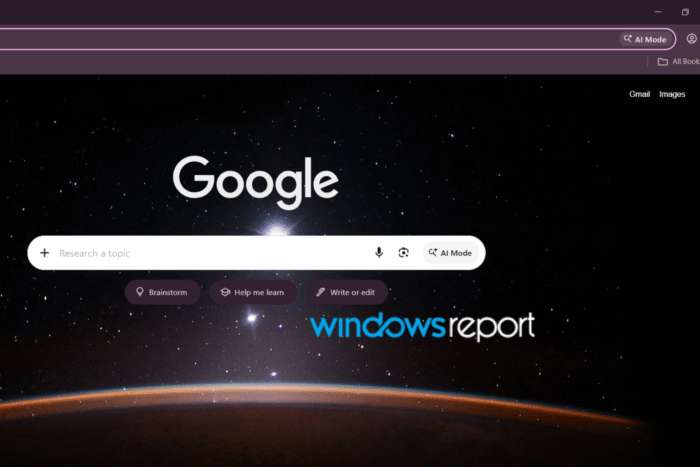
Google is quietly extending its AI Mode push from google.com into Chrome itself. Chrome Canary is now showing Google-style action chips under the New Tab Page (NTP) search bar, with prompts like “Brainstorm,” “Help me learn,” and “Write or edit,” even when users aren’t signed in to a Google account.
AI Mode is Google’s conversational search experience, where users can ask questions and continue with follow-up prompts instead of relying only on traditional search results.
Chrome’s NTP in the latest Canary build now surfaces a row of tappable AI suggestions directly under the search box. These chips are designed to kick off common AI-assisted tasks without requiring users to type a query first. Clicking each chip also brings up more suggested prompts related to that task, as shown below:
Brainstorm: Offers prompts like planning a packing list, setting up a workout routine, or building a study schedule.
Help me learn: Suggests ways to practice a language, take a quick quiz, or calculate a weighted GPA.
Write or edit: Helps with drafting cover letters, polishing a bio, or rewriting a note.
This closely mirrors what Google is currently showing on its homepage for non signed users, but bringing it directly to Chrome makes AI part of the browser’s default starting point.
What makes this more interesting is that the prompts appear even when you aren’t signed in. Google is putting AI Mode in front of Chrome users without first asking them to log into a Google account.
For now, we’ve spotted this in Chrome Canary, so it isn’t available to everyone yet. There’s no word on when Google might bring it to the regular version of Chrome, but this gives us another look at how the company is pushing AI Mode beyond Google Search and into Chrome itself.


Read our disclosure page to find out how can you help Windows Report sustain the editorial team. Read more



Improve this guide



User forum
0 messages