
Chrome Just Made Starting AI Mode a Lot Less Annoying
Chrome Canary now lets users type prompts and upload files from the New Tab Page search box before AI Mode opens.


 3 min. read
  Published on
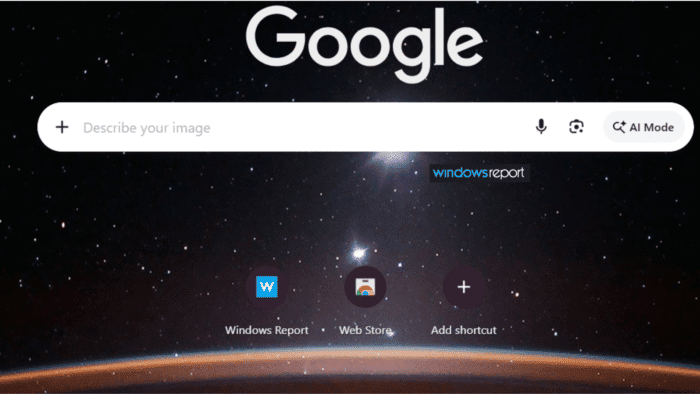
Google is testing a new AI Mode experience in Chrome Canary that lets users enter prompts and upload files directly from the New Tab Page search box. Instead of taking users straight to the AI Mode webpage, Chrome can keep them on the New Tab Page, where they can type a question, attach images or PDFs, and submit before AI Mode opens for responses.
AI Mode is Google’s AI-powered search experience that can answer questions, analyze files, and handle more complex queries than traditional Search.
Right now, clicking the AI Mode button in Chrome typically takes users directly to the AI Mode webpage, where they type questions and attach files before receiving answers. In Chrome Beta, this behavior is consistent. The button always opens the AI Mode page, whether you’re signed in or not.
How Chrome’s New Tab Page AI Mode Experience Works
In Chrome Canary, the experience is different. For some users, clicking the AI Mode button keeps you on the New Tab Page and turns the search box into an AI input field. You can type, describe your image, and submit without leaving. Chrome then opens AI Mode to display the response. Other users still see the Beta-like behavior and go directly to the AI Mode page.

In our testing, the New Tab Page search box turned into an AI prompt box after clicking the AI Mode button. The box showed an “Ask anything” message and accepted both typed questions and files. You could drop in images or PDFs, and they showed up right in the search box before you hit Enter. The search box also started showing AI Mode suggestions and past searches inside itself.
Instead of just being a shortcut that immediately opens AI Mode, the New Tab Page became where you could prepare your query before Google’s AI search even opened.
Google is working on this in Chromium, where the feature is called “NTP Composebox.” In plain terms, it’s a new compose-style input box that appears on the New Tab Page after you click the AI Mode button. The code adds support for file uploads, drag-and-drop, a carousel that shows your attached files, and other AI-focused UI elements.

One recent Chromium change adds checks for who gets this new experience. The code sends users who aren’t eligible directly to the AI Mode webpage instead. This means Google is testing different ways to start AI Mode in Chrome.
The difference may sound small, but it changes where AI interactions begin. In the current version, AI Mode is both where you start and where you get answers. With the new version, the New Tab Page can handle typing and file uploads first, while AI Mode becomes where answers are generated and shown.
Google has not announced when or if this New Tab Page AI Mode experience will roll out more widely. For now, the feature is still being tested in Chrome Canary.


Read our disclosure page to find out how can you help Windows Report sustain the editorial team. Read more



Improve this guide




User forum
0 messages