
Chrome overhauls "Autofill and passwords" with a new "Your saved info" settings hub
Chrome Canary is testing a new Your saved info section designed to take over from the Autofill and passwords page


 3 min. read
  Published on
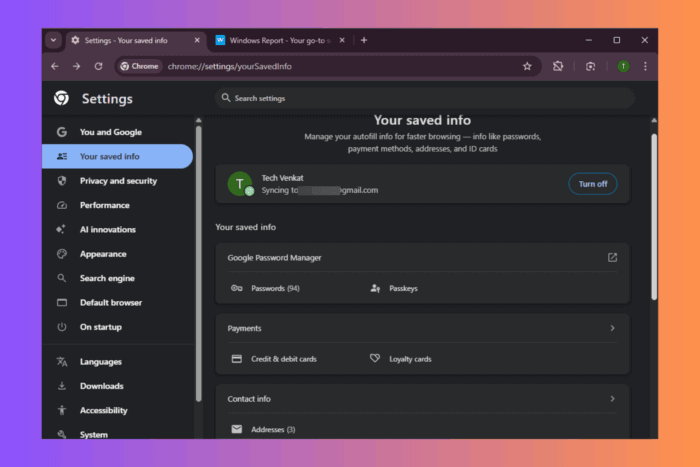
Google is redesigning how Chrome manages saved data. The company is testing a new section called “Your saved info” to replace the current “Autofill and passwords” settings page.
At present, the existing page, shown below, presents only passwords, payment methods, addresses, and the enhanced autofill option. It uses a basic layout and does not include separate sections for identity documents or travel information.

Chrome’s new Your saved info
By comparison, the new “Your saved info” page offers a cleaner layout and brings all stored data into one section. The change makes it easier for users to access and manage personal information used for browsing and web transactions.

In addition, the redesign adds support for loyalty cards, identity documents, and travel details. The other sections remain unchanged.

Existing sections include:
- Google Password Manager lists passwords and passkeys
- Payments show credit cards (now expanded to include loyalty cards)
- Contact info contains saved addresses
- Autofill settings include enhanced autofill and general controls used across all categories
- Related Google services link to Google Password Manager, Google Wallet, and the Google Account page
Newly added sections:
- “Identity docs” add support for driver’s licences and passports
- “Travel” includes travel info and vehicles
To support these changes, Chrome reorganised how these sections function internally. The new structure supports more types of data and keeps related information grouped more clearly. Spacing, icons, and labels were refined to make the page easier to read.
Chrome also introduced dedicated pages for identity documents and travel. These options did not exist in the earlier layout. The settings can now show or hide certain options based on relevance, which helps keep the interface clean.
The “Your saved info” description notes that the page manages autofill information for faster browsing. It highlights entries such as passwords, payment methods, addresses, and ID cards.
According to information from a Chromium commit, this hub helps users find and manage data used for web transactions. The commit also states that the structure allows support for additional categories in the future.
That’s not all. Chrome now lets you save PDFs to Google Drive from its PDF viewer and could add a read mode button in the address bar. Also, check our hands-on Vertical Tabs article.


Read our disclosure page to find out how can you help Windows Report sustain the editorial team. Read more



Improve this guide




User forum
0 messages