
Skip History: Chrome may bring tabs from other devices to Tab Search, too
Chrome's redesigned Tab Search panel could soon include synced tabs from other devices, alongside open tabs and tab groups.


 2 min. read
  Published on
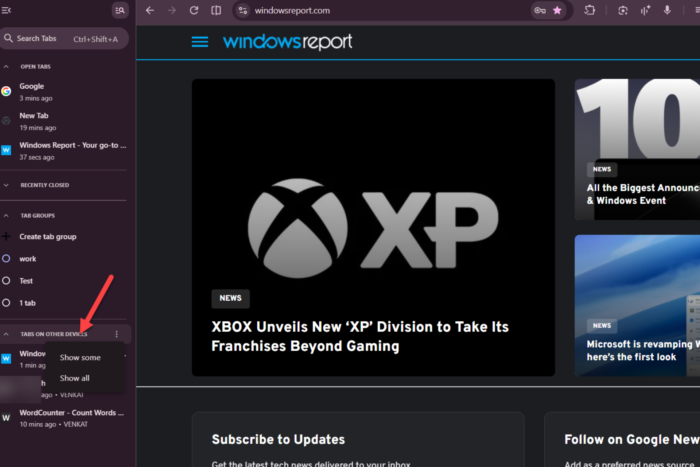
Chrome lets users access tabs opened on other devices through its History page when sync is enabled. Google is exploring a way to bring those tabs directly into Tab Search, alongside open tabs and tab groups, so users can find them without leaving the tab-management panel.
We recently reported that Google redesigned Chrome’s Tab Search panel to include tab groups. The panel already helps users find open tabs, and the addition of tab groups gives them another way to locate pages. Google is now working on bringing tabs from other devices into the same interface.
The new “Tabs on other devices” section appears alongside the other Tab Search sections. Chrome keeps this section collapsed to show only some tabs by default, helping users scan the panel without displaying the full list at once. If they want to see more, they can open the three-dot menu and select “Show all” to reveal all tabs from other devices. The menu also lets users return to showing only some tabs.
This change does not introduce cross-device tab syncing, which Chrome already supports. Instead, it gives users another place to find and access their synced tabs without navigating to History.
Google is experimenting with the feature behind the “Organizer Panel Foreign Tabs” flag (#organizer-panel-foreign-tabs), whose description says it enables cross-device tabs in the Organizer Panel.

In our testing, the “Tabs on other devices” section appears in Tab Search in both horizontal and vertical tab layouts.
Google has not announced when, or whether, the feature will reach Chrome’s stable channel. Its placement and behavior could change during development, and, like other experimental Chrome features, it is not guaranteed to ship.


Read our disclosure page to find out how can you help Windows Report sustain the editorial team. Read more



Improve this guide


User forum
0 messages