
Chrome tests mobile passkey unlock for desktop sign in
A new profile menu prompt lets Chrome request a linked phone’s screen-lock PIN to unlock encrypted passkeys for desktop sign-in.


 2 min. read
  Published on

Google is testing a new passkey access flow in Chrome Canary. A fresh entry inside the browser’s profile menu now invites users to “get passkeys on this device using Google Password Manager”.
Selecting the option opens a verification screen that requests the screen lock PIN of a linked Android phone. Chrome explains that the PIN is required to unlock encrypted data stored on that device before passkeys become available on the desktop browser.
This step verifies the device owner and keeps saved passkeys locked before desktop use.
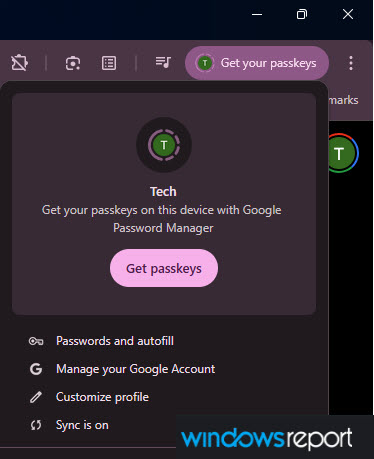
Desktop access to mobile-stored passkeys has required QR confirmation or phone approval. The new Canary behavior adds a direct unlock path tied to the Chrome profile and sync system. Cross-device authentication now moves closer to the main browser interface.
Since 2024, Google, Apple, and Microsoft have accelerated passkey rollout across browsers, operating systems, and built-in password managers. Sign-in screens now promote passkeys during account creation, store them securely on trusted devices, and sync them across devices and platforms. This lowers phishing risk and removes the need to remember complex passwords. Account access stays linked to devices the user controls.
Chrome now includes a phone-secured passkey unlock option in the profile menu. The browser treats passkey access as part of its core sign-in experience instead of relying only on an external phone authenticator.
For now, the prompt appears only in Chrome Canary, which Google uses to trial unfinished features. The interface and verification method are not final and may change later. Even at this stage, direct passkey unlock from a linked mobile device brings password-free desktop sign-in closer to daily use.


Read our disclosure page to find out how can you help Windows Report sustain the editorial team. Read more



Improve this guide




User forum
0 messages