
Chrome's AI May Let You "Create Images" and Do Research from the Address Bar
Google is testing a + button in Chrome Canary’s address bar to add files, images, and tabs for context, with options for Nano Banana and Deep Search.


 2 min. read
  Updated on
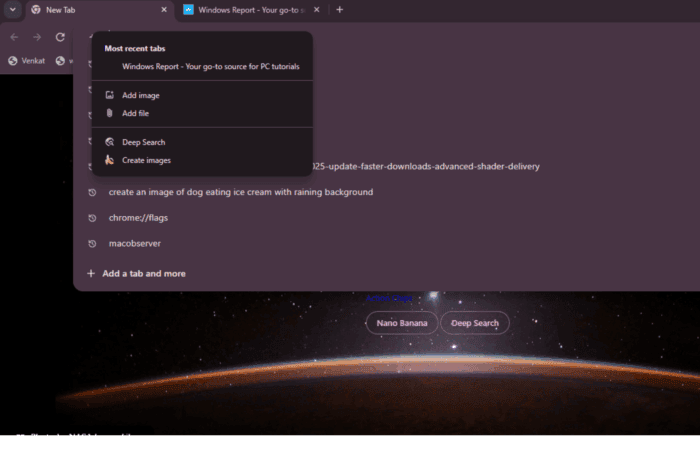
After adding Nano Banana and Deep Search under the New Tab Page search box, Google now appears to be bringing the same options to the address bar. In the latest Chrome Canary version, Google is testing a “+” button inside the bar that opens a small panel listing Deep Search, “Create Images”, “Add File”, “Add Image”, and ” Most recent Tabs”.
The new + button turns Chrome’s address bar into more than a space for typing web addresses. It now shows features and tools linked to Google’s Gemini AI. These let users begin creative or research tasks right from where they search or open sites.
A New + Button in Chrome’s Address Bar
When you click the + button, a small panel appears below the address bar with shortcuts to your most recent tabs and options to add files or images. Deep Search and Create Images appear beside them. This shows Google’s aim to unite AI, context, and search in one place. These buttons are visible but not working yet.

We have seen a similar AI experience earlier with the New Tab Page search box. Google now looks to bring the same to the Omnibox, also known as the address bar.
Chrome’s address bar is no longer just for visiting websites or running searches. It could soon let you create images, use Google Gemini AI features, add files or images, and ask Google AI Mode for context about what you have open.
Google is integrating AI into every part of Chrome, whether it is the address bar, the New Tab Page, or the search box. You should not be surprised by how deeply AI will connect with Chrome in the future.
That’s not all. Chrome is preparing a new layout redesign and testing a feature that opens dragged links in the same tab.
What do you think? Let us know your thoughts on this in the comments below.


Read our disclosure page to find out how can you help Windows Report sustain the editorial team. Read more



Improve this guide




User forum
0 messages