
ChatGPT Custom Stickers: How to Create & Share Them on iMessage & WhatsApp


 3 min. read
  Published on
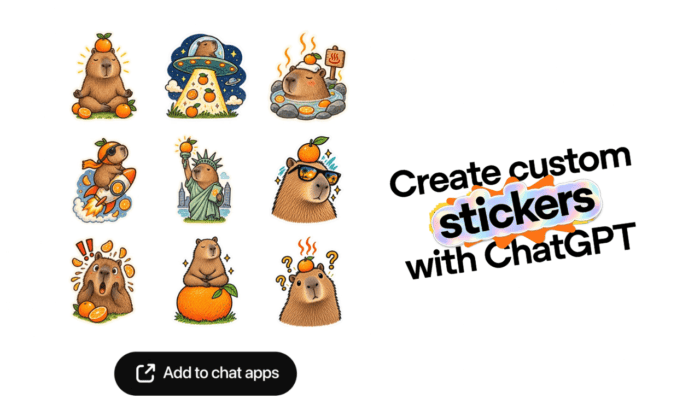
If you have been waiting for OpenAI to supercharge ChatGPT with some feature that could turn your photos, ideas, and inside jokes into custom stickers, you wish has finally been granted. OpenAI yesterday confirmed that ChatGPT users can create individual stickers, remix several images, change their style, and export them directly to supported chat apps. In this guide, we’ll walk you through steps to create custom iMessage and WhatsApp stickers using images and prompts using ChatGPT.
How to create a custom sticker in ChatGPT for iMessage and WhatsApp
- Head to ChatGPT Images section: The first and foremost thing you have to do is head to ChatGPT and open the Images section from the sidebar.
- Select “Stickers”: Choose Stickers option from the ChatGPT’s sidebar to start creating your custom sticker.
- Upload your photo: Add one or more images from your device. You can use selfies, pets, screenshots, memes, or almost anything else.
- Tell ChatGPT what you want: Type a simple request such as “Turn this photo into an iMessage sticker.” You can also describe a particular style or ask ChatGPT to remove or add elements.
Editor’s Tip: For better results, describe the expression, pose, background, and visual style you want instead of simply saying “make a sticker.”
Finally, ChatGPT will generate the sticker, including a transparent background when appropriate. If you uploaded several images, you could ask ChatGPT to remix them into multiple stickers.
How to share your ChatGPT custom sticker to iMessage
Once your sticker is ready, look for Add to chat apps. Select iMessage from the available options. The sticker can then appear in the dedicated ChatGPT section inside the Messages sticker carousel. You can use the same process to create additional stickers for a custom collection.
How to share ChatGPT custom stickers to WhatsApp
Once you are done creating the custom stickers, simply tap Add to chat apps, then select WhatsApp. There is one important catch, though. WhatsApp requires at least three stickers for an export, according to the feature details shared by OpenAI. That means you can’t export just one sticker to WhatsApp through this option.
Other things you ask ChatGPT to do when or after creating custom stickers
You can ask ChatGPT to:
- Turn a photo into a sticker.
- Create multiple stickers from several images.
- Add or remove visual elements.
- Copy the style of another image.
- Create a sticker based entirely on your description.
- Save the finished sticker to your photos.
The feature essentially turns ChatGPT into a quick sticker-making tool, without requiring a separate sticker editor.

Read our disclosure page to find out how can you help Windows Report sustain the editorial team. Read more



Improve this guide


User forum
0 messages