
Error Process in Job 760 (0x2F8): How to Fix it
Try using breakaway privileges if you encounter this issue


 2 min. read
  Published on

ERROR_PROCESS_IN_JOB isn’t a common error and it affects programmers and system administrators. The issue appears if the process is restricted by being a part of a job object, but let’s see how we can fix this.
How can I fix ERROR_PROCESS_IN_JOB?
1. Check if the process is in a job
- Press Windows key + S and type powershell. Choose Run as administrator.
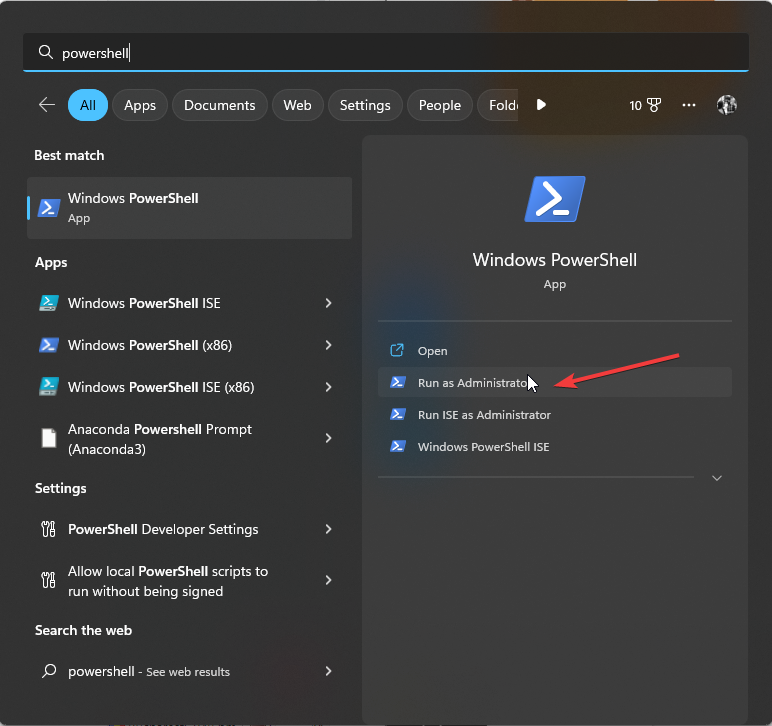
- Next, run the following command:
Get-Process | Where-Object { $_.Path -like "your-process-name" } | Select-Object Id, Name
- Alternatively, you can use the Windows API QueryInformationJobObject function or tools such as Process Explorer to do this.
2. Use breakaway privilege
- Open your code.
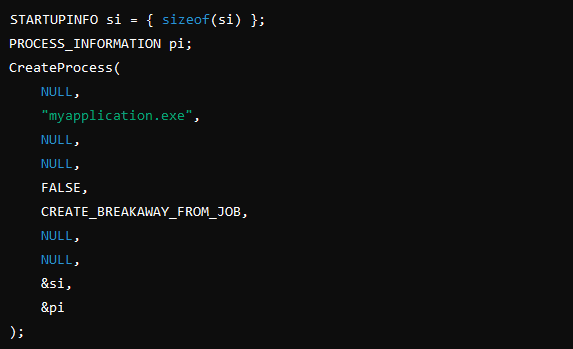
- Add the breakaway like this:
STARTUPINFO si = { sizeof(si) };
PROCESS_INFORMATION pi;
CreateProcess(
    NULL,
    "myapplication.exe",
    NULL,
    NULL,
    FALSE,
    CREATE_BREAKAWAY_FROM_JOB,
    NULL,
    NULL,
    &si,
    &pi
);
- Save changes.
3. Try launching the process outside a job
- Open Windows Search and type cmd. Choose Run as administrator.

- Next, run the following: start “” “your_program.exe”
- The program should now start.
4. Other tips to try
- If you want to run the process outside of the job, terminate the job, and launch the process again.
- Modify the job restrictions using the SetInformationJobObject and give it the JOB_OBJECT_LIMIT_BREAKAWAY_OK privilege.
- If the job is managed by a third-party, application or service, or if it’s a part of a system-level process, look for third-party support.
These are some of the methods that you can use to fix ERROR_PROCESS_IN_JOB 760 (0x2F8) The specified process is part of a job.
If you’re having similar issues, we have guides on ERROR_CANT_TERMINATE_SELF and ERROR_THREAD_NOT_IN_PROCESS that might give you more information.
Readers help support Windows Report. We may get a commission if you buy through our links.

Read our disclosure page to find out how can you help Windows Report sustain the editorial team. Read more



Improve this guide

User forum
0 messages