
Lynote AI Review: Detect and Humanize AI-Generated Text


 6 min. read
  Published on
Key notes
- Detailed AI-detection with model-specific signals.
- Humanize text to bypass all popular AI detectors.
- Access these and other AI tools with a generous free plan.
With so many different generative AI platforms and AI detection tools, it’s difficult to find the best solution for creating unique text that passes as human.
Fortunately, Lynote AI is tackling this head on with its combined AI Detector and Humanizer tools that account for all the major platforms. After testing Lynote AI, here’s everything you need to know:
What is Lynote AI?
Lynote AI is a powerful suite of productivity tools that offers advanced AI detection and a guaranteed 99% undetectable AI Humanizer. This rewrites AI-generated text at the sentence and paragraph level into more natural, human-like text.
It also offers tools for detecting AI images and creating accurate YouTube transcripts and summaries.
Overall, the platform is suitable for students, writers, marketers, educators, and professionals who use AI-assisted writing and want to get the most authentic results.
You can get started for free, while its yearly pro plan works out as little as $8.33 per month.
Key Features
Let’s take a closer look at Lynote AI’s main tools and why they stand out:
AI Detector
For many, the AI Detector will be the tool to start with. Here you upload your document or enter a minimum of 60 words, and it quickly returns an analysis for determining the likelihood of AI-generation.
Currently, one of my main gripes with the AI detection world is the problem of different detectors focusing on different AI models and completely ignoring others.
There’s also a blanket approach to scoring and labelling. Either a text is deemed AI without any further insight, or it’s given a percentage likelihood, which on its own is unhelpful.
Not only does this lead to people being wrongly accused of using AI, but it also leaves those wanting to refine and humanize AI text without the context to do so.
I was pleasantly surprised at how detailed Lynote AI’s results were. You don’t just get a single score or stamp claiming something is AI-generated. Instead, you get model-specific detection signals.
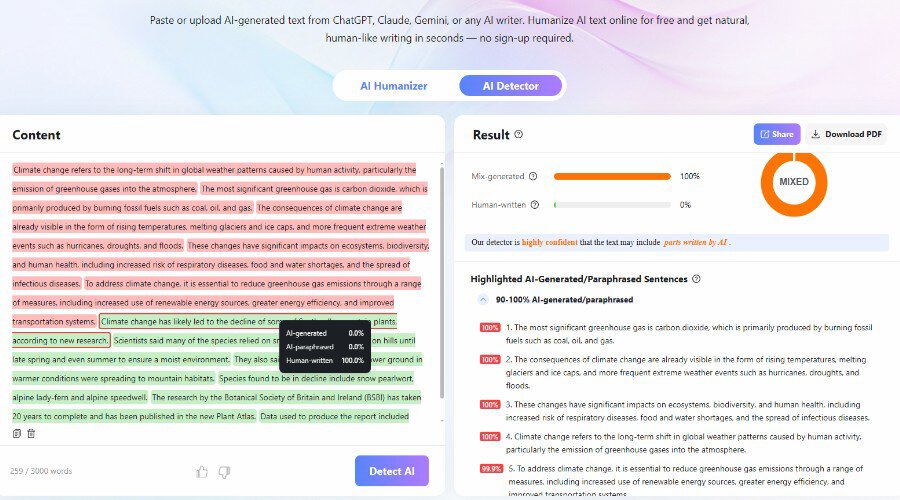
For example, it can detect and differentiate between the style of phrasing used by ChatGPT, Claude, Gemini, and others. Moreover, it takes volume into account. A single ChatGPT-style sentence isn’t going to give you a 99% score.
The whole text is combed-through sentence-by-sentence, highlighting areas that are clearly AI-generated, AI-edited, or a combination of human and AI. It even suggests areas that have been paraphrased or parsed through the AI humanization process.
This puts you in the perfect position for improving the text manually. Over time, you also begin to understand what the different AI models do and how to avoid those patterns to begin with.
The AI Detector supports more than 50 languages, and its free version offers deeper analysis than I’ve found with the likes of ZeroGPT, GPTZero, QuillBot, and most other detection tools.
Of course, using AI is about saving time, so jumping over to the Lynote AI Humanizer is a great way to quickly improve text that has been flagged for AI.
AI Humanizer
To get started with the AI Humanizer, paste in your text or upload a document. In most cases, the default settings are adequate, but it’s good to see you can tailor the style and reading level for certain audiences.
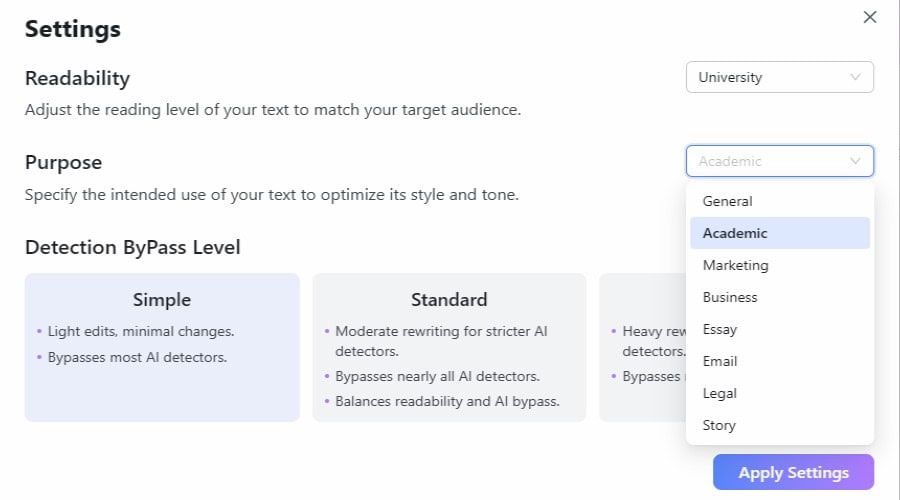
For example, a student might select University level readability and Academic for the purpose. Whereas a quick message to a colleague is better suited to Standard readability and Email for purpose.
You can also set the strength of the re-writing and how strongly it will bypass detectors. Generally, it will bypass GPTZero, Copyleaks, Originality.ai, and Sapling with a high Human Score.
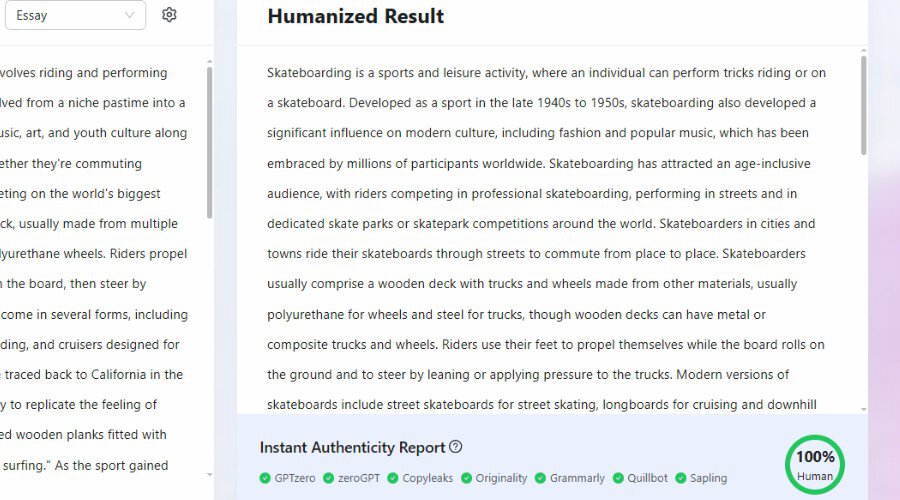
Its Authenticity Report demonstrates this firsthand, giving you a score for all the major AI detection platforms.
Because it sits alongside Lynote’s AI Detector, you can always test the humanized text again without switching between different websites.
After trying the Humanizer, it’s clear this is more than just a basic article spinner and doesn’t just change the order of words or swap synonyms. Rewrites maintain the facts and context of the original, while avoiding the signals associated with AI-generated text.
I also found the rewritten text typically flows better, with more varied sentence lengths and less repetitive phrasing.
To top it off, Lynote avoids plagiarism (passes Copyscape) and can preserve keywords for search engine optimized content.
Other AI Tools
There are lots of other useful tools to use alongside the AI detector and humanizer, including:
YouTube Transcript Generator
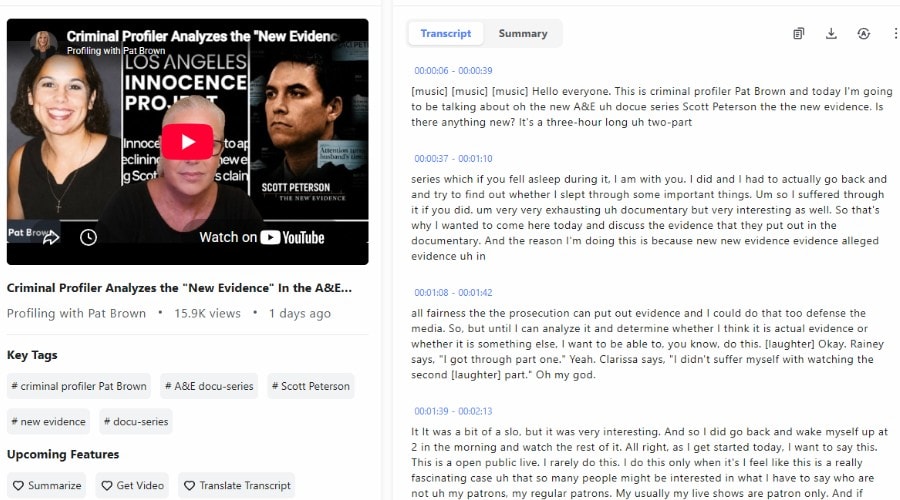
This lets you quickly extract accurate transcripts from YouTube videos by simply pasting a video URL. Once generated, transcripts can be read or exported for later use, as well as summarized or translated. This all makes it easier to research content, take notes, or repurpose videos into articles, blog posts, and social media content.
You can add up to 10 videos at once for bulk transcription. Moreover, entering a playlist URL will transcribe all the videos in the playlist.
I especially like that the transcript is timestamped, allowing you to jump to key moments, verify quotes, help with subtitles, etc.
YouTube Video Summarizer
More than just a basic text summary, this tool gives a title and overview of the video, as well as a chapter outline, a list of core concepts discussed, and action points.
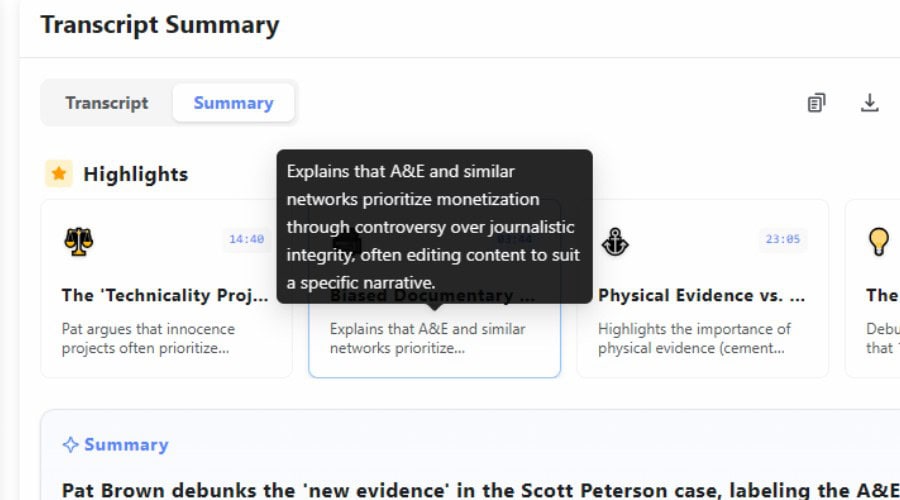
This makes it particularly useful for learning or, for example, creating a written tutorial from a video.
The summarizer is 100% free and you can generate unlimited summaries without signing up.
Pricing
Anyone can use Lynote AI for free, but to detect and humanize more words, consider the following premium plans:
- Pro Monthly ($29.99/mo) – Up to 3,000 words for AI Detect & Humanize, unlimited YouTube transcription length.
- Pro Yearly ($99.99/yr).
You can also try Pro for $1.95 a day for 3 days.
Lynote AI Review – Verdict
To conclude this Lynote AI review, there is a lot to love about this suite. The AI Detector goes beyond simply assigning a percentage score, offering detailed, model-specific analysis that helps you understand exactly why text has been flagged. Combined with the AI Humanizer, it creates a seamless workflow for refining AI-assisted writing. The results are accurate, natural-sounding, and unique.
Throw in useful extras like YouTube transcription and summaries, and Lynote AI creates excellent value for students, writers, marketers, and anyone looking to create more authentic, human-like content.


Read our disclosure page to find out how can you help Windows Report sustain the editorial team. Read more



Improve this guide



User forum
0 messages