
Microsoft Blocks RDP Phishing Attacks With New Windows Security Update
Opening .rdp files now triggers security warnings in Windows


 3 min. read
  Published on
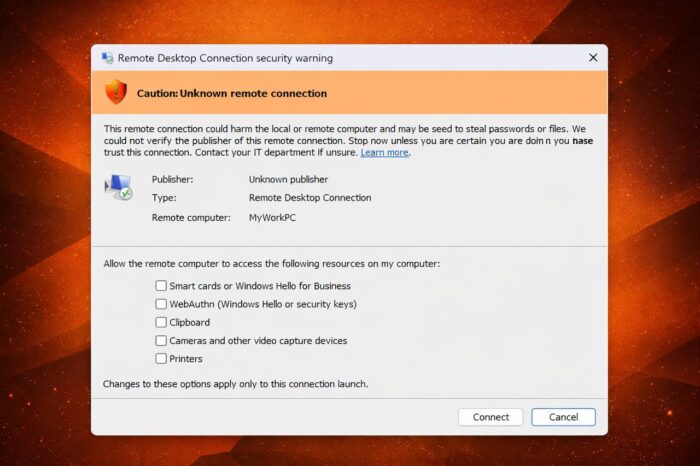
Microsoft has introduced new security protections aimed at blocking phishing attacks that abuse Remote Desktop Protocol (RDP) files, following growing concerns around enterprise-targeted threats. The changes arrive with Windows 10 KB5082200 and Windows 11 updates KB5083769 and KB5082052, as first reported by BleepingComputer.
RDP files become a growing attack vector
RDP (.rdp) files play a key role in enterprise environments, allowing users to quickly connect to remote systems. However, attackers have increasingly exploited them to trick users into connecting to malicious servers.
These files can silently redirect local resources such as drives, clipboard data, and even authentication methods. In phishing scenarios, this opens the door to credential theft, file exfiltration, and unauthorized access to corporate systems.
Security researchers have observed campaigns where malicious RDP files connect victims to attacker-controlled machines, capture sensitive clipboard data like passwords, and abuse authentication features, including smart cards and Windows Hello.
New security prompts and connection transparency
To address these risks, Microsoft now introduces a series of user-facing protections designed to increase awareness and reduce accidental exposure.
When opening an RDP file, users will now see a one-time educational prompt explaining the potential risks. The system requires explicit acknowledgment before proceeding.
Before every connection, Windows also displays a detailed security dialog. This interface clearly shows the remote system address, the publisher’s verification status, and a full list of any requested resource redirections.
Safer defaults and stronger warnings
Microsoft has tightened default behavior by disabling all resource redirection options unless explicitly allowed. This change limits what a remote system can access by default.
Unsigned RDP files now trigger a prominent warning labeled “Caution: Unknown remote connection,” while signed files display verified publisher information. Even with signed files, Windows still urges users to confirm the connection’s legitimacy.
These protections apply strictly to RDP files opened manually. Direct connections initiated through the Remote Desktop client do not trigger the same safeguards.
Admin controls remain available
For enterprise environments that rely on custom workflows, Microsoft allows administrators to temporarily disable the new warnings via the Windows Registry. This requires modifying the Terminal Services client policy key and setting the RedirectionWarningDialogVersion value.
Despite this option, Microsoft strongly recommends keeping the protections enabled, emphasizing the long history of RDP-based phishing attacks.
A step forward, but broader issues remain
The update marks a meaningful improvement in Windows security, especially for organizations heavily reliant on remote access tools. By surfacing connection details and limiting silent redirections, Microsoft reduces the risk of users unknowingly exposing sensitive data.
At the same time, Windows 11 continues to face criticism for its inconsistent design and legacy interface elements. Microsoft has already acknowledged these issues and confirmed that UI improvements remain in progress, suggesting that security and usability updates will continue to evolve side by side.

Read our disclosure page to find out how can you help Windows Report sustain the editorial team. Read more



Improve this guide



User forum
0 messages