
Windows 11’s Old AutoPlay Popup Is Finally Getting a Makeover


 2 min. read
  Published on
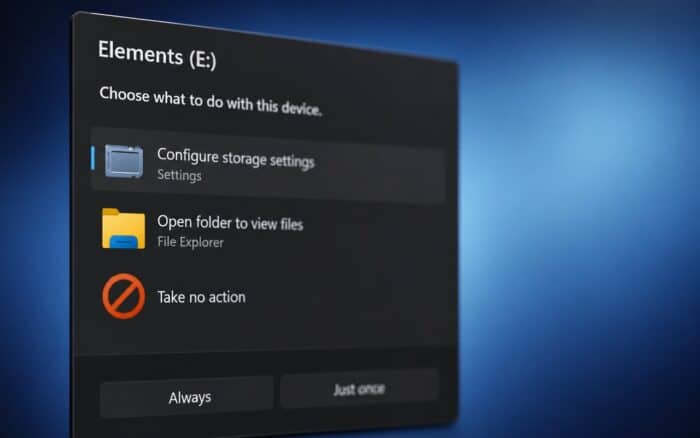
Windows 11 is getting more modern WinUI dialogs as Microsoft continues replacing older system interfaces with updated designs. Several redesigned pop-ups are already appearing in Windows Insider preview builds.
Windows 11 gets a redesigned AutoPlay dialog
Microsoft is now modernizing the AutoPlay dialog that appears when users connect removable media such as USB drives.
The current AutoPlay interface still carries design elements dating back to the Windows 8 era. The new version replaces it with a full dialog centered on the screen.
The redesigned interface includes rounded corners, larger icons, increased spacing between controls, modern WinUI styling, and support for both light and dark modes.
The result brings AutoPlay closer to the visual style Microsoft already uses across newer parts of Windows 11.
AutoPlay also gets more useful controls
The new dialog does more than change the appearance. Users can still select what Windows should do when they connect a device, including opening it in File Explorer.
Microsoft is also adding two options for handling the selected action: “Always,” which remembers it for future connections, and “Just once,” which applies it only this time.
The current Windows 11 AutoPlay flyout lacks this choice, so the redesign also restores functionality alongside the visual overhaul.
Microsoft keeps modernizing Windows 11
Microsoft has increasingly brought WinUI and Fluent Design elements into the Windows shell instead of limiting them to individual apps.
The company is also preparing a cleaner Windows 11 right-click menu and testing a dark-themed Properties dialog.
Meanwhile, the latest Release Preview update introduced a movable Windows 11 taskbar, showing that Microsoft continues revisiting long-standing parts of the desktop experience.
Via Windows Latest

Read our disclosure page to find out how can you help Windows Report sustain the editorial team. Read more



Improve this guide



User forum
0 messages