
Microsoft Brings Classic Refresh Option Back to Windows 11 File Explorer
Spotted in Windows 11 Experimental Build 26300.8376


 2 min. read
  Published on
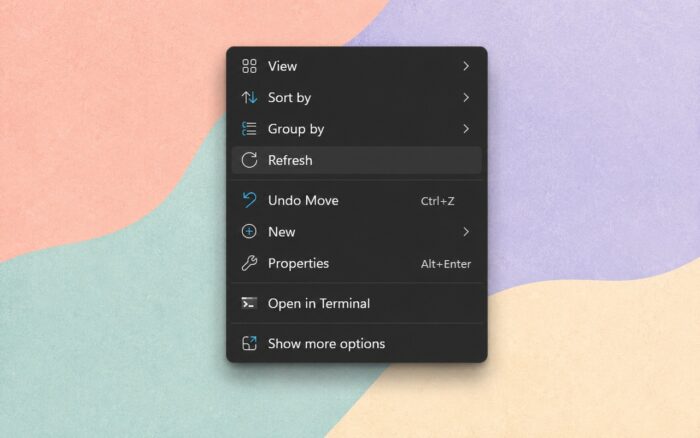
Microsoft appears to be reversing another controversial Windows 11 design change by restoring the classic “Refresh” option directly inside the modern File Explorer context menu.
According to Windows Latest, the change is currently testing in Windows 11 Experimental Build 26300.8376 and also adds a direct “Print” option to the redesigned right-click menu. Until now, both actions required users to open the older legacy menu through “Show more options.”
Microsoft continues restoring missing Windows 10 functionality
Windows 11’s modern context menu has faced criticism since launch for removing familiar shortcuts and slowing down common workflows. Many users complained that basic actions required extra clicks compared to Windows 10.
Microsoft previously defended the redesign by arguing that Refresh functionality already existed in File Explorer’s address bar. However, users continued requesting traditional right-click access anywhere inside folders and desktop views.
The upcoming change suggests Microsoft is gradually walking back some of the more restrictive decisions introduced with the Windows 11 redesign.
File Explorer improvements continue across recent builds
The updated File Explorer experience reportedly includes several additional usability improvements aimed at reducing friction for everyday users and power users alike.
Microsoft is working on faster context menu performance, smoother keyboard navigation across Explorer UI elements, and less cluttered flyouts. The company also plans to improve the Details view by displaying file sizes in more readable formats such as KB, MB, and GB, instead of always showing values exclusively in KB.
The address bar is also receiving fixes for paths containing double backslashes and quotation marks. Microsoft reportedly improved how renamed files appear and fixed issues where address bar suggestions failed to close properly.
Bigger Windows 11 cleanup effort underway
The latest File Explorer changes align with Microsoft’s broader effort to restore missing Windows 10 functionality while modernizing Windows 11 using newer WinUI 3 technologies.
Recent preview builds already revealed testing for smaller taskbar modes, movable taskbar functionality, and additional File Explorer optimizations. Microsoft is also reportedly preparing a modern file properties dialog and faster File Explorer loading through preloading improvements.
The company appears increasingly focused on improving usability after years of criticism surrounding Windows 11’s simplified interface decisions.

Read our disclosure page to find out how can you help Windows Report sustain the editorial team. Read more



Improve this guide


User forum
0 messages