
Windows 11 26H1 Experimental Build Reduces Monthly Restarts and Adds Touchpad Controls


 4 min. read
  Updated on

Windows 11 26H1 Experimental Build 28120.2630 introduces a unified update process, adaptive hibernation, new touchpad controls, and several File Explorer fixes.
Windows 11 updates may require fewer restarts
Microsoft is testing a unified update process that coordinates driver, .NET, and firmware updates with the monthly Windows quality update.
Instead of restarting the computer separately for different update types, Windows should install them together and complete the process with a single monthly restart. The change could reduce interruptions, especially on devices that regularly receive firmware and driver updates.
Microsoft is also making update pauses more flexible. Users can extend a paused update period as many times as necessary, rather than allowing Windows to resume updates automatically after a limited period.
Adaptive hibernation changes based on battery level
Build 28120.2630 introduces adaptive hibernation behavior designed to balance faster resumes with battery preservation.
Windows should hibernate less frequently when the battery level remains above 80%. This allows supported devices to stay in a state that provides a faster instant-on experience.
When the battery level drops below 10%, Windows will enter hibernation sooner. The system can then preserve more power and reduce the risk of the battery draining completely while the device remains unused.
Precision touchpads receive more gesture settings
Microsoft is expanding gesture controls for precision touchpads. Users will be able to adjust the default speed of scrolling and zoom gestures from Windows Settings.
The build also introduces accelerated scrolling. Repeating a scrolling gesture increases its speed, which should make navigating long documents, websites, and lists faster.
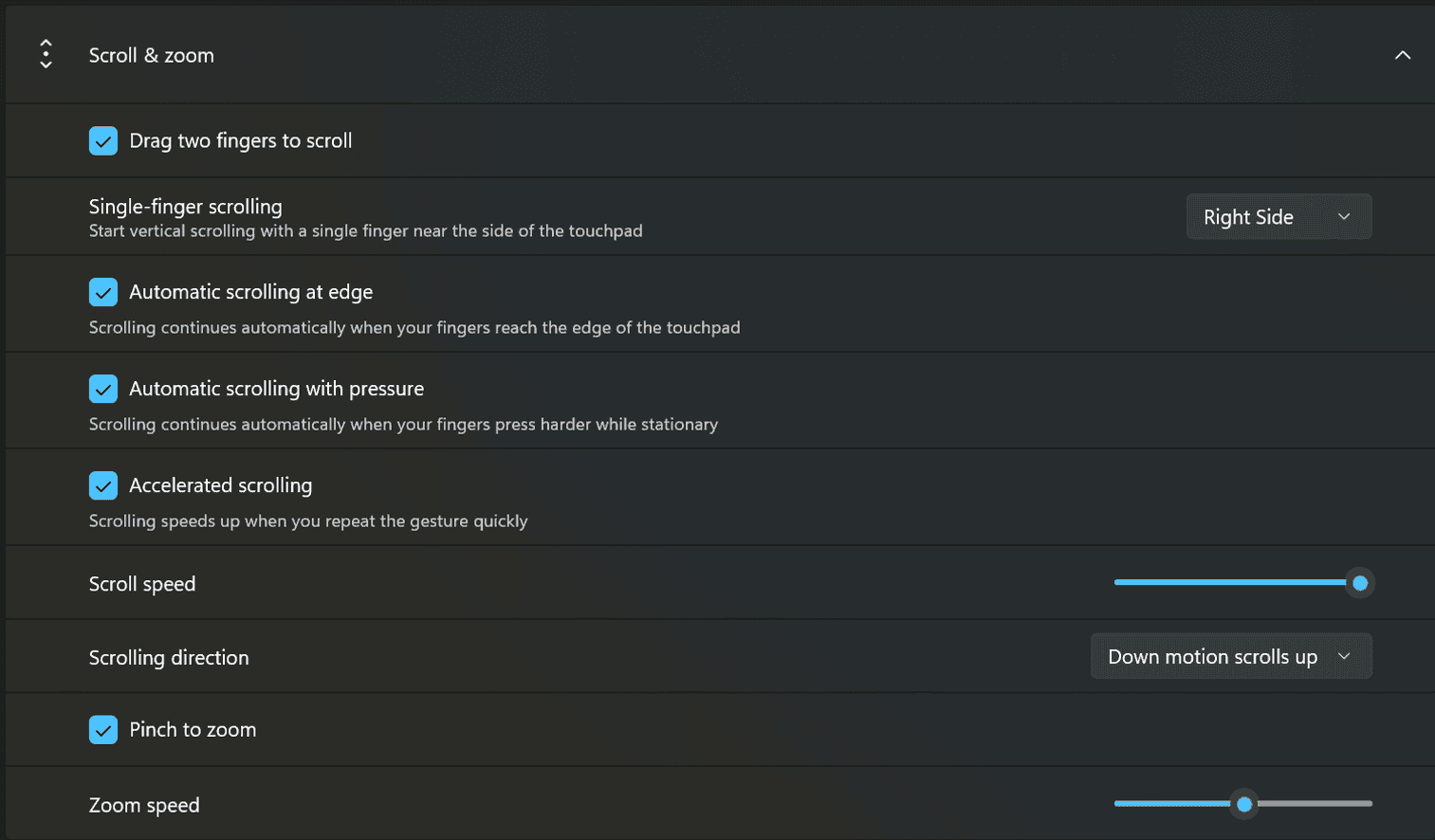
Additional touchpad features include automatic scrolling and optional single-finger scrolling support.
WinUI 3 applications will require upcoming changes in Windows App SDK versions 1.8 and 2.0 to support all the new scrolling capabilities.
File History can back up to SMB shares again
Microsoft fixed a File History problem that prevented automatic backups to SMB network shares.
Affected users previously received an invalid credentials message even when they entered the correct network login details. File History should now connect to supported SMB locations and continue scheduled backups normally.
File Explorer no longer mislabels DFS files
The update also fixes an issue affecting files stored on Distributed File System mapped drives.
After reconnecting to a network, Windows could incorrectly treat files on a DFS drive as downloads from the internet. This behavior sometimes displayed a security warning in the File Explorer Preview pane.
Windows could also add an unexpected Mark of the Web attribute when users copied affected files. Build 28120.2630 should prevent both problems.
Mouse cursor and voice typing fixes arrive
Microsoft addressed an input bug that caused the mouse cursor to blink repeatedly for some Windows Insiders.
The company also improved the reliability of voice typing preferences. Windows should now remember settings for automatic punctuation and the voice typing launcher more consistently.
PUBG may not launch after the update
PUBG: BATTLEGROUNDS may fail to launch after users install Build 28120.2630 because of a compatibility issue.
Microsoft has applied a safeguard that prevents affected systems from opening the game and encountering additional stability problems. Microsoft and the game’s developer are working on a resolution.
Players who regularly use the affected device for PUBG may want to consider the compatibility problem before installing the build.
Microsoft renews the Insider flight certificate
Build 28120.2630 includes a renewed Windows Insider flight certificate.
The current certificate expires on August 11, 2026. Experimental Channel users should install this build or a newer release before that date to continue receiving Windows Insider preview updates.
Microsoft is testing several other Windows 11 changes across its preview channels. A recent Windows 11 26H1 Beta build introduced Taskbar improvements and a process for reducing monthly restarts.
The company has also released Future Platforms Build 29639, which allows users to pause updates indefinitely.
Another Experimental Windows 11 update recently added smarter search behavior, Phone Link previews, and other improvements.

Read our disclosure page to find out how can you help Windows Report sustain the editorial team. Read more



Improve this guide




User forum
0 messages