
Microsoft Clarifies Who Authenticator Root Blocking Affects


 3 min. read
  Published on

Microsoft has clarified who will be affected by the new jailbreak and root detection policy in Microsoft Authenticator, as spotted by Windows Latest. The restriction applies to Microsoft Entra credentials, which means work and school accounts, not personal Microsoft accounts or standard third-party 2FA codes.
The change matters for users who rely on Microsoft Authenticator to access company, school, university, Microsoft 365, Teams, Outlook work, Azure, or Intune accounts. If the device is rooted or jailbroken, Authenticator may eventually block those work or school sign-ins.
Microsoft says the feature is enabled by default for affected customers. There is no opt-out option for the Authenticator jailbreak and root detection policy.
Microsoft Authenticator Blocking Targets Entra Work and School Credentials
The restriction applies to accounts managed through Microsoft Entra. These typically include work or school accounts.
That means services like Outlook, Teams, SharePoint, OneDrive for Business, and Microsoft 365 can be affected when users sign in with a Microsoft work or school account.
The policy does not currently apply to personal Microsoft accounts. Microsoft also does not plan to apply it to standard third-party 2FA codes stored in Authenticator for now.
Third-Party 2FA Codes Should Keep Working
Users who store regular third-party 2FA codes in Microsoft Authenticator should still be able to use those codes on rooted or jailbroken devices.
However, there is one important exception. If a third-party service uses “Sign in with Microsoft” through a company Entra account, the work account sign-in path could still fall under the new restriction.
In other words, Authenticator codes for regular third-party logins should continue working, but Microsoft work or school account authentication may not.
Microsoft Will Roll Out the Block in Phases
Microsoft will not immediately lock users out. The rollout will happen in phases, giving affected users time to move to a supported device or remove root or jailbreak changes.
First, Authenticator will show a warning that the device appears to be rooted or jailbroken. Users will initially be able to continue after seeing the warning.
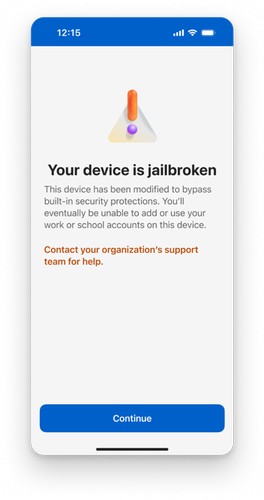
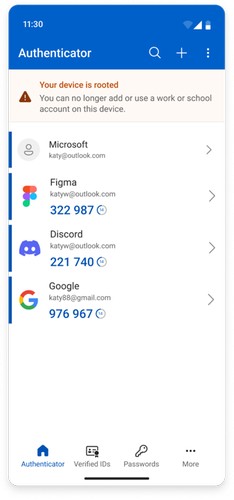
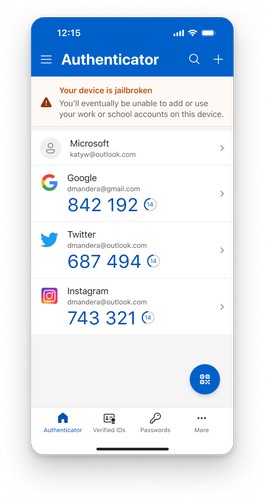
Image credit: Microsoft
A persistent banner will then remain on the Authenticator home page. This banner will remind users that their device does not meet the required security state.
Final Phase Will Block New Credentials and Sign-Ins
In the final phase, users on rooted or jailbroken devices will be blocked from creating new credentials or signing in through Microsoft Authenticator.
To regain access, users will need to reverse the jailbreak or root changes. They can also switch to another supported device that meets Microsoft’s security requirements.
The rollout was originally planned for February 2026, but Microsoft says it is still being phased in. The company now expects the rollout to finish around mid-2026, with users expected to see changes by the end of July.
Microsoft Says the Change Improves Account Security
Microsoft says the new detection policy is designed to improve account security. Rooted and jailbroken devices can bypass some platform protections, which creates additional risk for organizations using Microsoft Entra authentication.
The estimated gap between rollout phases is around one month. This phased approach should help organizations prepare users before the final blocking stage begins.
In another Authenticator security improvement, Microsoft now requires manual number entry as an extra protection step. Microsoft has also detailed recent security upgrades in Edge for Business as part of its broader push to protect enterprise accounts and data.

Read our disclosure page to find out how can you help Windows Report sustain the editorial team. Read more



Improve this guide




User forum
0 messages