
Microsoft Gives Windows 11’s Mouse Indicator a Modern Look


 2 min. read
  Published on
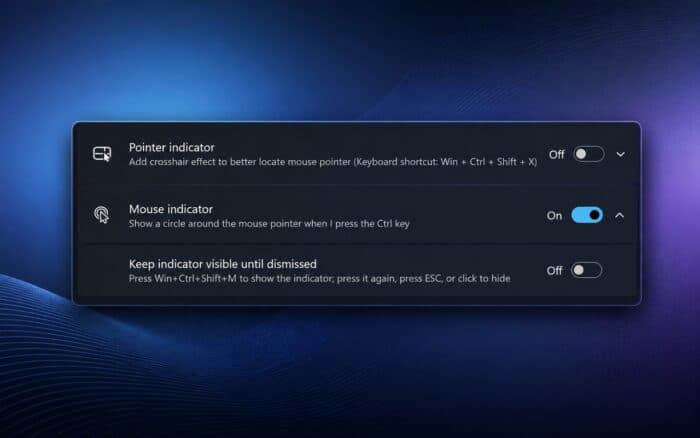
Windows 11 is getting a modern Mouse Indicator that makes it easier to find the cursor, complete with smoother animations and a new persistent mode.
Microsoft has been updating more parts of Windows 11 lately. The latest Experimental build introduced a modern AutoPlay experience, while a recent Beta build added an option to start apps maximized.
Now, Microsoft is turning its attention to the Mouse Indicator accessibility feature.
Windows 11 gets a redesigned Mouse Indicator
Windows 11 currently lets users enable Mouse Indicator from Accessibility settings. Once enabled, pressing Ctrl displays a circle around the mouse pointer, making the cursor easier to locate on the screen.
PhantomOfEarth spotted a redesigned version of the feature in testing. Microsoft has replaced the older implementation with a more modern version that includes smoother animations.
Microsoft is also adding an optional “Keep indicator visible until dismissed” mode that will give users a more persistent indicator.
Pressing Win+Ctrl+Shift+M keeps the indicator visible instead of letting it disappear automatically. Users can dismiss it by pressing the shortcut again, hitting Esc, or clicking the mouse.
The change fits Microsoft’s broader effort to modernize older Windows 11 components and create a more consistent interface.
Many of these updates remain limited to Windows Insider builds, so Microsoft hasn’t confirmed when the redesigned Mouse Indicator will reach everyone.
More Windows 11 changes are already in testing. A new Experimental Windows 11 26H1 build also introduces improved File Explorer previews.
Via Windows Latest

Read our disclosure page to find out how can you help Windows Report sustain the editorial team. Read more



Improve this guide



User forum
0 messages