
Microsoft Integrates Viva Engage Communities Inside Teams


 2 min. read
  Published on
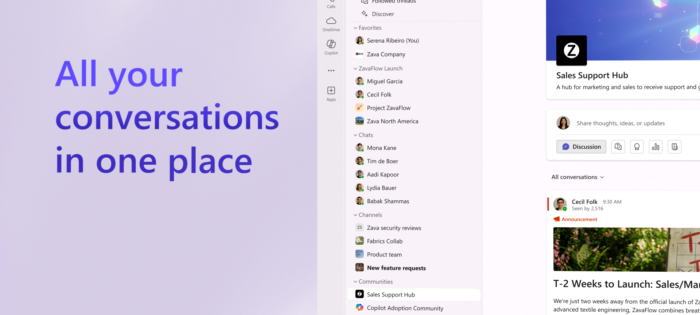
Microsoft is rolling out a new Communities experience inside Teams, bringing Viva Engage communities directly into the app where employees already chat, meet, and collaborate. The update is now available in public preview, which makes company-wide communication more visible and easier to access during the workday.
Viva Engage discussions are now live in Teams
Instead of living in a separate app, communities now sit alongside chats and channels in Teams. Microsoft says the change is designed to strengthen company culture, especially for distributed teams, by keeping broader conversations closer to daily workflows.
Communities in Teams introduce a redesigned layout that feels native to the platform. There’s a larger conversation pane, a docked side rail, and familiar unread indicators. Communities appear inside the unified Chat app, making it easier to scroll feeds, react to posts, and join discussions without switching contexts.
Employees also get more control over how communities appear. Users can reorder them, hide low-priority groups, and organize communities into custom sections. Discovery is built in too, with global search and a new browse experience making it easier to find interest groups, functional spaces, and organization-wide announcements.
AI also joins community conversations
At this point, we can’t imagine Microsoft products without AI, though it has some plans to cut back on AI this year. Speaking of AI features, community agents are now available in public preview, which helps answer repeated questions using existing organizational knowledge. Admins can review and approve responses, speeding up information sharing while keeping accuracy in check.
Community content also feeds into Microsoft 365 Copilot. Public conversations in Engage can now act as grounding sources, allowing Copilot to surface answers with citations that link back to the original discussions. Notably, communities in Teams support events, long-form posts, Q&A, and rich media. Admins can manage membership, pinned posts, and settings directly within Teams, making it easier to run large, organization-wide communities from a single place.
Moreover, the rollout requires no migration, with existing community content, permissions, and governance settings carrying over automatically for Engage customers who opt into the public preview.

Read our disclosure page to find out how can you help Windows Report sustain the editorial team. Read more



Improve this guide



User forum
0 messages