
New Experimental (26H1) Build Improves Windows 11 Search, Live Captions, and Adds Pointer Indicator Accessibility Setting
Windows 11 Insider Experimental (26H1) Build 28120.3272 is now available


 2 min. read
  Published on
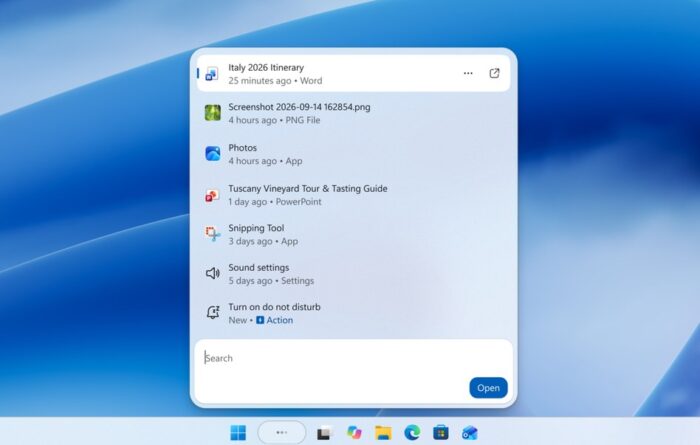
Microsoft has released another Windows 11 Insider preview with useful changes to Search, accessibility, and Live Captions. Windows 11 Insider Experimental (26H1) Build 28120.3272 also fixes a recent issue that caused some applications and games to crash.
Windows 11 Search gets cleaner results and new controls
The latest build simplifies Search Home, reducing visual clutter and making recent searches easier to access. Microsoft is also improving how Search identifies results, helping users distinguish apps, settings, files, web results, and Microsoft Store suggestions.
There’s another welcome change for users who prefer local results. Windows 11 now offers a setting to control whether web and Microsoft Store suggestions appear alongside local search results. You can find it under Settings, Privacy & security, and Search. These changes give you more control over your search experience without removing online suggestions entirely.
Windows 11 adds a new Pointer Indicator feature
Microsoft is introducing Pointer Indicator, an accessibility feature designed to help users with low vision locate their mouse cursor more easily. You can enable it under Settings, Accessibility, and Mouse pointer and touch.
Once enabled, press Windows + Ctrl + Shift + X to toggle the feature. This should make finding the cursor easier during everyday work.
Live Captions is also getting a useful adjustment. A new Include Screen Reader audio setting prevents captions from transcribing screen reader audio when disabled. The option is off by default, keeping captions focused on microphone and system audio.
Microsoft is also reorganizing the Privacy & security settings page. Camera, microphone, and location controls should become easier to find, with related information grouped more clearly.
Game crashes also get a fix
Microsoft has fixed an issue involving msmpeg2ac3dec.dll, which recently caused some applications and games to crash. Family Safety messaging is also improving when age-restricted parental controls block applications.
This release follows several other Windows Insider builds released today. For those who missed, Windows 11 Beta Build 26220.9739 adds Xbox mode Gaming Task View improvements and per-monitor Magnifier zoom. Meanwhile, Experimental Build 26340.9750 introduces hybrid-device web sign-in support and Windows Hello brightness adjustments.

Read our disclosure page to find out how can you help Windows Report sustain the editorial team. Read more



Improve this guide



User forum
0 messages