
New Windows 11 Beta Build Adds Gaming Task View in Xbox Mode, Pre-Monitor Magnifier Zoom, and More
Windows 11 Insider Preview Build 26220.9739 is now live in the Beta channel


 2 min. read
  Published on
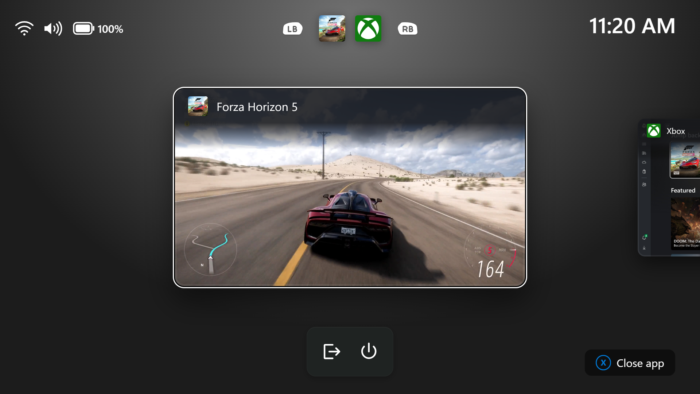
Microsoft has released a new Windows 11 Beta build that adds several useful improvements for gamers, accessibility, and everyday desktop tasks. Windows 11 Insider Beta Preview Build 26220.9739 introduces independent Magnifier zoom controls, refreshed Xbox gaming navigation, and a cleaner File Explorer search experience.
Windows 11 Magnifier gets a major multi-monitor upgrade
One of the highlights of this Build release is that users working with multiple displays. Magnifier can now maintain separate zoom levels for each monitor, allowing users to keep one screen at 300% while another stays at 150%. The feature is enabled by default and requires monitors to use Extend mode rather than Duplicate. Users can adjust zoom through keyboard shortcuts, the mouse wheel, Magnifier settings, or its toolbar.
Microsoft is also adding viewport locking. Pressing Ctrl + Windows key + K keeps the magnified view fixed on a selected screen while users work elsewhere. Pressing Windows key + Esc releases all locked views.
Xbox gaming and File Explorer get improvements
Microsoft is also updating Gaming Task View in Xbox mode with a new navigation bar. It provides quicker access to Exit to Desktop and Power Options, making essential system controls easier to reach while gaming. File Explorer search results are also getting a more consistent layout. File names, locations, and dates now appear in a standardized format, making results easier to scan.
Meanwhile, Microsoft is expanding the Device Info Card in Settings Home to more global markets. Eligible Windows Insiders signed in with Microsoft accounts can view key PC specifications and usage information directly from Settings.
Fixes in Windows 11 Build 26220.9739
Microsoft says this build improves shutdown reliability, reducing the likelihood of shutdown hangs in certain situations. Dialogs for system messages, including low-battery warnings and permission prompts, should also return to their expected modern design. Meanwhile, Family Safety receives improved messaging when parental controls block applications because of age restrictions. Not to forget, Microsoft has also fixed app and game crashes caused by an issue with msmpeg2ac3dec.dl.

Read our disclosure page to find out how can you help Windows Report sustain the editorial team. Read more



Improve this guide


User forum
0 messages