
NFL Fantasy Football App Not Working: Top Fixes You Should Try


 3 min. read
  Published on

If the NFL Fantasy Football app is not working, it can be due to network problems, outdated software, or temporary glitches. You can usually fix the issue by following the steps below.
What can I do if NFL Fantasy Football app is not working?
Table of contents
1. Fix your internet connection
- Open another app or website to test your Internet.
- Switch between Wi-Fi and mobile data.
- Restart your router if needed.
- Move closer to the router for better signal.
- Run a quick online speed test.
2. Restart and refresh the app
- Close the NFL Fantasy Football app completely.
- Swipe it away from recent apps.
- Wait a few seconds before reopening.
- Launch the app again.
- Try logging in to confirm it works.
3. Clear cache and reinstall
- On Android, go to Settings > Apps > NFL Fantasy.
- Tap Storage and choose Clear Cache.
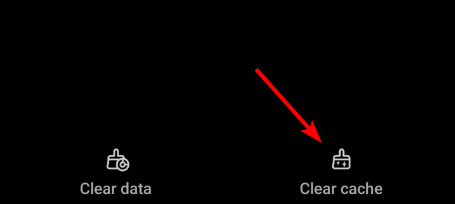
- On iOS, uninstall and reinstall the app to reset cache.
- Download the app fresh from the store.
- Log back in with your account details.
4. Update your app and device
- Go to the App Store or Google Play Store.

- Search for NFL Fantasy Football.
- Tap Update if a newer version is available.
- Restart your phone after updating.
- Check for system updates on your device too.
5. Restart your device
- Hold down the power button.
- Select Restart or Power Off.
- Wait until the device shuts down fully.
- Turn it back on.
- Open the app again.
6. Check server status
- Visit the official NFL Fantasy Football website.
- Look at NFL’s social media for outage posts.
- Check forums where users report issues.
- Use a server status tracker site.
- If servers are down, wait for them to recover.
7. Turn off VPN or ad blockers
- Open your VPN or ad blocker app.
- Disable the service temporarily.
- Restart the NFL Fantasy Football app.
- Try to log in again.
- Leave it off if the app works fine.
FAQs
This usually happens due to poor internet, outdated versions, or NFL server issues.
Clear cache, reinstall the app, and make sure VPNs or blockers are disabled.
Occasional outages happen during high traffic events like draft season or game days.
Yes. A VPN may block or slow connections. Disable it if the app is not working.
Contact NFL Fantasy Football support or wait if servers are confirmed to be down.
If the NFL Fantasy Football app still does not work, you may be dealing with server errors like the NFL app error code 403 forbidden. Similar app issues are common in gaming too, such as FIFA 20 black screen problems.
Performance glitches are also possible. Fixing them is often similar to solving FIFA 22 lag by updating software and optimizing your device. Keeping the app current and checking NFL server status will help avoid future disruptions.
If you also run into issues with ticketing or game-day features, our MLB Ballpark app not working guide walks you through step-by-step fixes that solve crashes and login problems.

Read our disclosure page to find out how can you help Windows Report sustain the editorial team. Read more



Improve this guide

User forum
0 messages